












GetResponse Review 2026 – Is this the best tool for you?


GetResponse is a marketing platform with email marketing, advanced automation, ecommerce tools, webinars, and even online courses. But is it worth the price?
For this GetResponse review, I created email campaigns, imported contacts, built automations, and tested the landing page editor. I also tried newer features like the AI Course Creator, contacted customer support, and compared GetResponse’s pricing and features with competing email marketing platforms. Here’s what I found.
GetResponse email marketing software summary
- GetResponse is an all-in-one marketing platform with email marketing, automation, ecommerce, and lead generation.
- Creating newsletters is quick. In our test, I had my first email ready in about 10 minutes.
- Marketing automation is one of its strongest features. You can build welcome sequences, abandoned cart campaigns, and workflows based on subscriber behavior.
- GetResponse has 150+ email templates, 200+ landing page templates, and tools for forms, pop-ups, and sales funnels.
- Ecommerce brands get product blocks, purchase-based targeting, abandoned cart recovery, and revenue attribution.
- Creators can sell online courses and paid newsletters.
- GetResponse has an AI Insights tool for campaign analysis and an MCP connection for ChatGPT and Claude.
- Pricing starts at $19/month for 1,000 contacts. You need the Marketer plan for most advanced automation and ecommerce features. There’s also a free plan for basic email marketing.
GetResponse’s Core Features
GetResponse is a full-featured email marketing and automation tool with all the nuts and bolts you’d expect. Here are GetResponse’s most important features:
- Drag-and-drop email editor and templates: Creating marketing emails and newsletters is easy. Drag content blocks on the canvas and edit them directly. Add special elements like images, video, and products to your emails. GetResponse has 150+ email templates.
- Marketing automation: Build welcome sequences, drip campaigns, abandoned cart emails, and complex workflows with GetResponse’s visual automation builder. Add triggers, conditions, tagging, and lead scoring to target subscribers based on their behavior. The AI assistant suggests workflow templates to help you get started. Unlimited automations are on the Marketer plan and above.
- Ecommerce marketing: Connect your store to GetResponse to sync products and customer data. Create abandoned cart emails, price drop campaigns, and personalized product recommendations. Track the revenue generated by your campaigns.
- Funnel builder: Create complete sign-up and sales funnels. Connect sign-up pages, emails, and checkout steps in a guided sales funnel.
- Segmentation: Build dynamic segments from contact details, email engagement, website behavior, and purchases. There are 13 ready-made ecommerce segments, including first-time buyers and repeat customers.
- Landing pages: Build landing pages with a drag-and-drop editor. GetResponse’s landing page editor can add forms and videos. The pages are hosted by GetResponse, so you don’t need separate hosting.
- Reporting and AI Insights: Track opens, clicks, conversions, and sales. GetResponse also analyzes campaign performance with AI and suggests ways to improve your emails.
GetResponse Pros and Cons
Pros
- Simple to get started, with room for advanced marketing. GetResponse is intuitive enough to build your first email in about 10 minutes. And it offers advanced automation, lead scoring, dynamic content, funnels, and webinars.
- It’s an all-in-one marketing platform. You get email marketing, landing pages, signup forms, sales funnels, webinars, website building, and even AI writing, all tightly integrated.
- Advanced automation without the confusion. In my test, setting up a detailed welcome series with follow-ups took less than 30 minutes.
- Built-in funnels and landing pages. I like that the funnel builder guides you through creating the signup page, thank-you page, and promotion emails in the right order. Together with GetResponse’s webinar features, it’s a nice package for running online events.
- Strong ecommerce marketing features. GetResponse connects to Shopify, WooCommerce, Magento, and other ecommerce platforms. My favorite ecommerce feature is the price drop automation. You can control the minimum price reduction and how often someone must view a product before receiving an email.
- Has content monetization features. You can sell courses and paid newsletters. That saves coaches and creators from having to connect a separate course platform.
- Reliable and quick customer support. The team is available on weekdays, and there’s a 24/7 AI chatbot. In our test, a human agent joined within 3 minutes and answered our questions quickly. Customer reviews are also positive about the support team’s speed and helpfulness.
Cons
- Some templates feel outdated. While the email and landing page editors are good, parts of the template library could use a refresh.
- The cheaper plans are limited. Starter includes 1 custom automation with 6 elements. You’ll need Marketer, starting at $59/month for 1,000 contacts, to get unlimited workflows, abandoned cart recovery, advanced segmentation, and revenue tracking. Brevo’s Standard plan has unlimited contacts in automations, 500 contacts, and 5,000 emails for $18/month.
- Doesn’t have a built-in CRM. GetResponse manages contacts well, with tagging, scoring, and segmentation, but doesn’t include sales pipelines or deal tracking like a CRM platform.
- Some advanced features are enterprise-only. Transactional emails, dedicated IPs, and AI-powered product recommendations aren’t included in the regular small-business plans. SMS marketing is also restricted to MAX for most customers. It’s available for regular paid plans in Poland, Germany, and Switzerland.
Is GetResponse for you?
Recommended if:
- You’re a small or mid-sized business or freelancer. GetResponse makes it easy to send newsletters, set up signup forms, build landing pages, and automate campaigns.
- You want to manage email campaigns, webinars, courses, and funnels all in one platform. GetResponse connects these features with automation, so new signups can go straight into follow-up campaigns.
- You want automation that isn’t overcomplicated. Its workflows, autoresponders, and tagging make it simple to automate campaigns based on subscriber behavior.
- You run an ecommerce store and want to automate more than newsletters. GetResponse works well for small business owners and ecommerce brands that want abandoned cart campaigns, personalized product emails, and sales tracking.
- You want to turn your content into income. If you’re a content creator who wants to earn from your work, GetResponse is worth a look. You get tools to build a website, create landing pages, and even launch online courses.
Not recommended if:
- You want a full CRM with pipelines and deal tracking. While GetResponse has good contact management, segmentation, and lead scoring, it’s not a full CRM with email marketing.
- You want to combine newsletters and transactional emails. GetResponse doesn’t have transactional emails in SMB plans. If you need to send order confirmations, password resets, and similar emails, Brevo or dedicated transactional email services are better fit.
- You want automation at the lowest price. Starter is fine for basic email marketing, but its single six-element workflow is restrictive. If you want more automation workflows for a lower price, check out cheap email tools, like MailerLite, Moosend, or Brevo. All three offer capable automation tools at a lower starting price than GetResponse’s Marketer plan.
Sign up to GetResponse for free
GetResponse Review Rating Details
| Ease of UseEase of learning and use based on initial setup, navigation, and everyday tasks. | GetResponse is easy to get started with. The navigation is straightforward, and the email editor shows relevant settings when you select a content block. |
|---|---|
| Email EditorThe email builder based on usability, content blocks, layout controls, and editing features. | The GetResponse email editor is clear and logical, with reusable blocks and drag-and-drop editing. You can add: images, text, buttons, videos, spacers, social links, countdown timers, products, and custom HTML. Save and reuse custom blocks for recurring content. |
| Email TemplatesEmail templates based on design quality, selection, responsiveness, and customization. | 150+ email templates in 7 categories. Most are nice, although some look a bit outdated. I’d stick to the newer templates. You can save templates and upload your custom HTML email templates. I’d love to see some more templates with designs in the free plan. |
| Email TypesWhich sending modes exist: one-off campaigns, A/B tests, resends, autoresponders, automated flows, and transactional. | 6 different email types: newsletters, autoresponders, A/B testing, RSS newsletters, surveys, and advanced automations. |
| Marketing AutomationMarketing automation based on workflow building, templates, triggers, conditions, and channels. | The visual automation builder has conditions, filters, actions, tagging, and lead scoring. There are 40+ workflow templates. The AI assistant recommends templates based on your goals. It takes a bit of time to familiarize yourself with all the possibilities. |
| Ecommerce Marketing | GetResponse has strong ecommerce features and integrations with popular ecommerce platforms. I especially like the price drop automation. You can set minimum price reductions and product view conditions. |
| Content Monetization | The Creator plan has tools for selling online courses and paid newsletters. The AI course builder creates course outlines and lessons. You can accept payments through Stripe and PayPal. I like having webinars, landing pages, and email automation to promote courses. |
| List ManagementList management based on importing, segmentation, filters, tags, and profiles. | GetResponse makes it easy to manage lists and create dynamic segments. Filter by custom fields, email engagement, purchase history, location, and lead scores. Combine conditions with AND/OR logic. There are 24 segment templates, including 13 for ecommerce, like abandoned carts and repeat buyers. The AI Segment Builder creates segments from prompts. You can also bulk-update contact fields. |
| PersonalisationPersonalization based on customer data, dynamic content, and recommendations. | Add names, interests, past actions, or any data with custom fields. The dynamic content blocks let you show different sections based on tags, custom fields, or lists. You can combine 8 conditions to fine-tune what blocks subscribers see. |
| Landing Pages & FormsLanding pages and forms based on builders, templates, targeting, and customization. | GetResponse has a drag-and-drop landing page builder with 200+ templates, A/B testing, and AI-assisted page creation. Add images, videos, forms, and buttons. The form builder has 180+ templates for embedded forms, pop-ups, slide-ins, and notification bars. Trigger pop-ups after a set time, when visitors scroll, or on exit intent. Some of the templates look outdated. |
| Reporting & AnalyticsReporting and analytics based on available metrics, reports, and actionable insights. | Detailed reports for emails, forms, landing pages, automations, funnels, and webinars. Ecommerce reports show attributed revenue, orders, and average order value for individual emails, plus total revenue from automation workflows. AI Insights analyzes campaign results and suggests improvements to subject lines, calls to action, and sending times. |
| Customer ServiceCustomer support based on contact channels, availability, helpfulness, and response speed. | Human live chat Monday to Friday, 8 AM-10 PM for English and 9 AM–5 PM for Polish (CET/CEST). AI chatbot available 24/7. Email support in 7 languages (English, Polish, German, French, Spanish, Italian, and Portuguese). The Help Center has hundreds of articles, step-by-step setup guides, troubleshooting tips, and video tutorials. |
| DeliverabilityEmail deliverability is based on the deliverability tools for authentication, sender reputation management, and inbox placement. | GetResponse uses shared IPs with established reputations and monitors sending practices to protect deliverability. It checks imported contacts for invalid domains and risky addresses, automatically removes hard bounces and repeated soft bounces. List hygiene tools block unwanted addresses and domains. Dedicated IPs and IP warm-up are available with MAX. |
| Spam & Design CheckPre-send checking based on spam testing, design previews, risk detection, and warnings. | GetResponse has a built-in spam checker that flags authentication and HTML formatting issues that might send emails to the spam folder. There’s also inbox preview to see how your email looks in popular webmail, desktop, and mobile clients. Includes Gmail, Yahoo, Outlook 365, Outlook desktop versions, Apple Mail, and more. |
| AI ToolsAI features based on content generation, recommendations, automation, and practical usefulness. | GetResponse has AI tools for creating emails, landing pages, websites, courses, and marketing campaigns. The AI Email Generator creates complete newsletters. It gives you a starting layout, but the designs are generic. You still need to review AI-generated designs and recommendations before sending. AI Insights analyzes performance and suggests improvements.
|
| Integrations & APIHow many integrations a platform has, API access, and custom integrations. | 170+ integrations, including ecommerce platforms, website builders, analytics, and CRMs. If you can’t find an integration, you can use Zapier to integrate GetResponse with thousands of apps or the API for custom integrations. GetResponse MCP connects your account to ChatGPT, Claude, and other AI assistants to analyze campaigns, find contacts, and draft newsletters. |
| User PermissionsUser permissions based on roles, access controls, and customization. | 3 default user permissions are available for administrator, marketer, and designer. Assign custom user permissions for each part of GetResponse. Just answer a series of questions to give no, partial, or full access to campaigns, subscribers, forms, landing pages, websites, automation, billing, settings, and templates. |
| GDRP & Legal CompliancePrivacy compliance based on GDPR support, consent tools, data protection practices, and accessibility support. | GetResponse has features to help with GDPR compliance. You can add consent checkboxes to signup forms, automatically include unsubscribe links in emails, and update or delete subscriber data when needed. These features make managing consent and contact information easier. |
| Interface LanguagesHow many languages you can use to navigate and work inside the platform. | GetResponse is available in 11 languages: English, German, Dutch, Italian, French, Spanish, Polish, Portuguese, Indonesian, Vietnamese, and Russian. |
| Customer SatisfactionCustomer satisfaction based on review scores, recurring feedback, and overall user sentiment. | GetResponse gets lots of positive reviews from customers. It has 4.2 on Capterra and 4.3 stars on G2 during our research. |
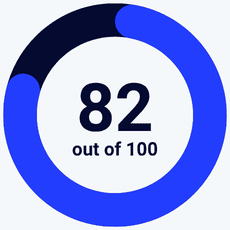
Overall Score
Getting started with GetResponse
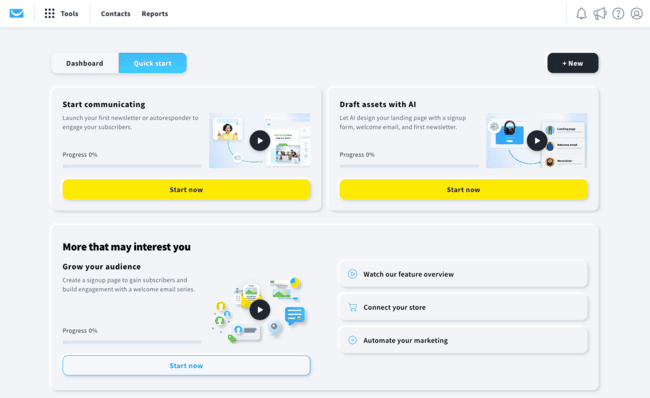
Signing up for GetResponse takes about 5 minutes. You start by filling out your name, email, and password. Then you’re asked to confirm your email. GetResponse asks you to fill out some company data after you confirm your email: company name, address, and phone number. Then you can start exploring. The getting-started wizard is split into marketing and content creation.
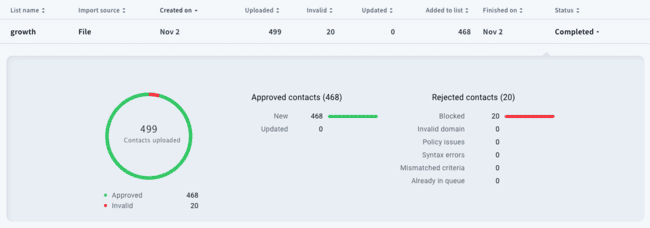
First, I wanted to test adding a sender and importing a list. Importing a list took me 2 minutes. After uploading my CSV, mapping data to custom fields was quick and simple.
GetResponse shows a notification during the import that they’ll check my list. This is to make sure the list won’t harm our account, GetResponse, and other customers. Good to know they take deliverability and security seriously. GetResponse also cleaned 20 invalid contacts automatically during the import.
You can set up sender emails manually or automatically. The automatic version is an integration with Entri. It adds the TXT records for popular domain providers. It worked for our domain, and we could set it up in about 8 minutes.
Get started with GetResponse for free here
GetResponse Review: Platform Walkthrough
Now to the part you’ve been waiting for. We’re going to review the core GetResponse features and see if they’re the right fit for you.
Creating and sending emails with GetResponse
I was able to set up my first email in 10 minutes, and it felt really intuitive. Once you create a free account, you can directly start designing your actual email. Click on ‘Create newsletter’, and you’re greeted by 150+ email templates. Nice!
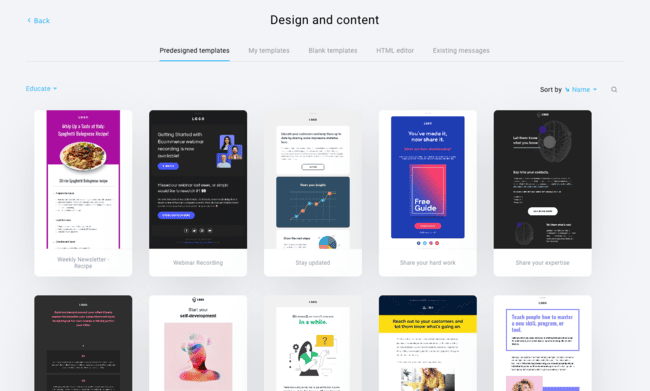
GetResponse has 7 categories of email templates. For example, you can ‘educate, promote, welcome’ your customers. Say you like an email template, press “save,” and it shows up in the ‘My templates’ tab to reuse later.
GetResponse also has an AI Email Generator that creates complete newsletters. Enter a few keywords, select your industry, tone, layout, and colors, and it generates an email with copy, images, and a subject line. It’s a quick way to get a first draft. What was tough during testing is that the design customization is too limited. You get fairly generic, stock-like images suggested. I’d use it to get a layout to start with.
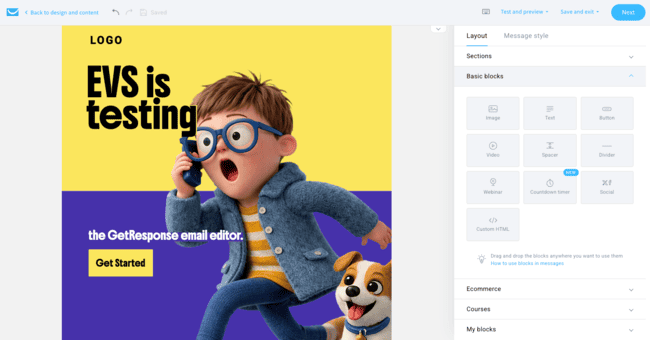
The editor keeps most formatting and layout settings hidden until you select a content block. Old-school HTML code lovers can start from scratch or add custom HTML blocks to their emails. For everyone else, there’s the drag-and-drop.
Drag & drop email editor blocks
In the layout section, you decide the structure and look of your email. Set up how many columns you want, basic colors, etc. The main editing is done with drag-and-drop content blocks.
You can add:
- Images, text, and buttons
- Video (YouTube-ish!)
- Whitespace and margins
- Social sharing links
- Custom HTML
- Countdown timers
My favorite part of the email editor is that you can save blocks and sections. I always use the same elements for headers, footers, and some text and image combos. So in my next email, I save a lot of time by reusing them.
Adding videos and images is straightforward. You can either drag and drop your image or browse from GetResponse’s free stock image collection.
For videos, paste a YouTube or Vimeo link. GetResponse adds a thumbnail with a play button that links to the video.
Under the ecommerce tab, you can add products to your email from your online store. Connect a store like Shopify, and your products are available directly in the editor. There’s also a block that recommends products a subscriber viewed but didn’t buy. That’s useful for bringing shoppers back without manually picking products for every email.
GetResponse also has a countdown timer block for promotions and launches, like a Black Friday sale or a webinar registration deadline. You can drag it into your email, set the end time, and customize the design.
Setting up your email for success
On a single page, you create the whole email. Add subject lines, sender email address, and choose the right email list to send it to.
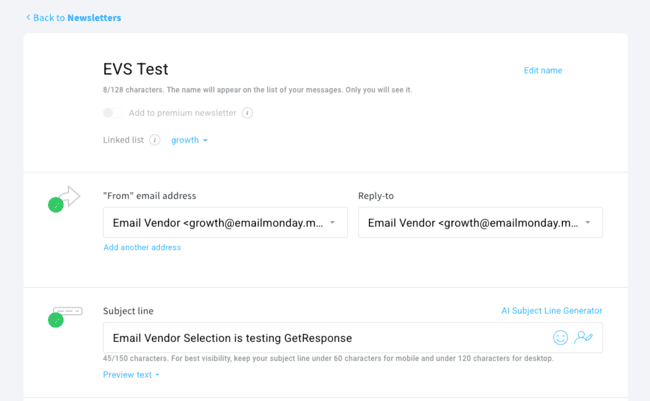
The cool thing about GetResponse email tracking is that it tracks ecommerce interactions:
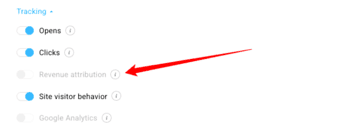
You can track what your readers do after they click on your email links. Click tracking works with a GetResponse tracking snippet, but also works with a Google Analytics integration.
With ecommerce tracking, you know which email marketing campaigns drive revenue and sales. And can justify your marketing costs.
Med&Beauty is a good example of what this can look like in practice. The Polish medical and beauty apparel brand uses GetResponse to send product launches, promotions, and newsletters. 10 newsletters generated over $43,000 in sales in 5 months, with an 873% reported ROI.
Marketing Automation in GetResponse
Marketing automation is one of GetResponse’s strongest features. You can combine subscriber actions, website visits, purchases, and delays in the same workflow.
I already liked GetResponse marketing automation when I opened the automation menu and saw this:
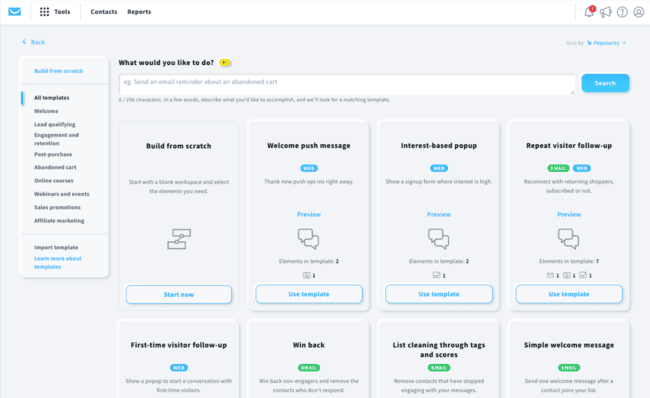
This page looks like a marketer’s dream. Each card has automation templates to get you started. For testing, I’m making a ‘welcome’ automation.
Creating a welcome automation
On to creating an automation to welcome my new subscribers. I start with a pre-made automation template. And after a few clicks, I already have this:
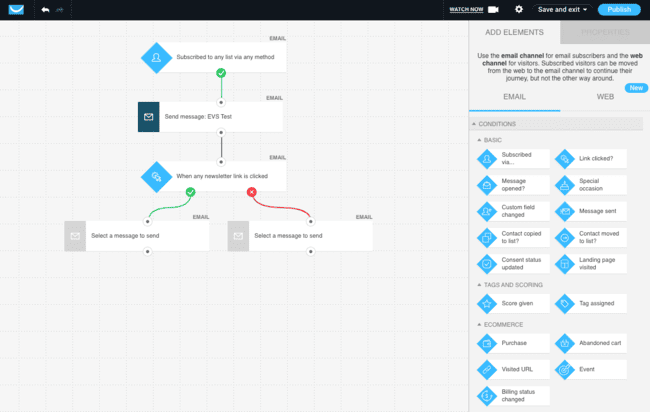
When you zoom in on the automation flow, you realize GetResponse has done half the work for you. Now you just go in and update the emails, conditions, and timing to how you’d like it.
The automation editor has conditions and actions. For instance, based on whether a customer buys something or not (condition), you send different emails (action). My first action is to send a welcome email. You can add as many emails and conditions as you want.
I’ve created a flow where my new customers get 2 emails in 2 days. Then, for my convenience, I separate customers who clicked a link in my email. Once the campaign starts, GetResponse keeps track of all of this automatically.
It takes a bit of time to familiarize yourself with all the possibilities. But once you do, you have the power to build complete customer journeys.
With GetResponse, you can create automation workflows for:
- Lead qualification
- Engagement and retention
- Post-purchase notifications
- Abandoned cart triggers
- Webinars and online courses
- Sales promotion
- Affiliate marketing
The templates include common workflows, and you can edit the conditions, delays, and actions to fit your own setup.
GetResponse’s automation tools now have a few shortcuts that make setting up workflows quicker. You can describe what you want to achieve, and the AI assistant suggests a suitable automation template. For example, ask for a welcome sequence or a workflow to win back inactive subscribers.
You can also start an automation from a saved segment. Say you have a segment of customers who purchased 3 times but haven’t ordered in 90 days. You can use that audience as the starting point for a reactivation campaign.
DAAG, a Polish leather goods brand, uses GetResponse’s welcome automation to introduce new subscribers to its products and company story. The brand reported $29,500 in sales from its welcome campaign. It also generated around $25,200 from abandoned cart recovery over eight months.
Not every automated email needs a complete workflow. GetResponse Autoresponders let you schedule welcome emails, follow-ups, and other messages after someone subscribes. You create emails just like normal newsletters, but trigger them to be sent as an autoresponder.
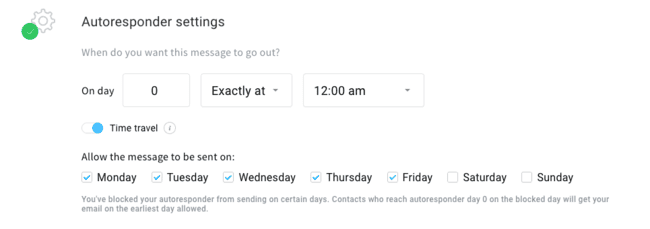
You have plenty of control over the timing. Send an email immediately after signup, a few hours or days later, or on a specific day. You can also skip certain days of the week. If you don’t want your emails going out on weekends, for example.
The feature I like most here is the ‘time travel’ toggle. You turn this on to deliver the email at the recipient’s local time.
Sign up for GetResponse for free here
Growing your list with GetResponse
Website Builder
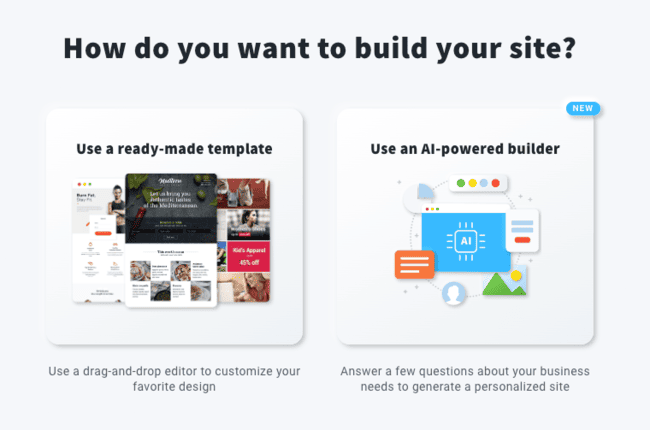
You build a website from templates or with their ‘AI-powered builder’. With the AI-powered builder, you answer a few questions and GetResponse will automatically generate a personalized website.
Other website building options include:
- Widgets (forms, chat boxes, price tables, etc.)
- Website colors and themes
- Adding logos and images
After fiddling with the builder for just 5 minutes, I was able to create a decent homepage with minimal effort.
The builder lets you edit everything on the page. You can change fonts, text sizes, add/remove images, reposition elements, adjust padding, and more.
There’s a separate menu for adding and editing pages on the website. You can tweak the navigation bars, headers, and footers. The drag-and-drop editor shows further customization when you select a section.
The menus look exactly like the email and landing page editor.
Landing Page Builder
The GetResponse landing page builder is included in all paid plans, and there’s a limited version in the free plan. GetResponse has 200+ landing page templates. You can start from a template, use AI to help generate a landing page, or build your own design with the drag-and-drop editor. Some of the older designs in our test looked dated, but the editor itself gets the job done.
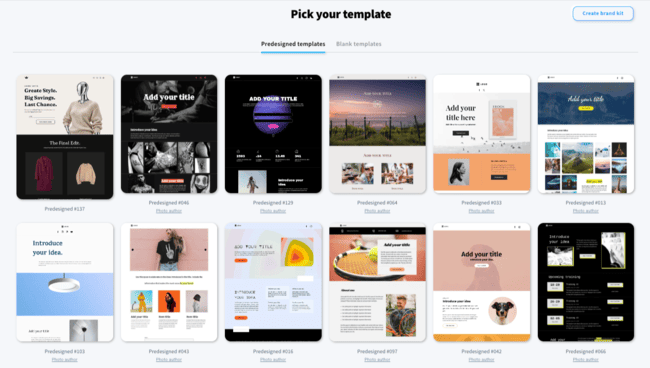
After choosing a landing page template, you can start editing. The editing experience is different from the email creator.
The single-column menu on the right has all the drag-and-drop elements like text, images, video, buttons, etc.
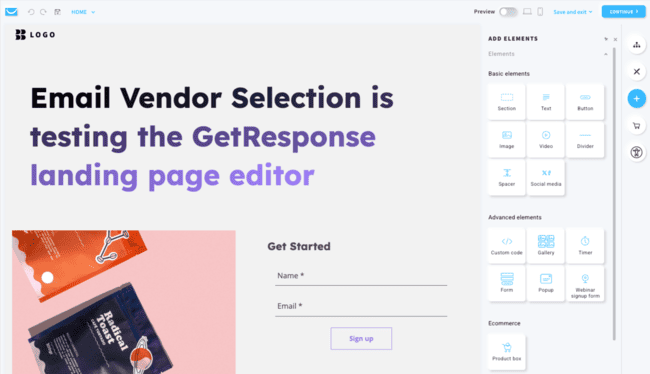
I initially wanted labels for the icons, but after a few minutes in the editor, I could recognize most of them.
You can create A/B variants of your landing page from the beginning. The top left corner of the page lets you create as many variants as you want, along with forms and thank-you pages.
Landing page setup
Once you’re happy with the design, you can add a domain, a favicon, a cookie consent banner, and email list settings.
What comes next is probably my favorite part. As with your emails, you set up analytics and web event tracking for your landing pages. You can choose your analytics platform to track landing pages. GetResponse integrates with Google Analytics, Facebook Pixel, Google Ads, Google Tag Manager, and Yandex Metrica.
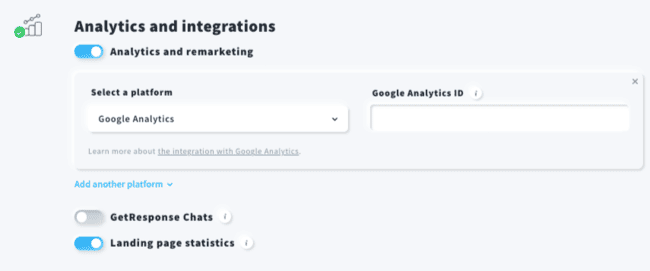
I’d use GetResponse’s landing pages because they connect directly to webinars, funnels, and automations.
GetResponse Forms and Popups
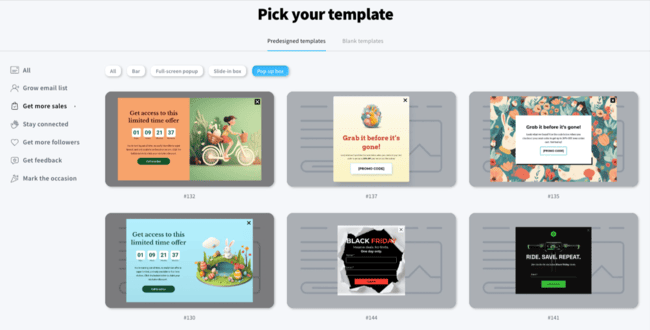
GetResponse has a drag-and-drop form builder to create embedded forms, pop-ups, slide-ins, and notification bars. There are 180+ templates to get started with.
You can trigger pop-ups after a time delay, when someone scrolls, or when they’re about to leave the page.
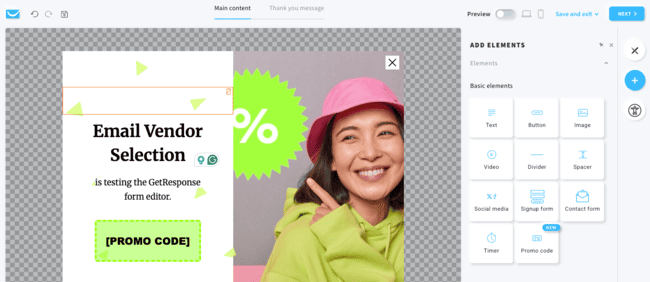
For example, an ecommerce store could show a discount pop-up when someone is about to exit a product page. Or a small business could offer a free guide to visitors who have read most of an article.
Managing Contacts in GetResponse
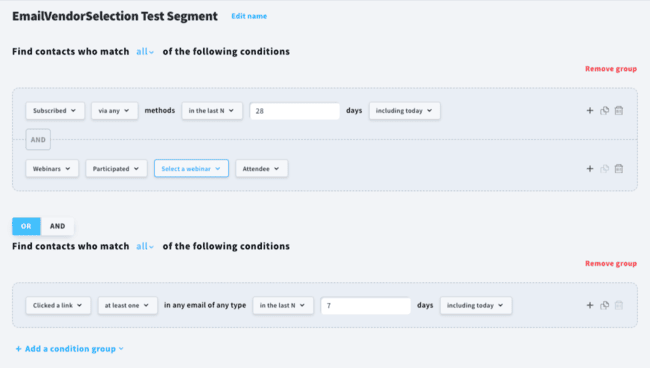
GetResponse has solid list management tools. You can upload existing contacts from a CSV file, organize contact details with custom fields, and filter subscribers based on engagement, location, and purchase behavior.
Segments are dynamic. You don’t have to recreate an audience every time you’re sending campaigns. You can build a segment of customers who made a purchase in the last 90 days.
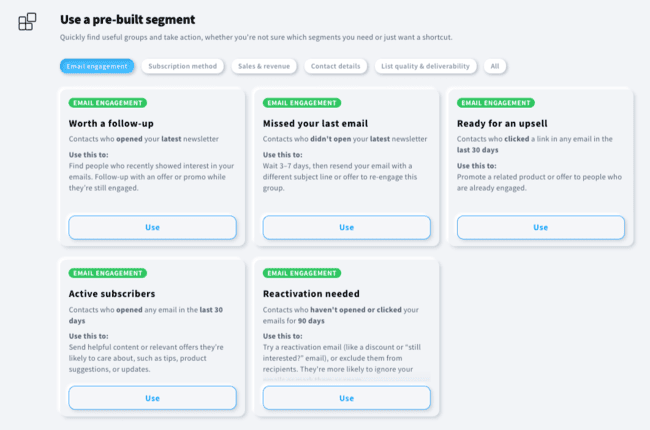
In the AI Segment Builder, you can describe the audience you want, and the AI creates the segment conditions for you and asks follow-up questions if needed. You can review and adjust the rules.
I tested the AI Segment Builder with a clear prompt: find contacts who clicked an email in the last 30 days but hadn’t purchased in 90 days. It created the segment with 177 matching contacts within 5 seconds. Then you get a button to view the segment and check the conditions and matching contacts. It correctly combined the two filters with AND logic.
Testing the AI Segment Builder with the less specific prompt: find my most valuable customers. Instead of guessing, the AI asked if I meant customers with the highest spending, most purchases, or strongest engagement. When I replied “Find VIPs,” it recognized the VIP field and asked for confirmation before creating a segment with 52 contacts. I like that it asks questions when a request is unclear and lets you review the conditions afterward.
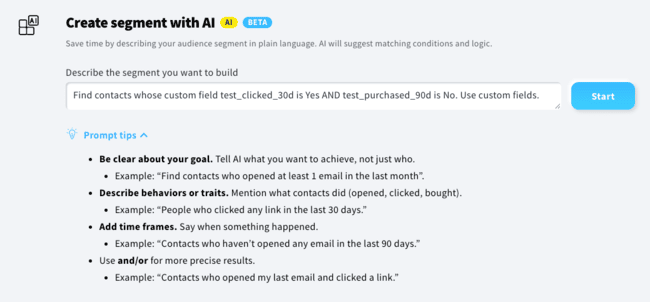
GetResponse recently added more segment templates for engaged subscribers, inactive contacts, different signup sources, and list quality. Ecommerce stores get 13 segment templates, including abandoned carts, first-time buyers, and repeat customers.
You can also update custom field values for everyone in a segment in one action. And start creating a newsletter directly from the segment, with the recipients already selected. You still have AND/OR logic for building segments yourself.
GetResponse Ecommerce Marketing
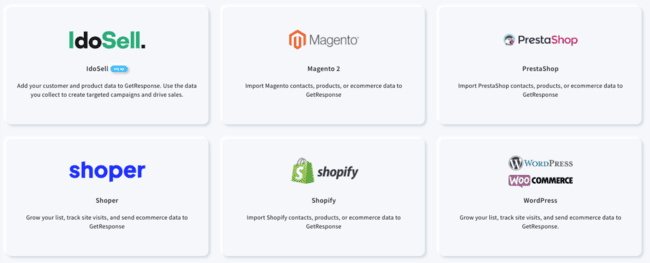
Connect GetResponse to Shopify, WooCommerce, Magento, PrestaShop, Shoper, or IdoSell, and use customer and product information in your campaigns. The ecommerce tools include abandoned cart recovery, product recommendations, promotional codes, and price drop campaigns.
Price Drop campaigns caught my attention. If someone looks at a product and its price later goes down, GetResponse can automatically send them an email. You can choose the minimum price reduction, like 10%, and how many times someone must view the product before they’re eligible.
I especially like being able to set a minimum number of product views. Someone who looked at a product five times is probably more interested in a price drop.
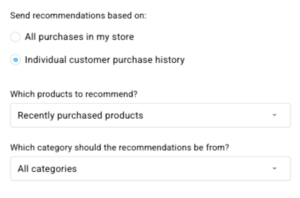
You can also add products customers recently viewed to newsletters and automated emails. And show the original and sale prices together. It’s a useful way to personalize your campaigns without manually creating a different email for every shopper.
For Shopify users, customer tags sync into GetResponse. You can use tags like VIP customer or repeat buyer for segmentation and automation.
Tortli, a personalized-gifts store, uses GetResponse to recover abandoned carts. The company reported recovering 1,377 carts and generating €32,300 in sales over 4 months. And €5,100 of recommended products added to shopping carts per month.
GetResponse Course Creator and Paid Newsletters
GetResponse has tools for content creators who want to monetize their knowledge. The Creator plan includes an AI course builder, paid newsletter subscriptions, webinars, and a website builder.
You can use AI to create a course outline and organize your lessons. Then add videos, text, audio, quizzes, and other material. Students get a member area to access their courses, track progress, and see their results. You can also issue completion certificates.
I tested GetResponse’s AI Course Creator using our email marketing for financial services guide. It started by generating a course brief with the language, audience, tone, description, and lesson count. The brief gave me something to work with, but the tone didn’t match our guide. The course builder added quizzes to 3 of 4 modules, which is a nice touch. It also generated lesson content, video scripts, suggested visuals, and production notes. That’s pretty impressive from a single URL.
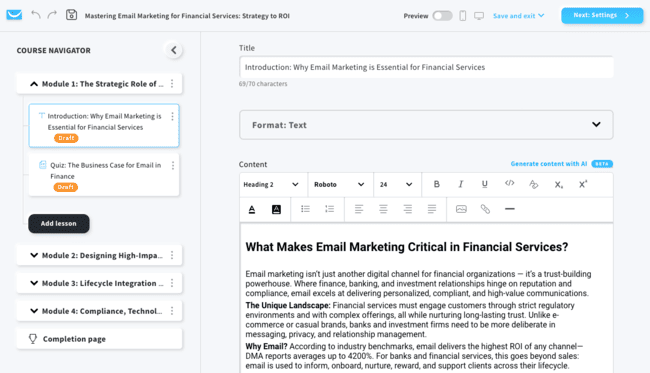
The lesson content still needs lots of editing before I’d consider publishing it. In our example, it covers relevant topics like onboarding, segmentation, automation, and compliance. But mostly at a surface level. There are few practical examples or exercises that would teach students how to build actual campaigns. And the writing has generic phrases like “trust-building powerhouse.” The quizzes ask for your touch too. The wrong answers are often obvious.
For me, this is a course outline generator, not a finished course creator. It saves you from starting with a blank page, but I wouldn’t publish those lessons without a serious rewrite.
For selling courses, GetResponse supports payments through Stripe and PayPal. You can charge for individual courses or offer subscription-based access.
Dedicated online course platforms offer more teaching features. Teachable has lesson progression rules, student communities, and built-in checkout tools. FreshLearn includes gamified learning and student rewards. GetResponse focuses more on selling your courses, with landing pages, email sequences, and automation to turn leads into students.
Paid newsletters are another monetization feature for creators. You can charge subscribers for access to exclusive email content. And use the same email marketing and automation tools to promote your subscriptions.
Building Funnels in GetResponse
On to the conversion funnel feature. A funnel is another way to describe all the steps in a marketing campaign. So that includes forms, emails, and pages.
GetResponse’s conversion funnel builder starts by asking if you want to:
- Build your email list (or leads)
- Sell products
- Promote a webinar
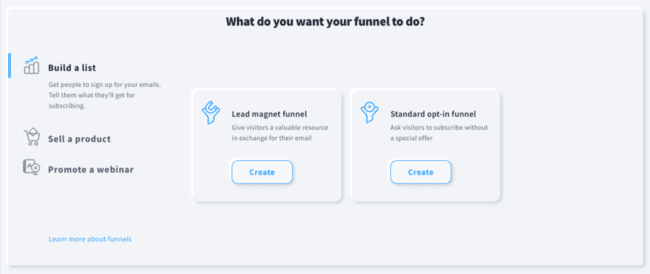
Begin with a new lead magnet or use one from the 17 templates GetResponse offers. Once you’ve picked your lead magnet, you can build your funnel.
The whole funnel-building process is guided. You get suggestions of what to do at each step and don’t forget anything. GetResponse, for instance, tells you not to forget a thank-you page and directly offers a thank-you page template. Smart!
How to create a conversion funnel
As your first step, you’ll create a signup landing page. Pick the template, tweak your copy and design, and publish the page.
Then you’ll create the thank-you page, followed by a promotional email. This is the email to start promoting your newly made funnel.
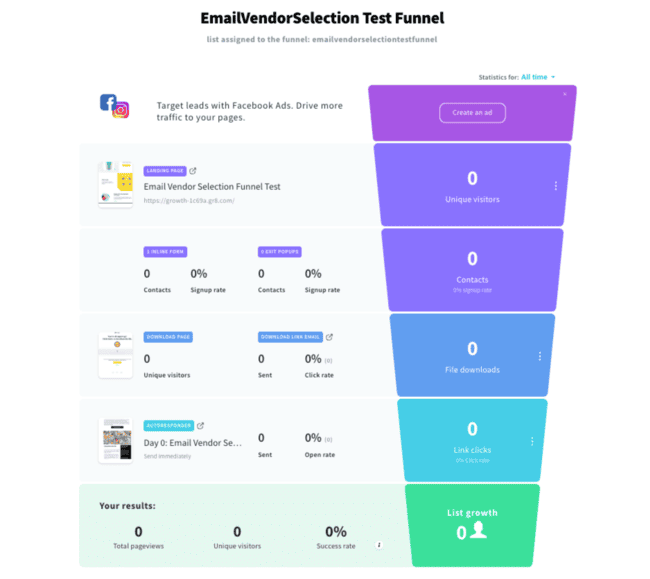
Promote your funnel through Facebook ads. You just need to connect your Facebook account to GetResponse.
GetResponse also has an AI assistant for Google Search ads. Describe your product, target audience, and campaign goal, and it generates 8 headlines and 4 ad descriptions. You can edit the suggestions before launching the campaign with your connected Google Ads account.
Finally, you get all your stats to monitor your campaign’s progress. Monitor signup rates, the number of contacts, page views, and success rate from the conversion dashboard. You can check where people drop off without opening several different reports.
The funnel builder is a great tool for lead magnets. It keeps your signup page, thank-you page, promotion emails, and conversion stats together. I like not having to connect separate software for different steps.
GetResponse Webinars
Webinars are so hot right now. And webinar hosting isn’t something you find in most email marketing platforms.
After entering the webinar title, date, and duration, you choose which contact list registrants should join. You can add autoresponders for registrants to get right after they sign up.
After everything is set to go, GetResponse will create a webinar link to drive people to sign up for your webinars.
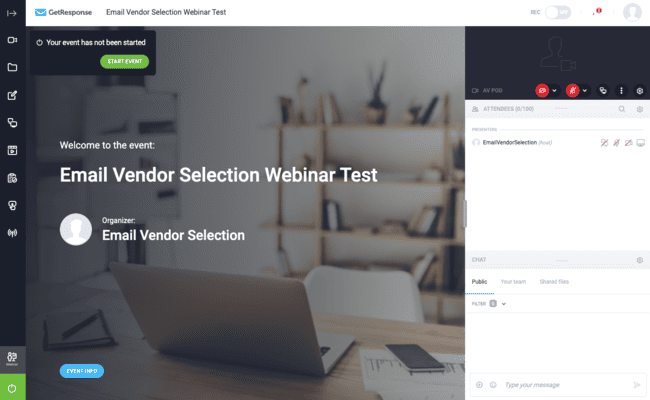
Now you can send invites to your contact list, manage other webinars, and keep track of webinar performance.
You can use chat, polls, Q&A, and a whiteboard during webinars. If you want to show a feature or product, you can share your screen. If I’m looking to sell a product, I can add a call to action directly in the webinar.
People who are already using email marketing and webinars on different platforms will love the fact that GetResponse brings them both together.
You have access to the chat pod and the global settings for your event. The event is hosted inside the GetResponse app. They also have a mobile app you can use to give your webinar on the go.
GetResponse Web Push Notifications
Web push notifications reach website visitors who have opted in, even when they aren’t browsing your site. You can use them to promote new content, product launches, and limited-time offers. GetResponse has custom opt-in prompts, scheduled notifications, and AI-assisted writing.
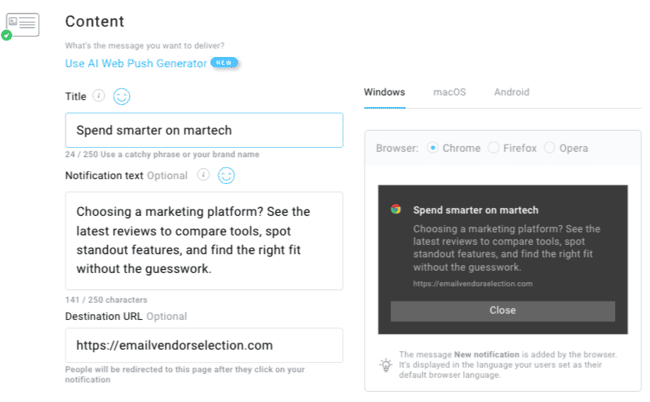
You can trigger web push notifications in workflows based on customer behavior. For example, send an email about a sale, followed by a browser notification to subscribers who haven’t clicked. Use push notifications for timely messages where a short reminder makes sense.
GetResponse Paid Ads
You can create and manage Google Search and Facebook/Instagram ads directly from your GetResponse account. There’s also an AI assistant for Google Ads that suggests headlines and descriptions.
The biggest advantage is connecting advertising with your email marketing. You can create a landing page, run ads to it, and trigger automations for subscribers. I wouldn’t replace Google Ads or Meta Ads Manager with GetResponse, especially for more complicated campaigns.
GetResponse Chats
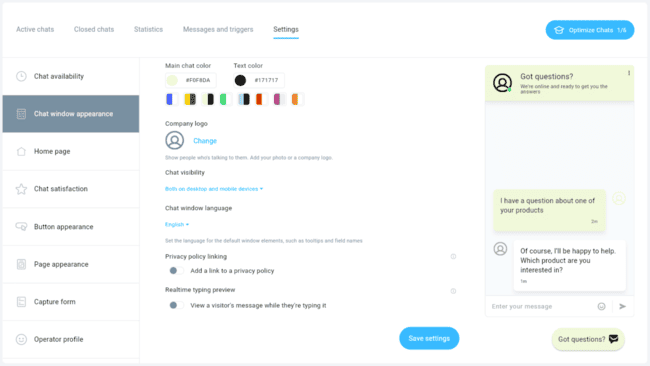
GetResponse Chats lets you talk to visitors directly on your website or landing pages. You can add a chat widget, set automated welcome messages, use quick replies, and respond through the mobile app. When a subscriber starts a conversation, you can see their contact details, subscription date, and engagement score. There’s also a link to their full contact profile.
A course creator could answer questions about a course before someone signs up. An ecommerce store could help shoppers choose products. It’s not as advanced as dedicated live chat or customer service software. But if you only need simple website chat, it’s there.
GetResponse Reporting and Analytics
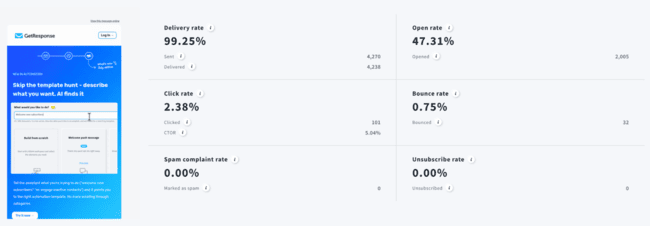
GetResponse has reporting for emails, automation workflows, landing pages, forms, funnels, and ecommerce campaigns. The basics are all there: opens, clicks, unsubscribes, bounces, and spam complaints.
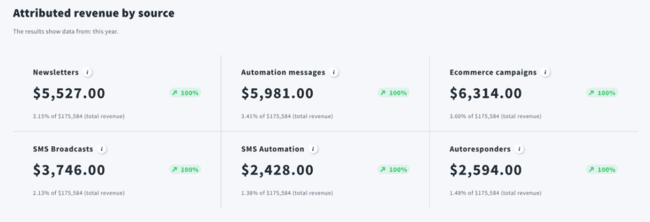
The ecommerce reports show you which campaigns are making money. You can see attributed sales, order counts, and average order value for individual messages. You can also check the revenue generated by an entire automation workflow. If you’re sending abandoned cart emails, you can see how much revenue the campaign recovered.
GetResponse also has AI Insights. It analyzes your email content and results, then gives recommendations. These can include changing a subject line, improving a call to action, or trying a different send time. You can export the analysis as a PDF.
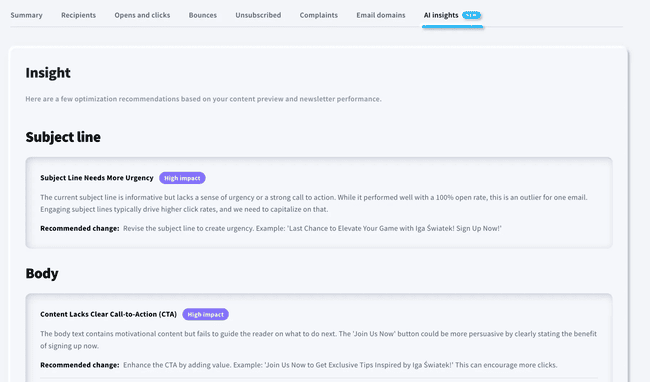
AI Insights appears alongside the regular reports, so you get recommendations based on actual campaign results. It suggested making the “Join Us Now” button more specific by explaining what subscribers would get. The CTA advice is solid, but recommendations in our test seem a bit generic. AI Insights is still in beta, so I’d expect the suggestions to improve.
GetResponse Integrations and API
GetResponse has 170+ integrations. These include ecommerce platforms, website builders, analytics, payment systems, and CRMs.
You can connect Shopify, WooCommerce, Magento, PrestaShop, Shoper, and IdoSell. Store integrations can sync customer and product data so you can use purchases and browsing behavior in emails and automations.
GetResponse also works with WordPress and Google Analytics. And you can connect other platforms through Zapier or create custom integrations with the GetResponse API.
GetResponse recently added an MCP integration that connects your account to AI assistants like ChatGPT and Claude. You can ask questions about campaign performance, search contacts based on engagement or custom fields, and create newsletter drafts. For example, ask which of your last five newsletters performed best. Or have the assistant prepare a landing page, newsletter, and welcome email for a product launch.
MCP is available on all plans. Generated campaigns are saved as drafts, so the AI assistant won’t publish or send them automatically. I prefer this to letting an AI assistant send campaigns directly. You can review every draft before publishing.
How Much Does GetResponse Cost? Pricing & Plans
GetResponse has 3 main paid plans: Starter, Marketer, and Creator.
GetResponse pricing is based on the number of contacts. Paid plans start with 1,000 contacts, and all 3 include unlimited monthly email sends. Here’s a breakdown of their prices:
| Price per month | What you get |
|---|---|
| Free | 500 subscribers
|
| $19 per month€16 per month | 1K subscribers Starter plan with unlimited email sends |
| $29 per month€27 per month | 2.5K subscribers Starter plan with unlimited email sends |
| $54 per month€48 per month | 5K subscribers Starter plan with unlimited email sends |
| $79 per month€69 per month | 10K subscribers Starter plan with unlimited email sends |
| $174 per month€149 per month | 25K subscribers Starter plan with unlimited email sends |
| $299 per month€259 per month | 50K subscribers Starter plan with unlimited email sends |
| $539 per month€469 per month | 100K subscribers Starter plan with unlimited email sends |
Pricing checked: 19 Nov 2026
The Starter plan starts at $15.58/month. You get newsletters, autoresponders, landing pages, forms, pop-ups, basic reporting, and one custom automation workflow. It’s a good starting point for basic email marketing, but the automation limit is only six elements per workflow.
Marketer starts at $48.38/month. This is the marketing automation plan I’d recommend for most ecommerce brands and businesses that want advanced targeting. It adds unlimited automation workflows, advanced segmentation, sales funnels, abandoned cart recovery, product recommendations, web push notifications, and revenue reports.
Creator starts at $56.58/month. You get everything in Marketer, plus webinars, a website builder, online courses with 500 students, and paid newsletters.
MAX is the enterprise plan with custom pricing, unlimited users, SMS marketing, transactional emails, dedicated IPs, priority support, and a dedicated account manager. SMS is also available on regular paid plans for accounts based in Poland, Germany, and Switzerland.
GetResponse also has a free plan with 500 contacts and 2,500 newsletters a month. It includes basic email marketing tools, signup forms, and one landing page. There’s a 14-day free trial of premium features.
GetResponse Discount
If you opt for a yearly subscription, you already get 18% off. But we got you an additional 10% discount, just sign up through this special link here. And if you also complete the get started checklist, there is an extra 10% discount.
The best GetResponse discount you can get is through Email Vendor Selection, saving you up to 33.6% by combining all discounts.
Get the best GetResponse discount here
GetResponse Customer Support
GetResponse has responsive customer support through live chat, email, and a 24/7 AI chatbot. All paid plans, including Starter, Marketer, and Creator, include live chat and email support. English live chat is available Monday to Friday, 8 AM-10 PM. Polish live chat runs Monday to Friday, 9 AM-5 PM (CET/CEST).
Customer reviews are generally positive about the speed and helpfulness of GetResponse’s support. Our experience with a human agent was positive too, although the chatbot couldn’t answer a fairly simple question.
We tested GetResponse’s live chat by asking if we could customize the main menu. It only shows Tools, Contacts, and Reports, so we wanted to add shortcuts to frequently used features like Email Marketing and Automation. It was a simple question, but the AI chatbot didn’t have the answer. We were transferred to a human agent, who joined about 3 minutes later and quickly confirmed that the menu is fixed and can’t be customized. The chatbot struggled with a simple question. The human agent answered it in seconds.
GetResponse has a big Help Center with hundreds of articles covering the full platform. There’s a getting-started guide and step-by-step tutorials. The resource library has 56 video guides and 72 GetResponse tutorials.
The GetResponse platform is available in 11 languages. Email support is available in 7 languages: English, Polish, German, French, Spanish, Italian, and Portuguese. The only minor downside is that phone support is only available with the MAX plan.
Bottom Line: Is GetResponse the right fit for you?
GetResponse is a strong choice if you want more than newsletters. The automation builder, ecommerce targeting, funnels, and reporting give you lots of ways to turn subscribers into customers. I also like having webinars and online courses in the same account. If that sounds like a good fit for your business, try GetResponse.
Starter is affordable for regular email marketing. I recommend Marketer if you need automation and ecommerce features. Some email and landing page templates could use a refresh, but the editors are easy to work with.
Get started with GetResponse for free
Frequently Asked Questions (FAQs)
Is GetResponse good for email marketing?
Does GetResponse have a CRM?
Where can I find the GetResponse API key?
How does GetResponse compare to Mailchimp?
GetResponse Alternatives
GetResponse vs. ActiveCampaign
ActiveCampaign is one of the strongest GetResponse alternatives for marketing automation. Both have visual workflow builders, segmentation, ecommerce triggers, and AI tools. ActiveCampaign also includes 950+ automation templates, advanced conditions, and conversion goals. Plus starts at $59/month for 1,000 contacts, the same as GetResponse Marketer. Predictive sending, advanced segmentation, and attribution reporting require Pro, starting at $99/month. The sales CRM is a paid add-on.
GetResponse Marketer also includes unlimited workflows, advanced segmentation, abandoned cart recovery, and revenue reporting. It has unlimited monthly email sends, while ActiveCampaign Plus limits sends to 10 times your contacts.
I’d pick ActiveCampaign if automation is your main priority and you need to connect marketing to a sales pipeline. GetResponse is a better fit if you want webinars, funnels, and an online course builder alongside email marketing.
Read our full ActiveCampaign review.
GetResponse vs. Brevo
Brevo is a cheaper GetResponse alternative if you have a large contact list but don’t email everyone frequently. Brevo prices its email marketing plans mainly by email volume. Starter costs $9/month for 5,000 emails, and Standard starts at $18/month. GetResponse Starter costs $19/month for 1,000 contacts, but includes unlimited email sends.
Brevo has email, SMS, WhatsApp, transactional emails, and a built-in sales CRM. Standard includes unlimited marketing automation contacts, A/B testing, and advanced reporting. That’s considerably cheaper than GetResponse Marketer at $59/month for 1,000 contacts.
Both have free plans. Brevo’s free plan has 100,000 contacts and 300 emails a day. GetResponse includes 500 contacts and 2,500 monthly emails in its free plan.
I’d choose Brevo for most small businesses that want email, CRM, and multichannel marketing without spending much. GetResponse makes more sense if you need unlimited email sending, built-in webinars, sales funnels, or online courses.
Read our full Brevo review.
GetResponse vs. MailerLite
MailerLite is a cheaper, easier-to-use alternative to GetResponse. Its email editor is easy to use, with 100+ modern templates and predesigned content blocks. You also get landing pages, sign-up forms, a website builder, and ecommerce integrations.
For 1,000 subscribers, MailerLite Comfort and GetResponse Starter both cost $19/month. But Comfort includes 50 active automations, compared with just one six-element workflow on GetResponse Starter. MailerLite Power costs $39/month for 1,000 subscribers, with unlimited automations, emails, and landing pages. GetResponse Marketer costs $59/month and adds more advanced ecommerce targeting, revenue reporting, and funnels. GetResponse’s free plan allows 500 contacts, compared with 250 on MailerLite Free.
MailerLite also supports paid newsletters, digital products, and bookings. But it doesn’t have built-in webinars or an online course platform. GetResponse also has website tracking, lead scoring, and more advanced ecommerce automations, including price drop campaigns.
For newsletters, list building, and everyday automation, I’d choose MailerLite. It’s easier on the budget, and I prefer its email templates. Pick GetResponse if you need the advanced marketing features or want to run webinars and sell courses.
Read our full MailerLite review.
GetResponse vs. Constant Contact
Constant Contact is a GetResponse alternative worth considering if you run events. It has built-in registration pages, ticket sales, invitations, and attendee tracking. You also get phone support on all paid plans. GetResponse has webinars with registration and automated follow-ups.
Constant Contact Lite starts at $12/month for 500 contacts, but includes just one automation template. Standard costs $35/month and gives you three. For unlimited custom automations, you need Premium at $80/month. Email sends are also limited to 10-24 times your contacts, with extra charges if you go over. GetResponse includes unlimited email sends on every paid plan.
I’d choose GetResponse for email marketing, automation, ecommerce, and funnels. Constant Contact’s event tools are useful, but its limited automation and high prices are hard to recommend.
Read our Constant Contact review and Constant Contact alternatives for more details.
GetResponse vs. AWeber
AWeber is a GetResponse alternative for small businesses that need newsletters and simple automations. It has 600+ email templates, an easy drag-and-drop editor, landing pages, and good customer support. GetResponse offers more advanced automation, stronger segmentation, lead scoring, and ecommerce features.
AWeber Lite costs $25/month for 1,000 contacts, compared with $19 for GetResponse Starter. AWeber includes 3 automations. GetResponse limits you to 1 six-element workflow.
For unlimited automations, AWeber Plus costs $45/month, compared with $59 for GetResponse Marketer. GetResponse has more advanced ecommerce and targeting features, plus unlimited email sends. AWeber Plus includes 12,000 emails a month. Both have free plans for 500 contacts. AWeber’s free plan has 3,000 monthly emails, compared with GetResponse’s 2,500.
I’d choose GetResponse for businesses that want to build more advanced customer journeys, with website tracking, lead scoring, purchase-based targeting, and sales funnels. AWeber is good for newsletters and basic automation.
Read our full AWeber review.
GetResponse vs. Kit
Kit (formerly ConvertKit) is an email marketing service for creators, bloggers, and newsletter publishers. It has tools for growing an audience, sending newsletters, and selling digital products and subscriptions. Kit’s Creator Network helps you grow your list through recommendations from other newsletters. You can also earn from sponsorships and paid recommendations.
GetResponse also has features for creators and coaches. The Creator plan includes an AI course builder, student management, quizzes, certificates, webinars, paid newsletters, and sales funnels. GetResponse has a more advanced email editor. It’s also a better fit for ecommerce stores, B2B service providers, agencies, and nonprofits. You get website tracking, lead scoring, abandoned cart recovery, and purchase-based segmentation.
Kit has a more generous free plan with 10,000 subscribers and unlimited newsletters. GetResponse Free includes 500 contacts and 2,500 emails a month. For 1,000 contacts, Kit Creator costs $39/month with unlimited automations, compared with $59 for GetResponse Marketer. GetResponse Creator costs $69/month and adds the course and webinar tools.
I’d choose Kit if you’re mainly focused on growing and monetizing a newsletter. For digital marketing that also involves ecommerce campaigns, webinars, and sales funnels, I’d choose GetResponse.
Read our review of Kit.