
Gemini Pricing: How much does it cost?


Gemini is Google’s generative AI platform with everything from a free basic chatbot to advanced AI models for coding, content creation, and enterprise workflows. But how much will you actually pay for Google Gemini?
We reviewed the plans carefully, cross-checked the pricing, and tested Gemini to see how the plans and features really compare. The result is a clear, no-fluff breakdown that reflects both the numbers and our testing experience.
We’ll break down Google Gemini’s pricing, including Google Workspace plans for businesses and individuals, and the Gemini API costs for developers. We’ll also compare prices against similar AI tools.
Short on Time? Quick Summary of Gemini Pricing
All Google Workspace plans include Gemini. Here’s what Gemini features you get with each plan:
- Starter plan: includes the Gemini app and Gemini in Gmail. Costs $7/user/month.
- Standard, Plus, and Enterprise plans: have Gemini inside all Google Workspace apps, like Gmail, Docs, Sheets, Slides, Drive, Meet, and Chat. Easily get help for drafting emails, summarizing documents, generating content, and analyzing data. Without jumping between tabs. Starts at $14/user/month for the Standard plan.
Gemini for Google Workspace never uses your prompts, corporate data, and client deliverables to train public AI models.
Businesses that want to increase everyday productivity and collaboration without managing a separate AI subscription should get Google Workspace Standard, Plus, or Enterprise.
Get started with Google Workspace for free
And you can get 20% off Standard and Plus plans with our coupon codes.
AI Expanded Access is a Workspace AI add-on, designed for organizations that want higher limits. It includes advanced image and video generation. Designed for teams that rely heavily on AI for images and video.
Individuals can choose from these Gemini plans:
- Gemini Free: Includes the basic Gemini assistant for image generation, deep research, Gemini Live, Canvas, and Gems. Great for simple personal use or students starting out.
- Google AI Plus: Costs $7.99/month. Including Gemini’s more powerful model (3.1 Pro) and limited access to Veo 3.1 Lite. It also adds Gemini to Google apps, like Docs, Vids, and Sheets.
- Google AI Pro: $19.99/month. Including Gemini’s more powerful model (3.1 Pro) and Veo 3.1 Lite. It also adds higher access to Gemini Code Assist and CLI, Gemini 3 Pro in Search, plus Deep Search and AI agents. Ideal for power users who want better AI outputs without the high price tag.
- Google AI Ultra: $99.99/month with 20TB storage, $199.99/month with 30 TB storage. Premium plan with the highest limits to models and features, including video generation with Veo 3.1, Deep Think, and early access to experimental AI features. Geared towards AI enthusiasts or professionals who need the absolute best.
The Gemini API has a pay-as-you-go usage model for developers.
Gemini in Google Workspace Plans
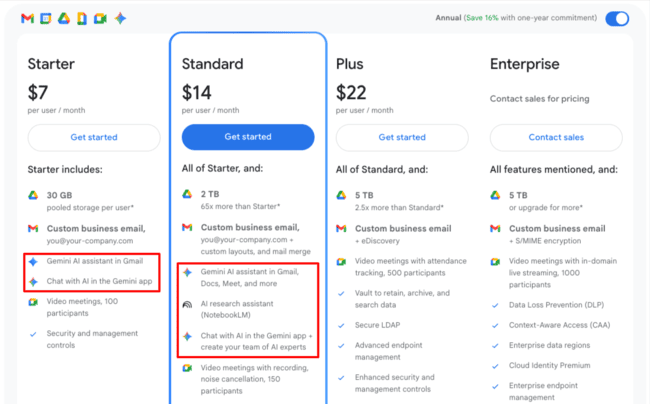
All Google Workspace plans include Gemini. The Standard, Plus, and Enterprise plans all include Gemini in Workspace apps and Gmail. In the Starter plan, you get the Gemini app, Gemini in Gmail and Vids. Let’s break down what AI features each plan has in detail.
Gemini for Google Workspace ensures that your prompts, corporate data, and client deliverables are never used to train public AI models.
Gemini in Google Workspace Starter
Google Workspace Starter includes the Gemini app, and Gemini in Gmail and Vids.
What you can expect:
- Gemini assistant for writing help, summaries, and simple research
- No Gemini integration across all Workspace apps
Starter is designed to give small teams a taste of Gemini without increasing plan costs.
Who is it for? Small teams or businesses that only need occasional AI help and don’t rely heavily on Gmail, Docs, or Sheets automation.
Gemini in Google Workspace Standard, Plus, and Enterprise
Google Workspace Standard, Plus, and Enterprise plans include full Gemini integration in Workspace apps. In these plans, Gemini becomes a daily productivity tool rather than a standalone assistant.
Included Gemini features:
- Gemini built directly into Gmail, Docs, Sheets, Slides, Drive, Meet, and Chat
- Writing, rewriting, and summarizing emails and documents
- AI-generated outlines, tables, and formulas in Sheets
- Image generation in Slides and Docs
- Meeting notes, summaries, and follow-ups in Google Meet
- Data protection and admin controls
Gemini features are largely the same across Standard, Plus, and Enterprise. The main differences between these plans are storage limits, security features, compliance tools, and admin controls.
Who is it for? Most teams should look at Standard or Plus if they want Gemini embedded in everyday workflows. Enterprise is best for larger organizations that need advanced security, compliance, and centralized AI management.
Get 20% off Google Workspace Standard and Plus using the coupon codes below:
- Ends January 31, 2027
Apply the unique promotion code when prompted. This code is only valid for new Google Workspace users and the Standard plan. See additional terms and conditions
- Ends January 31, 2027
Apply the unique promotion code when prompted. This code is only valid for new Google Workspace users and the Plus plan. See additional terms and conditions
The AI Expanded Access add-on gives teams higher access to advanced Gemini models and tools. Including deep reasoning, premium image and video generation, and advanced research features. Everything works with Workspace apps like Gmail, Docs, Sheets, Slides, and Meet. Workspace admins manage the access, so companies can control who gets Expanded Access and how it’s used across the organization. Find out more with our Google Workspace pricing guide.
Get started with Google Workspace for free
Google Gemini Pricing Plans for Individuals (Free vs Pro vs Ultra)
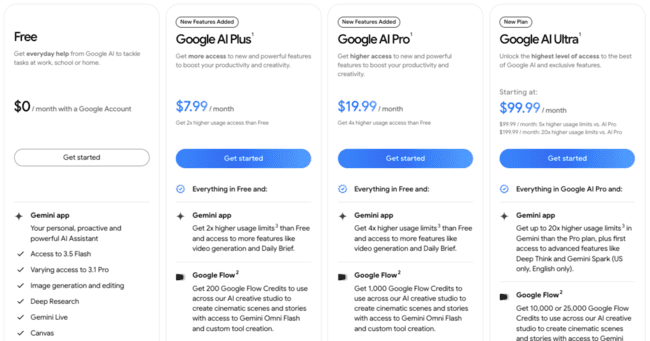
Google Gemini has a free plan and 3 paid subscription plans for individual users. These are part of Google’s personal plans:
Gemini Free
If you have a Google account, you already have Gemini. The free tier includes the 3 Flash model and varying access to 3.1 Pro. You can chat with the AI, get writing help, generate images, or do light research.
The free plan has usage limits. Google frequently adjusts limits based on current server capacity. If the system is busy, free users are throttled first. It’s great for casual use or testing the waters, but it won’t have the full power of Gemini’s latest models.
Gemini Free Plan Usage Limits
| Feature / Model | Free Plan Limit |
| Gemini 3 Fast | General Access (Unlimited for most casual users) |
| Gemini 3.1 Pro | Basic Access |
| Thinking Model | Basic Access (Daily limits fluctuate based on demand) |
| Image Generation (Nano Banana) | 20 images per day |
| Deep Research | 5 reports per month (using the Fast model) |
| Audio Overviews | 20 per day |
| Context Window | 32,000 tokens |
Google AI Plus
Google AI Plus costs $7.99 per month. It’s for personal users who need more AI access without having to jump to the Pro plan.
Google AI Plus includes:
- Enhanced access to the Gemini app with Gemini 3.1 Pro
- Access to Nano Banana Pro for image generation
- Limited access to Veo’s video generation features
- Gemini features in Google apps like Gmail, Calendar, Meet, Docs, and Vids
- NotebookLM with higher limits, including 100 sources per notebook
- Flow for AI video creation
- 200 GB of storage
- Family sharing for 5 other users
Who is it for? Google AI Plus is best for personal users who want more than the free Gemini plan, but don’t need everything in Google AI Pro. It’s a good fit for students, casual creators, and everyday users who want better image generation, more research help, some video tools, and extra storage at a lower monthly price.
Google AI Pro
Google AI Pro costs $19.99 per month. AI Pro unlocks Gemini’s 3.1 Pro model along with:
- Higher access to Gemini 3.1 Pro, Deep Research, Flow, and image generation
- Jules (coding agent) with higher limits
- Gemini Code Assist and CLI with higher daily limits
- Google Antigravity (agentic dev platform)
- 5x more Audio Overviews and notebooks in NotebookLM
- Gemini in Chrome
- Google Home Premium’s Standard plan
- 5 TB of cloud storage (shared across Drive, Photos, Gmail)
Who is it for? Google AI Pro is perfect for students, professionals, or content creators who heavily use AI. If the free or Plus plans feel limiting or you need smarter, longer, more reliable AI outputs (without the wait), the $19.99/month AI Pro plan is a great value with similar prices to OpenAI’s ChatGPT Plus, but tightly integrated with Google’s ecosystem.
Google AI Ultra
Google AI Ultra costs $99.99 per month. This is Google’s “everything and the kitchen sink” plan. It’s a premium subscription for those who want the absolute best of Google’s AI.
Ultra includes everything in AI Pro, plus:
- Highest usage limits across all models
- Veo 3.1 video generator & Flow video editor
- Google Search with the highest access
- Gemini Agent (US only, English only)
- Project Genie (US only, create and explore 3D virtual worlds)
- Google Home Premium’s Advanced plan
- YouTube Premium
- 20 TB cloud storage
Who is it for? AI Ultra is aimed at AI enthusiasts who rely on AI for lots of workflows. $99.99/month is steep, even Google admits it’s for people who “want to be on the absolute cutting edge of AI”. If you don’t absolutely need those advanced features or high limits, most users will be fine with the much cheaper Pro plan.
Gemini Education Plans
Google Workspace for Education plans include Gemini for free. It’s called Gemini for Education. Teachers and students get Google’s generative AI models and tools directly through the Gemini app and Google Classroom. It’s built on Gemini 3 and offers higher usage limits than consumer versions, plus enterprise‑grade data protection and admin controls. This means institutions can start planning lessons, personalizing learning, and brainstorming ideas with AI without buying an add‑on.
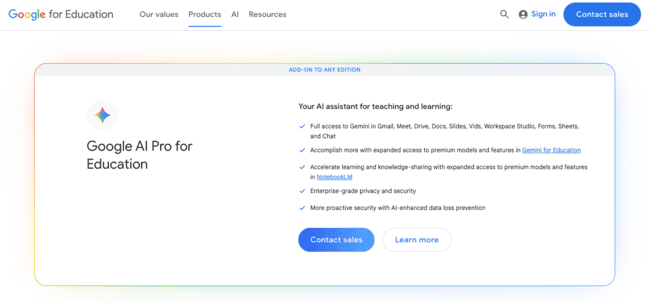
Google offers a Google AI Pro for Education add-on. This has customer pricing and includes full access to Gemini in Gmail, Docs, Sheets, Slides, Vids, Meet, and Chat, plus expanded NotebookLM features and AI‑enhanced data loss prevention.
Google Gemini API Pricing (for Developers)
Perhaps you’re a developer or a company looking to integrate Google’s Gemini models into your own software via the API or through Google Cloud’s Vertex AI platform. Google Gemini’s API pricing works on a pay-as-you-go model. Prices vary based on the amount of data you process. You pay per token that the AI model handles.
Google charges separate rates for input tokens (your prompt to the AI) and output tokens (the AI’s response). The more you generate or the bigger the prompt, the more it costs. Different Gemini models have different prices, and there are free tier quotas for each model for testing. Here’s a rough breakdown of current Gemini API costs:
Gemini 3.5 Flash
Gemini 3.5 Flash is Google’s most intelligent speed-focused model, combining reasoning with fast responses, strong search, and grounding. It’s built for high-volume apps that need more intelligence than lightweight models without the full cost of Pro.
Standard (real-time) pricing:
- Input: $1.50 per 1M tokens.
- Output: $9.00 per 1M tokens, including thinking tokens.
- Context caching: $0.15 per 1M tokens, plus $1.00 per 1M tokens per hour for storage.
- Search and Maps grounding: 5,000 prompts per month free, shared across Gemini 3, then $14 per 1,000 search queries.
Batch pricing: 50% discount on token pricing. Input costs $0.75 per 1M tokens, output costs $4.50 per 1M tokens, and context caching costs $0.075 per 1M tokens, plus $1.00 per 1M tokens per hour for storage.
Best for: Developers who need strong Gemini intelligence at high speed. It’s a good fit for high-volume chat, search-heavy apps, grounded answers, support tools, and real-time workflows where latency and quality both matter.
Gemini 3.1 Flash-Lite
Gemini 3.1 Flash-Lite is Google’s most cost-efficient Gemini 3.1 model, optimized for high-volume agentic tasks, translation, and simple data processing. It’s designed for workloads where speed and low cost matter more than using the most powerful Gemini model.
Standard (real-time) pricing:
- Input: $0.25 per 1M tokens for text, image, and video; $0.50 per 1M tokens for audio.
- Output: $1.50 per 1M tokens, including thinking tokens.
- Context caching: $0.025 per 1M tokens for text, image, and video; $0.05 per 1M tokens for audio, plus $1.00 per 1M tokens per hour for storage.
- Search and Maps grounding: 5,000 prompts per month free, shared across Gemini 3, then $14 per 1,000 search queries.
Batch pricing: 50% discount on token pricing. Input costs $0.125 per 1M tokens for text, image, and video, or $0.25 per 1M tokens for audio. Output costs $0.75 per 1M tokens, and context caching costs $0.0125 per 1M tokens for text, image, and video, or $0.025 per 1M tokens for audio, plus $0.50 per 1M tokens per hour for storage.
Best for: Developers building cost-sensitive, high-volume applications. It’s ideal for translation, extraction, classification, lightweight agents, automation, and simple data-processing workflows where low cost is the priority.
Gemini 3.1 Pro Preview
Gemini 3.1 Pro Preview is Google’s most advanced Gemini 3.1 model, built for complex reasoning, multimodal understanding, coding, agentic workflows, and “vibe-coding” use cases.
Standard (real-time) pricing:
- Input: $2.00 per 1M tokens for prompts ≤ 200k tokens, $4.00 per 1M tokens for prompts > 200k tokens.
- Output: $12.00 per 1M tokens for prompts ≤ 200k tokens, $18.00 per 1M tokens for prompts > 200k tokens.
- Context caching: $0.20 per 1M tokens for prompts ≤ 200k tokens, $0.40 per 1M tokens for prompts > 200k tokens, plus $4.50 per 1M tokens per hour for storage.
- Search and Maps grounding: 5,000 prompts per month free, shared across Gemini 3, then $14 per 1,000 search queries.
Batch pricing: 50% discount on token pricing. Context caching stays at $0.20 / $0.40 per 1M tokens, plus $4.50 per 1M tokens per hour for storage.
Best for: Developers who need the strongest Gemini model for advanced reasoning, complex coding, multimodal workflows, and agentic applications where quality matters more than cost.
Gemini 3.1 Flash-Lite Preview
Gemini 3.1 Flash-Lite Preview is Google’s most cost-efficient Gemini 3.1 model. It’s optimized for high-volume agentic tasks, translation, simple data processing, and lightweight workflows where speed and budget matter most.
Standard (real-time) pricing:
- Input: $0.25 per 1M tokens for text, image, and video; $0.50 per 1M tokens for audio.
- Output: $1.50 per 1M tokens, including thinking tokens.
- Context caching: $0.025 per 1M tokens for text, image, and video; $0.05 per 1M tokens for audio, plus $1.00 per 1M tokens per hour for storage.
- Search and Maps grounding: 5,000 prompts per month free, shared across Gemini 3, then $14 per 1,000 search queries.
Batch pricing: 50% discount. Context caching costs $0.0125 per 1M tokens for text, image, and video; $0.025 per 1M tokens for audio; plus $0.50 per 1M tokens per hour for storage.
Best for: High-volume apps, translation, data extraction, lightweight agents, support automation, and other workloads where low cost and fast responses are more important than using the most powerful model.
Gemini 3.1 Flash Image Preview
Gemini 3.1 Flash Image Preview is Google’s faster, lower-cost Gemini 3.1 image generation model. It’s designed for quick, interactive responses and high-throughput creative workloads.
Standard (real-time) pricing:
- Input: $0.50 per 1M tokens for text and image inputs.
- Text output: $3.00 per 1M tokens for text and thinking.
- Image output: $60.00 per 1M image tokens.
- Per-image equivalents: $0.045 per 0.5K image, $0.067 per 1K image, $0.101 per 2K image, and $0.151 per 4K image.
- Search grounding: 5,000 prompts per month free, shared across Gemini 3, then $14 per 1,000 search queries for text and image-based grounding.
Batch pricing: 50% discount.
Best for: Developers who need scalable image generation at a lower cost than Gemini 3 Pro Image. It’s a good fit for product mockups, creative tools, ad variations, ecommerce visuals, and high-volume image workflows.
Gemini 3 Flash Preview
Gemini 3 Flash Preview combines strong reasoning with high speed and low cost, suitable for high‑volume, time‑sensitive tasks.
Standard pricing:
- Input: $0.50 per 1M tokens for text/image/video, $1.00 per 1M tokens for audio.
- Output: $3.00 per 1M tokens.
- Context caching: $0.05 per 1M tokens for text/image/video, $0.10 per 1M tokens for audio, $1.00 per 1M tokens per hour for storage.
- Search grounding: 5,000 prompts per month free, shared across Gemini 3, then $14 per 1,000 search queries.
Batch pricing: 50% discount on input (0.25/0.50 per 1M tokens) and output ($1.50 per 1M tokens). Context caching rates remain the same.
Best for: When you need Gemini’s intelligence but must keep costs low and responses fast. Suitable for dynamic apps, real‑time search, and high‑volume chat.
Gemini 3 Pro Image Preview
Gemini 3 Pro Image Preview is Google’s high-quality native image generation model, built for detailed visuals, creative workflows, and premium image output.
Standard pricing (image generation):
- Input: $2.00 per 1M tokens for text/image inputs or about $0.0011 per image (560 tokens each).
- Output: $12.00 per 1M tokens for text responses, images cost $120 per 1M tokens, equivalent to $0.134 per 1K/2K image (1024×1024px or 2048×2048px) and $0.24 per 4K image (4096×4096px).
Batch pricing: Input $1.00 per 1M tokens text or ~$0.0006 per image, output $6.00 per 1M tokens text, $0.067 per 1K/2K image, and $0.12 per 4K image.
Best for: Developers who need top‑tier image quality and are willing to pay a premium. Because each image is equivalent to thousands of tokens, costs can add up quickly.
Gemini 2.5 Pro
Gemini 2.5 Pro is built for advanced reasoning, complex coding, long-context understanding, and high-quality multimodal tasks.
Standard usage (real‑time calls):
- Input: Free for small projects, paid rate is $1.25 per 1M tokens for prompts ≤ 200 k tokens, and $2.50 per 1M tokens for larger prompts.
- Output: Free in the free tier, paid rate is $10 per 1M tokens for prompts ≤ 200 k tokens, and $15 per 1M tokens for larger prompts.
- Context caching: Not available in the free tier. Paid rate is $0.125 per 1M tokens stored (≤ 200 k tokens) or $0.25 per 1M tokens (> 200 k), plus $4.50 per 1M tokens per hour for storage.
- Search grounding: Not available in the free tier. Paid tier includes 1,500 RPD free, then $35 per 1,000 grounded prompts.
- Maps grounding: Not available in the free tier. Paid tier includes 10,000 RPD free, then $25 per 1,000 grounded prompts.
Batch usage: 50% discount on token prices. Input tokens cost $0.625–$1.25, output tokens $5–$7.50 per 1M tokens, depending on context size. Maps grounding is not available in batch.
Best for: Heavy coding, advanced reasoning, large context windows.
Gemini 2.5 Flash
Gemini 2.5 Flash is a fast, cost-efficient multimodal model optimized for high-throughput workloads that still require strong reasoning and reliable outputs.
Standard usage:
- Input: $0.30 per 1M tokens for text/image/video, $1.00 per 1M tokens for audio.
- Output: $2.50 per 1M tokens (free in free tier).
- Context caching: $0.03 per 1M tokens for text/image/video, $0.10 per 1M tokens for audio. Storage: $1.00 per 1M tokens per hour.
- Search and Maps Grounding: 500 requests per day in the free tier, while the paid tier includes 1,500 free requests per day. After that, Search grounding costs $35 per 1,000 grounded prompts, and Maps grounding costs $25 per 1,000 grounded prompts.
Batch usage: Input tokens cost $0.15 (text/image/video) or $0.50 (audio), output tokens $1.25. Context caching rates are the same, search grounding only available in paid tier.
Gemini 2.5 Flash‑Lite
Gemini 2.5 Flash-Lite is Google’s most affordable Gemini model. It’s best for lightweight tasks, large-scale automation, and use cases where speed and low cost matter more than deep reasoning.
Standard usage:
- Input: $0.10 per 1M tokens for text/image/video, $0.30 per 1M tokens for audio.
- Output: $0.40 per 1M tokens.
- Context caching: $0.01 per 1M tokens for text/image/video, $0.03 per 1M tokens for audio.
- Search and Maps Grounding: 500 requests per day in the free tier, while the paid tier includes 1,500 free requests per day. After that, Search grounding costs $35 per 1,000 grounded prompts, and Maps grounding costs $25 per 1,000 grounded prompts.
Batch usage: Input tokens $0.05 (text/image/video) or $0.15 (audio), output tokens $0.20.
Gemini 2.5 Flash Native Audio (Live API)
Gemini 2.5 Flash Native Audio powers real-time, low-latency voice interactions, making it ideal for live assistants, conversational agents, and streaming audio experiences.
- Input: $0.50 per 1M tokens for text, $3.00 per 1M tokens for audio/video.
- Output: $2.00 per 1M tokens for text, $12.00 per 1M tokens for audio.
Gemini 2.5 Flash Image
Gemini 2.5 Flash Image is optimized for fast and economical image generation, balancing visual quality with high performance for production-scale creative workloads.
- Input: $0.30 per 1M tokens for text/image.
- Output: About $0.039 per 1024×1024 image (image output is billed at $30 per 1M tokens, a typical 1024×1024 image uses around 1,300 tokens).
- Batch: $0.15 per 1M tokens input and $0.0195 per image output.
Gemini 2.5 Flash Preview TTS & Gemini 2.5 Pro Preview TTS
These text-to-speech preview models convert written content into natural-sounding audio, with Flash focused on speed and cost efficiency and Pro delivering higher-fidelity speech.
- 2.5 Flash Preview TTS: $0.50 per 1M tokens input (text), $10 per 1M tokens output (audio). Batch: $0.25 input, $5 output.
- 2.5 Pro Preview TTS: $1.00 per 1M tokens input, $20 per 1M tokens output. Batch: $0.50 input, $10 output.
Image & Video Generation Models
- Imagen 4: Fast/Standard/Ultra tiers cost $0.02, $0.04, and $0.06 per image.
- Veo 3.1 Fast: $0.10/s for 720p, $0.12/s for 1080p, and $0.30/s for 4K.
- Veo 3 Lite $0.05/s for 720p and $0.08/s for 1080p. 4K output is not supported.
- Veo 3 Standard: $0.40/s. Veo 3 Fast: $0.10/s for 720p, $0.12/s for 1080p, and $0.30/s for 4K.
Good to know
- Context caching & storage: If your application frequently sends large prompts, consider caching to save token costs. Storage fees apply for long‑term context storage.
- Batch processing: Processing data in batches cuts token costs by roughly 50% but may increase latency. It’s ideal for offline/large‑scale jobs.
- Vertex AI: If you access Gemini models via Google Cloud’s Vertex AI, additional cloud service charges (compute, storage, fine‑tuning) may apply, but the underlying per‑token prices are similar to the API.
Overall, Gemini’s API pricing is flexible: you only pay for what you use. For small experiments, stay within the free tier. For production use, choose the model and tier (standard or batch) that balances cost with performance.
Features like long system prompts or tools (Search, Maps) used by Gemini can consume extra tokens beyond what you might expect. Google’s guidance recommends implementing usage quotas and alerts at ~75% of your budget, so you don’t get surprised by a big bill.
Google Gemini vs Other AI Tools: How Does Pricing Compare?
With many AI options out there, how does Google Gemini’s pricing stack up to competitors like OpenAI’s ChatGPT, Anthropic’s Claude, or Microsoft 365 Copilot? Here’s a comparison to put things in perspective:
Gemini vs ChatGPT
OpenAI’s ChatGPT offers a free version and ChatGPT Plus at $20/month. It’s very similar to Gemini’s free and $19.99 Pro plans.
ChatGPT Plus gives you expanded access to GPT-5 with advanced reasoning, higher messaging and upload limits, faster image creation, Deep Research, agent mode, memory, projects, tasks, custom GPTs, and expanded Codex usage. Gemini Pro integrates into Google’s own products (Docs, Gmail) and offers massive context windows and multi-modal input (images, videos, audio, etc.). This makes Gemini one of the best ChatGPT alternatives.
ChatGPT might excel at creative writing or have an edge with its plugin ecosystem. Gemini shines with up-to-date info via Google Search and tight Workspace integration. If you’re already in Google’s ecosystem (Google Drive, Gmail, etc.), go for Gemini. You’ll get similar features, often at a lower overall cost compared to juggling ChatGPT plus other tools. And using these coupon codes, you can get an even better deal with 20% off Google Workspace Standard and Plus plans:
- Ends January 31, 2027
Apply the unique promotion code when prompted. This code is only valid for new Google Workspace users and the Standard plan. See additional terms and conditions
- Ends January 31, 2027
Apply the unique promotion code when prompted. This code is only valid for new Google Workspace users and the Plus plan. See additional terms and conditions
Gemini vs Microsoft 365 Copilot
Microsoft’s AI Copilot is an add-on for Microsoft 365 business plans. MS365 plans with Copilot start at $27 per user per month. That’s much higher than Google’s Standard plan, which includes Gemini for $14 per user per month.
Microsoft’s Copilot integrates into Office apps (Word, Excel, Outlook, Teams) similar to how Gemini integrates into Google Workspace. If your company runs on Microsoft Office, Copilot’s cost might be justified, but Google’s offering undercuts it on price for comparable functionality in the Google ecosystem.
That said, Copilot includes some Microsoft-specific AI perks and works with Office documents natively.
Google is pricing Gemini as a better deal for businesses already using Workspace, often at a lower overall cost, especially for startups or smaller businesses. Enterprises will evaluate which office suite they’re invested in. Purely on pricing, Gemini is the more budget-friendly choice.
Gemini vs Anthropic Claude
Anthropic’s Claude is best known for strong reasoning, careful responses, and the ability to work with very large documents. Individuals can use Claude for free, or upgrade to the Claude Pro plan for $20 per month (or $17 per month with annual billing). It’s in the same price range as Google’s Gemini Pro. The Pro plan mainly increases usage limits and gives access to Anthropic’s most capable models.
Claude is more “AI-only” than Gemini. Anthropic does offer transparent usage-based API pricing, but there are no bundled extras like cloud storage or productivity apps. Claude can be a great value if you need to analyze long documents or produce thoughtful summaries in a conversational style. Gemini often looks more cost-effective for buyers who want AI tightly integrated into email, documents, and collaboration tools. For the same price as Claude, you can replace or reduce spend on other software.
Get started with Google Workspace for free
Which Google Gemini Plan Should You Choose? Quick Takeaways
Now for the million-dollar question (luckily, it won’t cost that much): which Google Workspace or Gemini pricing plan is right for you? Here’s a quick summary:
- Smaller teams with light AI use: Go for Google Workspace Starter. It includes the Gemini app, Gemini in Gmail and Vids.
- Most businesses and growing teams: Choose Google Workspace Standard or Plus. Both plans include full Gemini integration in Gmail, Docs, Sheets, Slides, Drive, Meet, and Chat. You can draft emails, summarize documents, generate content, and analyze data directly inside the apps you already use. This is already the best balance of price and AI features for most teams, but our 20% discount on Standard and Plus makes it an even better deal:
- Ends January 31, 2027
Apply the unique promotion code when prompted. This code is only valid for new Google Workspace users and the Standard plan. See additional terms and conditions
- Ends January 31, 2027
Apply the unique promotion code when prompted. This code is only valid for new Google Workspace users and the Plus plan. See additional terms and conditions
- Larger companies: Go with Google Workspace Enterprise. Gemini features are the same as Standard and Plus, but Enterprise offers stronger security and compliance controls. It’s the right choice if AI is critical to daily workflows and you need centralized data control.
- Developers and SaaS Builders: If you’re building a product that uses AI (chatbot, writing assistant, etc.), you’ll work with Gemini’s API. Start with the free tier in AI Studio to prototype. It gives generous limits to test your concept. Once you’re ready for production, enable billing for the API and choose the model that fits your use case.
Get started with Google Workspace for free
Here’s an overview of Gemini plans for personal use:
- Everyday users who want more than free: Get Google AI Plus for $7.99/month. It’s the middle ground between Gemini Free and Google AI Pro. With more access to Gemini 3.1 Pro, limited access to Veo 3.1 Lite, Deep Research, NotebookLM, Flow, Gemini in Gmail, and other Google apps. You also get 200 GB of storage across Gmail, Drive, and Photos, plus 200 monthly AI credits for Flow and Google Antigravity. It’s a good pick if you use Gemini regularly for research, writing, studying, or light creative work.
- Content creators, marketers, and power users: Go for the AI Pro plan for $19.99/mo. If you need AI writing tools for marketing copy and blog posts. Or if you want to use AI for analyzing data or coding, the Google AI Pro plan is worth it. The jump in model quality is noticeable. Longer, more coherent outputs and better understanding of context. For roughly the price of ChatGPT Plus, you get integration with Google Docs/Sheets, which is great for content and email work, like drafting newsletters, refining campaign ideas, etc. Most individuals and small business folks will find this the sweet spot for value and cost.
- AI Enthusiasts: Should consider Ultra ($99.99/mo), but only if you truly need its extras. Are you creating AI-driven video content, or do you absolutely need the latest experimental AI features before anyone else? If yes, get Ultra.