
SMTP.com Review 2026: Is it the email delivery service for you?


SMTP.com is a bulk email delivery service. It’s designed for sending transactional, triggered, and bulk emails through SMTP relay and API. Some of the biggest brands and even other email platforms use it to send transactional and bulk emails.
With this type of email service, strong deliverability that gets your emails into the inbox is what matters most. So I signed up, tested, and reviewed the platform in detail, including all the deliverability tools.
So let’s see if the platform is a good fit for you. In this SMTP.com review, I’ll cover all the features, ease of use, pricing, analytics, and deliverability tools.
SMTP.com Review Overview
If you’re short on time, here’s a quick summary of my SMTP.com review:- SMTP.com is an email API and SMTP service specializing in higher sending volumes.
- It comes with deliverability features like built-in email validation, IP warm-up, and detailed reputation analytics. Dedicated IPs are available, resulting in self-reported 98%+ delivery rates.
- SMTP.com’s API works with any platform. It’s popular with developers working for larger companies in sectors like finance, ecommerce, SaaS, publishing, media, and travel.
- Pricing starts at $25/month for 50,000 emails with a shared IP. Dedicated IPs start at $80/month. You can try SMTP.com with a 30-day free trial with 50,000 emails.
- Add-ons include Reputation Defender, which automates list cleaning, and Insight Engine, which creates enhanced data profiles for your contacts.
- Helpful customer support with global phone and chat support, 16 hours on weekdays, and 12 hours Sat-Sun.
👉 If you need a reliable SMTP service built for high-volume sending and strong deliverability, try SMTP.com for free.
SMTP.com Core Features
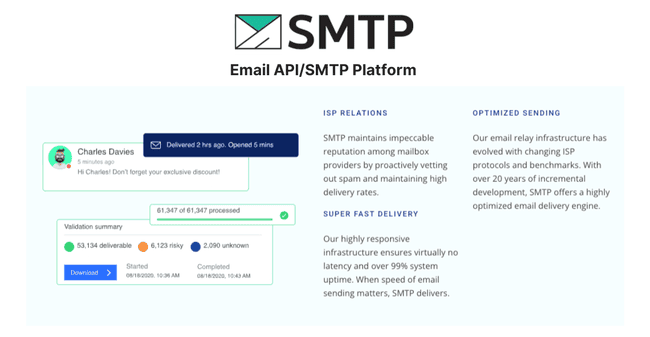
- Email API and SMTP: SMTP.com’s main feature is a RESTful JSON email API and SMTP relay. It adds email sending to any platform via straightforward, flexible connections.
- Reputation Defender: An automated list hygiene add-on that suppresses sending to risky addresses.
- Insight Engine: An add-on to enrich contact data. Useful for marketers wanting to fine-tune their segments with more data.
- Deliverability Features: Dedicated IPs, IP warm-up, list verification, and automated suppression all contribute to 98%+ deliverability rates.
SMTP.com Pros & Cons
SMTP.com Pros
- Solid deliverability. SMTP.com publishes 98%+ average deliverability rates. It achieves this from their own sending infrastructure, managed services, and features designed to protect sender reputation.
- Specialized in high send volumes. SMTP.com’s first plan starts at 50k emails per month, but can scale to accommodate huge senders that reach over 250 million emails a month.
- Straightforward plug-in to any platform. SMTP.com’s email API is flexible and straightforward for marketers and developers to use. It lets you add email sending to any app or platform.
- Built-in list verification. Email address validation helps reduce bounces and protect sender reputation. The optional Reputation Defender automates list hygiene.
- Phone and live chat support. All customers get phone and live chat support, which is a high level of service compared to others. The live helpdesk is available 16 hours a day on weekdays and 12 hours a day over the weekend.
SMTP.com Cons
- No built-in email marketing tools. SMTP.com is great for high-volume email delivery. But you can’t use it to create HTML emails or manage and automate campaigns. For contrast, some email marketing platforms also have transactional emails.
- No official SDK code libraries. SMTP.com provides API documentation and examples. Third-party libraries are available on GitHub, so it works. But we’d love to see SMTP publish its own official SDK libraries.
Get started with SMTP.com for free
Is SMTP.com For You?
Recommended if:
- You send high-volume emails and need a reliable infrastructure. SMTP.com is built to handle large sending volumes. Its infrastructure is designed for businesses that depend on consistent email delivery.
- You want to add email delivery to your digital platforms. The RESTful email API connects SMTP.com’s sending infrastructure to any platform. It’s ideal for transactional emails in ecommerce stores, SaaS, and other business apps.
- You prioritize high deliverability and strong sender reputation. SMTP.com claims a top 98%+ deliverability rate. Its deliverability tools protect high-volume senders from reputation damage.
Not recommended if:
- You want an all-in-one platform for email marketing. SMTP.com connects to email marketing platforms. But it’s not an email marketing service. For SMBs that also want to create and automate email marketing campaigns, it may be easier to use a transactional email platform that also has email marketing features, like Brevo, Moosend, or Mailtrap.
- You send fewer than 20K emails per month. SMTP.com’s cheapest tier is affordable and includes 50k emails a month. That’s a good starting point. But for smaller companies, a cheaper email marketing service is a better choice.
- You want to have a custom integration, but don’t have developer support. SMTP.com does a lot to be user-friendly, even without technical knowledge. And you don’t need advanced knowledge to use the SMTP relay or standard integration. But it is still a technical platform, so for custom email API integration, it’s best to have technical know-how available.
SMTP.com Review Rating Details
Email API and SMTP | SMTP.com’s infrastructure is ideal for high-volume sending. Its adaptable email API and SMTP relay connects to any platform. |
Ease of Use | For a technical email delivery platform, SMTP.com is relatively intuitive. It has simple navigation and strong setup guides. Some parts of the interface look a little dated. |
Reporting & Analytics | SMTP.com provides server-level reporting into email performance. This includes real-time monitoring of queue status and suppressions. Plus familiar email performance metrics like open and click rates. The data is comprehensive. I’d like to see better visual presentation, though. |
Customer Support | Phone and live chat on all plans set SMTP.com apart from many competitors. This is backed up by a knowledge base full of technical guides and FAQs. |
| Deliverability | Dedicated IPs, IP warm-up, authentication, and email validation help achieve a 98%+ average deliverability rate. |
| Email Content Spam check | SMTP.com is an SMTP relay. It will check if email addresses are valid, but a potential spam check on your email content isn’t available. It’s not usually part of pure relay tools. This can be done with an email deliverability tool. |
| Integrations & API | The RESTful email API connects to any platform. Many high-volume senders use SMTP.com with Ongage, Interspire, or other self-hosted email marketing software. It has ready-made plug-ins, including WordPress and Zapier. I’d like to see more. And published SDKs to make developers’ lives easier. |
| User Permissions | There are two levels of user permissions. Administrator and general user. Similar platforms often have more nuanced access controls. Like developer access to API settings. |
| GDPR & Legal Compliance | SMTP.com is fully compliant with international privacy, data security, and commercial email legislation. This includes GDPR, CASL, CCPA, and CAN-SPAM. |
| Interface Languages | SMTP.com is available in English. |
Overall Score

SMTP.com‘s strengths are its deliverability, sender reputation protection, and high-volume sending. Its infrastructure is built specifically for bulk and transactional email, with tools like dedicated IPs, IP warm-up, and built-in email validation helping senders maintain strong inbox placement. While it doesn’t include built-in email marketing tools, SMTP.com is a reliable platform for organizations that need a strong sending infrastructure.
Getting Started with SMTP.com
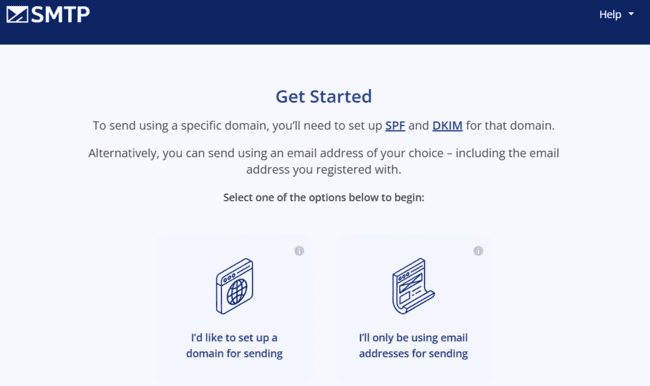
Launching a new SMTP.com account is pretty straightforward. Start by signing up with your email and business details. Next, there’s a quick two-step verification process. First, you choose a plan and enter your payment details, even if you’re only starting a free trial. A small $1 reversible charge is used to verify your card. After that, you simply confirm your email address using the code sent to your inbox.
That creates your account. Next, we set up email sending. There are two options. You can connect a domain. Or just provide an email address. Using a domain has several advantages. It means you can set up multiple email addresses. And you get better control over email deliverability in SMTP.com. You need to add SMTP.com’s SPF and DKIM records to your domain’s DNS settings.
With an email address, you just need to confirm via verification email. SMTP.com prompts you to use the address you signed up with. You can add other addresses manually later.
SMTP.com Review: Email Delivery Platform
SMTP.com SMTP and Email API
SMTP.com can connect to a website or app to send transactional and marketing emails.
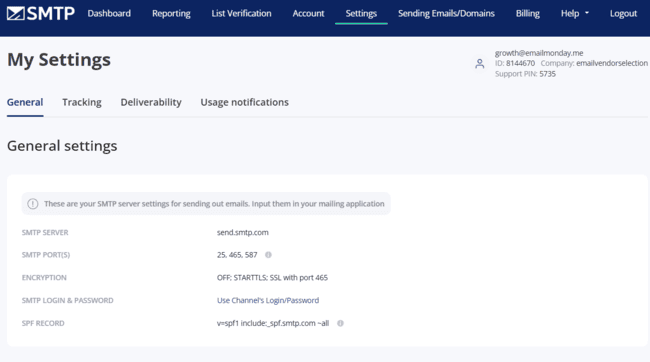
You use SMTP.com’s email API or SMTP to connect the tools and use an existing domain to send emails. It’s also how you send transactional emails. Connecting the API to a web store, for example, means you can set up automated email receipts. Order confirmations, updates, and more. Or if your business involves online accounts. You can use it for password resets, renewals, and updates. Or you can use it for promotional emails.
Like any API, it is good to have some coding know-how. But SMTP.com does its best to lighten the load. Its API is RESTful and returns responses in JSON as per the JSend specification. Rough translation: it works easily with HTTP clients in many programming languages. And data exchanges follow a lightweight, consistent, user-friendly format.
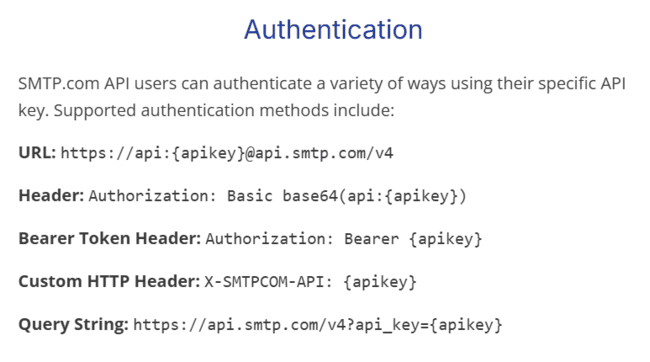
SMTP.com publishes sample code for authenticating connections using your account’s unique API key. And samples for API calls in JSON. It doesn’t, however, publish code libraries. You can find these easily enough in GitHub. But it would be easier to install them directly from SMTP.com.
SMTP.com Deliverability
SMTP.com publishes an average delivery rate of 98%, which we were able to verify from their internal logs. 98% is the gold standard for delivery rates, especially impressive on the high volumes SMTP.com deals in.
Good email deliverability also depends on the sender maintaining a good sender reputation itself of course. SMTP.com provides the tools to help you maintain a positive sender reputation. This is a win-win because it helps you get high inbox placement.
And that builds trust in SMTP.com’s sending infrastructure. It is notable that multiple email marketing platforms, like Campaigner and iContact, use SMTP.com for all their email delivery.
As a sender, you must add SMTP.com’s SPF and DKIM records to your DNS settings. SPF authorizes SMTP.com to send emails from your domain. DKIM uses authentication to verify message integrity. Together, they signal to mailbox providers that your emails are legitimate.
SMTP.com also supports DMARC. This controls what mailboxes do when authentication fails. And generates detailed reports on passes and failures. DMARC reports are technical, but SMTP.com presents them in a more accessible format. If a sending domain lacks correct authentication, you’ll see error notifications in the dashboard.
How you add SPF and DKIM records depends on your domain host. But there’s a long list of guides covering all major providers.

All but the Essential plan include a dedicated IP address. Unlike shared IPs, this means your sender reputation can’t be hurt by other senders.
SMTP.com enforces IP warm-up. High volumes from a new IP can look suspicious to spam filters. SMTP.com gradually increases your send limits over several weeks. This helps build trust with mailbox providers while ramping up the volume.

SMTP.com also has list verification built in, powered by Kickbox. This lets you check for ‘bad’ email addresses that are likely to cause bounces. You upload your contact list, and the tool tests addresses for server response and domain validity. You will get them categorized as good, suspicious, or low quality. The email validation costs $0.01 for tiny lists, and progressively becomes cheaper, down to $0.004 for cleaning a list with 1 million contacts. SMTP.com automatically suppresses high-risk addresses. But that won’t protect you from all bounces.
Reputation Defender
SMTP.com’s email verification tools save you from having to use a third-party app for cleaning your list. You can go one step further with the Reputation Defender. Reputation Defender automates list cleaning on the fly. It scans email lists as you send. If any fall short of its safety criteria, it simply doesn’t send the email to them.
Reputation Defender learns from every bounce. So it gets better at identifying risky addresses over time. You get fewer bounces and more emails landing in inboxes. All without having to manually upload lists and remove emails.
Get started with SMTP.com for free
Analytics in SMTP.com

SMTP.com’s strength with analytics is detail. It goes beyond standard open and click rates. Its SMTP infrastructure allows it to track email performance at the server level. Not just what happens at the client’s mailbox. This gives an accurate picture of delivery rates.
The main reporting overview appears on your account dashboard and the Reporting page. It shows:
- The total number of emails sent over the time period.
- % successfully delivered
- % opened
- % with links in the email clicked by the recipient
- % bounced (hard and soft combined)
- % hard bounced (i.e. permanent inability to deliver)
- % suppressed by SMTP.com’s system
- % in delivery (queued or delayed emails)
- % of spam complaints made after delivery.
There’s a line graph showing trends over time. You can set the time period to anything from a single day to a year. And change which metric you view by clicking it. The overview also breaks down all the above metrics per sender and per recipient domain. So you can see for instance, how all gmail.com addresses are doing.
The email queue reporting tab shows SMTP.com’s deeper infrastructure tracking. It breaks down the in delivery metric on the overview page.
The email queue tab splits up into three:
- Queued emails mean the servers are working to send your emails. This is important, especially with high-volume senders.
- In-delivery tells you how many are actively in the process of being sent or resent.
- Deferred means a mailbox has rejected a message. It may be a temporary issue, so the system will try again before categorising it as a bounce.
As well as these figures, SMTP.com lists the details of every delivery delay or issue. It updates all information in real time. So you always have clarity about delivery performance.
While the detail is great, SMTP.com is less good at presenting data. It’s mostly just raw figures and searchable logs. The only visual representations are the graphs showing trends over time. You can set up custom reports diving into specific metrics with set parameters. And either schedule these regularly via email or create them on demand. But they are simple .csv files that list data in plain numbers.
Insight Engine

Insight Engine is a recent addition to SMTP.com. It’s a data enrichment add-on that finds details about contacts on your mailing list. Details like name and demographic details, location, professional and social profiles, education, and interests.
What’s interesting about Insight Engine is that this profiling isn’t a one-and-done thing. You get daily reports listing contacts that have interacted with emails in the last 24 hours. So it monitors engagement. But adds enhanced, up-to-date information about who the people engaging are. This is great for building segments and targeting campaigns.
Insight Engine reports come as a daily .csv file you can download from your SMTP.com account. You get 50% of your email send limit included as look-ups each month. So if you have 50,000 emails, you get 25,000 new data look-ups.
SMTP.com API and Integrations
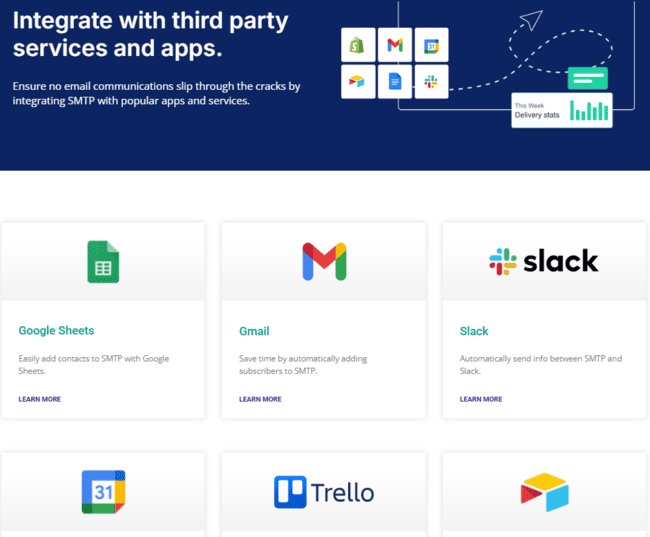
SMTP.com is an email API service. Integrating with other platforms is central to what it does. If you’re a developer, you can connect SMTP.com with any app you like.
SMTP.com offers 2 integrations where you don’t need to configure an API: Zapier and WordPress. Through Zapier, you can connect 8,000+ tools. The WordPress integration replaces the default PHP mail with the email delivery infrastructure of SMTP.com.
As for the API, SMTP.com flags its easy integration. That’s largely based on its API being RESTful and JSON formatted. So it’s familiar, flexible, and the code is simple. SMTP.com also publishes useful documentation in a clear format. This includes listing multiple authentication examples using the API key. But SMTP.com doesn’t publish its own SDKs. Its API is compatible with most programming languages. But you have to find the libraries yourself.
How Much Does SMTP.com Cost? Pricing and Plans
SMTP.com pricing plans start at $25 per month. This gives you a shared IP address and 50,000 emails every month. Dedicated IP addresses begin with the Starter plan.
All SMTP.com plans include its key features. The email API/SMTP relay, IP warm-up, list verification, reporting, and dedicated support.
Instead of a small free plan, we have arranged so EVS readers can test the service with a 30-day free trial with a generous 50,000 emails.
| Plan | Price per Month | Features |
| Essential | $25 | – 50k emails/month – Shared IP – All core features |
| Starter | $80 | – 100k emails/month – Dedicated IP – All core features |
| Growth | $300 | – 500k emails/month – Dedicated IP – All core features |
| Business | $500 | – 1 million emails/month – Dedicated IP – All core features |
Get started with SMTP.com for free
Reputation Defender and Insight Engine both are priced at 20% of your plan cost. Detailed verification reports cost $0.01 per email address.
As an extra, there’s also a managed delivery service available. This includes a dedicated account manager who provides expert support running the API and relay service.
SMTP.com Customer Support
SMTP.com has one big support ace up its sleeve: a telephone help desk for all paying customers, all over the world. The help desk’s hours of operation are generous, too. You can reach the support team 3 am to 9 pm EST, Monday to Friday. And 6 am to 6 pm on Saturday and Sunday. So if you have an issue with your account on a weekday. You can pick up the phone and get support 18 hours a day.
That’s a huge plus for a technical service like an email API. Even as a developer, there will be things you need help with. And at times, you need assistance quickly. Or a sending issue might be racking up bounces and hammering your sender reputation.
Along with phone support, SMTP.com has a live chat service during the same hours. Responses are prompt, and you deal with a person, not a chatbot. The main benefit for non-US customers over the phone is that there are no call fees. For less urgent enquiries. Or if you have an issue out of hours. You can send an email.
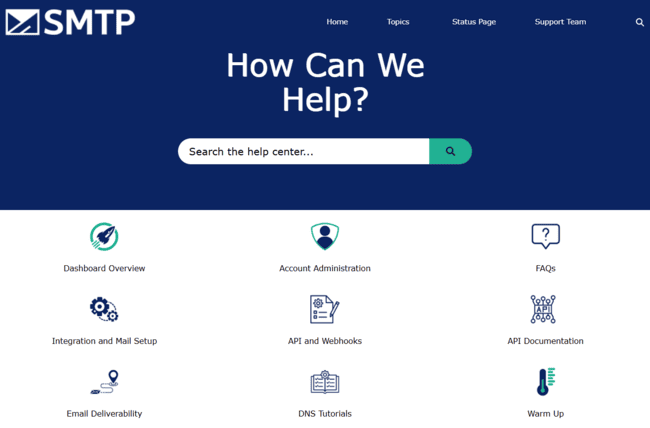
SMTP.com backs this up with a solid online knowledge base. I counted over 220 articles. Including 60+ quick and easy FAQ articles covering not just the platform, but lots of common questions about email infrastructure and deliverability. And there are guides about integration and mail setup for all different tools and DNS tutorials. These more technical guides are easy to follow. I’d just like to see more on API configuration and documentation.
Final Conclusion: Is SMTP.com the right email delivery platform for you?
That concludes my SMTP.com review. The big question now is whether it’s the right email delivery platform for you.
SMTP.com is in many ways a no-frills email delivery platform. It doesn’t do fancy, superslick interfaces. But it does provide resilient, reliable infrastructure for volume sending requirements. Ultimately, that’s the crux of your decision. If you need to send a lot of emails. And you want solid deliverability you can trust without a fuss. SMTP.com may be the right choice for you.
SMTP.com is great for adding transactional emails to a customer-facing website. Or if you need to overcome volume throttling on an existing email service.
It’s an SMTP relay and email API, so it works in tandem with other software. Somewhere to create emails, for instance. So if you are looking to design HTML emails for marketing campaigns in one platform, it isn’t a good fit.
SMTP.com does a good job of smoothing deliverability on the server side. And with some developer skills, you will be able to get the most out of the API. For a deliverability platform, it’s simple and easy to navigate. If you want an all-in-one email platform that includes email creation, look elsewhere.
Get started with SMTP.com for free
SMTP.com Frequently Asked Questions (FAQ)
Is SMTP.com legit?
Does SMTP.com have a free plan?
What is the limit of SMTP.com?
Does SMTP.com have good documentation?
SMTP.com Alternatives
Mailtrap
Mailtrap is an all-in-one email delivery service. It operates via an email relay and API. And scales to high volumes with excellent deliverability.
The main difference with SMTP.com is email marketing functionality. Mailtrap includes email creation, campaign, and marketing automation tools. So you can create emails in Mailtrap for whatever purpose. Marketing or transactional. Plus, you can set up, manage, and automate campaigns.
Mailtrap has a unique deliverability tool. A standalone sandbox email testing API. This creates a virtual environment for testing outgoing mail. Without having to send test emails to real contacts. But Mailtrap doesn’t include list validation. It suppresses email addresses after they bounce. But you need an email verification tool to proactively check before sending.
Compare these transactional email platforms with our Mailtrap review.
SendGrid
SMTP.com and SendGrid are both email API services. SendGrid also works via an SMTP relay and email API. And it specializes in very high-volume sending. SendGrid has its own server infrastructure and sends 100 billion+ emails a month. It’s just as big on deliverability as SMTP.com, with automatic IP warming on all new accounts. And dedicated IPs and email validation on higher tiers.
The main difference between the two is that SendGrid includes email marketing tools. It has an entire product dedicated to building and managing email campaigns. This includes visual and code HTML email builders, segmentation, and A/B testing.
SendGrid can be a better choice for marketers. You have to pay for the marketing suite separately. But it’s all within one platform. Campaign sending syncs with the bulk sending infrastructure. You don’t get a dedicated IP until you’re sending 1 million emails a month in SendGrid. With SMTP.com, you get a dedicated IP on all plans.
Find more similar services in our review of the best SendGrid alternatives.
Amazon SES
Amazon SES is an email sending platform built on the Amazon cloud. Like SMTP.com, it isn’t an email marketing platform. You need to get a separate drag-and-drop email editor to design emails. But it does provide the infrastructure you need for high-volume sending. Another similarity is Amazon SES’s excellent deliverability credentials. It’s particularly strong on delivery reporting and reputation analytics.
The main difference is how the platforms work. Amazon SES connects easily to any cloud platform. SMTP.com is more flexible. Its SMTP email relay plugs into desktop email clients. And its email API can connect to any digital app. But Amazon SES is more scalable. Its pay-as-you-go pricing means you only pay for the emails you send. This is good for growing businesses.
Amazon SES has different deliverability tools, too. Its Virtual Deliverability Manager automates inbox placement and send optimization. And its Mailbox Simulator lets you test bounces and how to avoid them. SMTP.com is great if you want deliverability you can trust backed up with strong monitoring. Amazon SES lets you be more hands-on with improving deliverability.
Check out our review of Amazon SES Alternatives and free SMTP servers for similar tools.
Mailgun
Mailgun is one of SMTP.com’s most direct competitors. It’s an email delivery platform built for bulk sending at high volumes. It combines an email API, SMTP relay, and deliverability tools. And it specializes in transactional emails.
One key difference is the way Mailgun organizes its features. It actually has five APIs in total. One for its email infrastructure. And more for email validation, suppressions, delivery tracking, and templates. Templates are a feature SMTP.com doesn’t have. It lets you store HTML designs in the Mailgun platform. Making them easy to access when you need to create a new email. The API structure means you can pick and choose the tools you need in Mailgun.
So Mailgun is a little more flexible. On the deliverability side, it also separates sending for transactional and promotional emails. Mailgun includes inbox placement testing, too. Overall, Mailgun is a good choice if you want to run transactional and marketing emails side by side. But with its single API, SMTP.com is easier to use.
Check out our full Mailgun review to compare these email delivery tools.