
SlickText Review 2026: Is it the most user-friendly SMS platform?

SlickText is a specialist SMS marketing platform. Founded in 2012, it was one of the first services dedicated to running SMS campaigns. It’s much more than just a mass SMS sender. It lets you automate, target, and track campaigns.
Having reviewed 20+ SMS platforms to date, we put SlickText through our full SMS platform testing and review process. We’ve heard how user-friendly it is from customer reviews. Even though it has more advanced tools than many SMS bulk senders.
We signed up and reviewed SlickText the way a real business would: we set up an account, built campaigns, created automations, and tested other features. We also researched other customer reviews to see how they matched our experience.
So will SlickText fit with your SMS program? This review will answer your questions. And help you decide if SlickText is the right platform for you.
SlickText Review Overview
Short on time? Here’s a brief summary of my SlickText review.
- SlickText is a full SMS marketing platform. You can create and automate SMS campaigns, grow contact lists, and engage customers with two-way conversations. But it’s only available in the USA and Canada.
- Usability is a big strength. The campaign, workflow, and form builders are among the most intuitive I’ve used. But that doesn’t come at the expense of the advanced marketing tools that it has.
- Creating SMS campaigns is fast and simple. You can personalize messages, attach files, track links, and schedule messages. That includes setting up recurring campaigns.
- SlickText’s drag-and-drop workflow builder is a standout. You can automate workflows based on contact behavior. There are 47 fully customisable workflow templates and 17 triggers. You can automate data collection, task assignment, and segmentations.
- SlickText has the most list growth tools I’ve seen in a text marketing platform. These include forms, pop-ups, text-to-join keywords, tap-to-join links, and QR codes.
- The shared Inbox supports one-to-one SMS for customer service and sales. Teams can organize conversations with assignments and tags. All plans allow unlimited inbound messages.
- SlickText pricing starts at $29/month for 500 message credits. There are no contact limits. And all paid plans include all features.
👉 If you want a text message marketing platform with lots of list growth tools, easy automation, and two-way conversations, try SlickText for free.
Get started with SlickText for free
SlickText Core Features
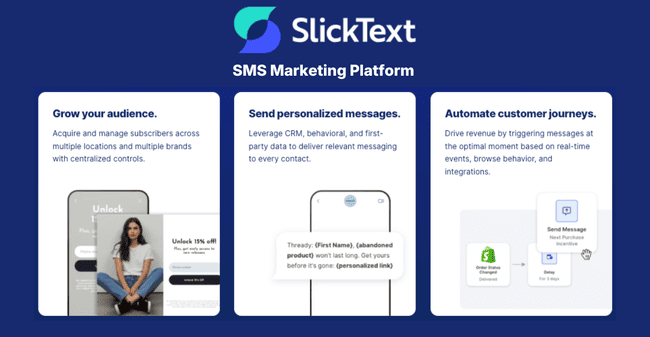
- SMS & MMS campaigns: SlickText is more than bulk SMS. You can send personalized text messages. Add tracked links to measure performance and schedule future and recurring sending. You can create campaign messages in 2 minutes. And there’s an AI writing tool to help.
- Two-way conversations: Chat with your contacts. All team members have access to a shared inbox for organizing and assigning messages.
- SMS automation: SlickText has an excellent visual workflow builder. This helps you automate key tasks like campaign sending, segmentation, and managing SMS and MMS messages. It comes with 47 pre-built workflow templates.
- List growth tools: Lead capture tools include web forms and website popups. You can get started easily with 32 popup and 29 form templates, and a user-friendly editor. SlickText also generates QR codes that link to forms for in-person signups.
- Text-to-join keywords: Contacts can sign up to receive your messages by sending you keywords. You can add these to pre-made SMS templates and send links for single-tap subscriptions.
- Segmentation: You can build very detailed segments to target campaigns. Custom fields, behavioral tracking, and nested conditions mean the possibilities are endless. Segments update automatically when contact data or behavior changes.
- Shortcodes: Shortcode numbers make replying to an SMS message easier. SlickText supports 5 or 6-digit SMS numbers for high-volume sending and opt-ins.
- Mobile app: The SlickText app for Android and iOS includes all the desktop features. It lets you create campaigns, manage contacts, and reply to conversations.
SlickText Pros and Cons
SlickText Pros
- Effortless navigation: For me, SlickText’s interface is its biggest strength. I found it a joy to use. Everything is easy to find, intuitive, and well-designed. Visuals help you navigate and learn what different tools do. It’s very effective at making advanced features like the automation builder accessible.
- Simple, predictable pricing: There is only one payment tier. It gives you all features. Plus unlimited contacts and inbound SMS messages. You simply pay more for more messages.
- Flexible audience growth: SlickText has more lead capture features than many marketing platforms I’ve used. It has the standard web forms and landing pages. But pairs these with keywords and tap-to-join links for signing people up by text message. And QR codes for in-person signups.
- Two-way messaging: SlickText’s support for inbound SMS makes it more than just a campaign service. It means teams can have conversations with contacts. This adds a customer engagement channel for sales and support teams.
SlickText Cons
- No free plan: SlickText offers a free trial. But there is no permanent free tier. That’s a barrier to early startups.
- US and Canada only: SlickText only supports sending in the US and Canada. That limits brands with international customers or global SMS plans.
Get started with SlickText for free
Is SlickText for you?
Recommended if:
- You want a complete SMS marketing platform. SlickText is a lot more than a bulk texting tool. If you want to personalize and target the messages you send. If you want to trigger SMS and MMS automatically based on contact behavior. If you want to build customer loyalty with two-way text conversations. And if you want tools to grow your audience. SlickText gives you the complete SMS marketing package.
- You want advanced features without a steep learning curve. SlickText has one of the most intuitive interfaces I’ve tested. The whole SlickText platform is easy to navigate and use. That applies to more advanced features like behavioral automation and dynamic segmentation too. It’s ideal if you’re new to SMS marketing or want to add better SMS marketing tools.
- You need to grow your SMS audience. SlickText gives you 6 ways to collect new marketing leads and contacts. These include standard web-based forms and pop-ups. Plus SMS keywords, tap-to-join links, and QR codes. This means you can grow your audience online, with texts, and in person.
- You want to use SMS for sales and customer support. Inbound SMS means you can have one-to-one conversations with contacts. This means you can develop relationships far beyond firing out campaigns. Sales teams can use conversations to drive conversions. And customer service teams can use it to provide support.
Not recommended if:
- You have low sending requirements and don’t need inbound SMS. SlickText’s cheapest tier comes with 500 SMS messages per month. It’s not particularly cheap for that amount of texts. For occasional sending, pay-as-you-go services may be better value.
- You need to send messages outside the USA and Canada. SlickText does not serve international text messages outside of the US and Canada. If you need to send messages elsewhere, you will need a different SMS marketing platform.
- You want an all-in-one marketing platform. SlickText is a specialist in SMS and MMS. It doesn’t have other functions like email, CRM, push notifications, and WhatsApp. If you want more functions in one platform, a full marketing platform is a better fit.
SlickText Review Rating Details
Ease of Use | SlickText is one of the most user-friendly marketing platforms I’ve used. The interface is a pleasure to use. It makes advanced features feel simple without losing performance. |
SMS & MMS Campaigns | Creating campaigns is fast and easy. The SMS builder includes personalization, tracked links, and AI content generation. |
Two-way Conversations | Customer support and sales teams can use SlickText for one-to-one messaging. All plans include unlimited inbound texts. And the email-style inbox helps teams manage all conversations. |
SMS Automation | SlickText supports advanced automation with behavioral triggers and conditions. The drag-and-drop builder and 47 workflow templates keep everything user-friendly. |
| List Growth Tools | SlickText has 6 lead capture tools and 60+ templates for forms and popups. There’s a polished drag-and-drop editor for building web-based forms. You can generate keywords and tap-to-join links for sign-up via SMS. And QR codes for in-person lead capture. |
| List Management | Segmentation is a real strength. Behavioral tracking, automated data collection, and real-time updates make targeting especially flexible. |
Personalization | Personalize messages with merge tags. There are 12 default contact fields. And you can create any custom fields you like. |
| Reporting & Analytics | Presents data in clear, accessible dashboards. Revenue attribution and team analytics are useful. Campaign analytics track the number of messages, clicks, unsubscribes, click rates, and unsubscribe rates. |
Mobile Apps | Apps for Android and iOS provide almost the full desktop feature set. Great for managing campaigns and inbox conversations on the move. But building forms and complex workflows is less comfortable on a small screen. |
| Customer Service | Live chat and phone support available during office hours (EST). There’s a large online knowledge base with 65+ how-to articles covering all platform features. |
| Deliverability | SlickText reports whether messages are queued, delivered, undelivered, or failed. This makes delivery problems easy to identify. Mandatory opt-in confirmations help limit unsubscribes and spam complaints. |
| AI Writing ✔️ | The SMS editor includes an AI tool that generates messages from a prompt. |
| Integrations & API ✔️ | SlickText has 16 integrations. These include Shopify, HubSpot, Salesforce and several email marketing platforms. There’s a well-documented API for developers to build their own integrations. |
| User Permissions ✔️ | Supports multiple users with customizable permissions. Admins can choose whether each user can view, edit, send, or manage specific areas of the account, including messaging, contacts, campaigns, billing, user management, and the shared inbox. |
| Legal Compliance ✔️ | SlickText requires all recipients to opt in to receive SMS messages. It provides editable templates for opt-in confirmations. And automatically handles unsubscribes. It also has a link to T&Cs on all messages, in line with TCPA compliance. |
| International Sending ❌ | SlickText is only available in the USA and Canada. |
| Customer Satisfaction | SlickText scores very highly on both Capterra (4.8) and G2 (4.8). The most common thing users praise is how easy it is to use. Customer support and the mobile app crop up regularly as positives, too. |
Overall Score
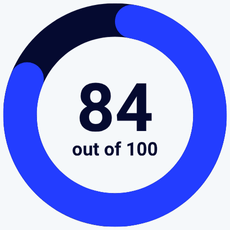
SlickText is ideal for small businesses getting started with SMS. And teams ready to move beyond basic campaigns with stronger automation and list growth tools. We found it very intuitive, and customer reviews back this up. It has advanced campaign automation, behavior-based targeting, and 6 list growth tools. Two-way messaging helps sales and support teams create valuable relationships.
Getting Started with SlickText
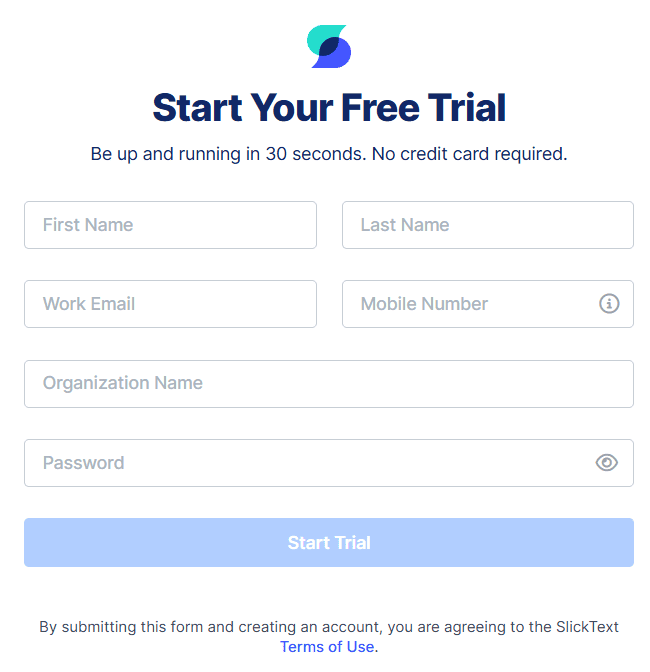
Creating a new account in SlickText is a matter of filling in a simple form. It takes about 10 minutes. You’ll have to verify with a US or Canadian mobile number.
Before you can send messages, SlickText will register your sending number with carriers. SlickText works with carriers to make the process as quick as possible. By default, you get a free toll-free number, and approval is often completed the same day, usually within 48 hours. You’ll need to provide basic business details like your legal business name, tax ID, website, address, contact email, and messaging use case. 10DLC/local numbers take longer to register, typically about a week.
Get started with SlickText for free
SlickText Review: SMS Marketing Service
Sending SMS and MMS Campaigns in SlickText
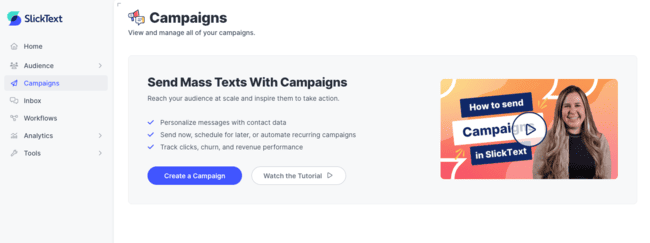
SlickText talks about ‘sending mass texts with campaigns’. There are a lot of services that let you send SMS and MMS in bulk. Less common are those where sending is treated as part of a proper marketing campaign.
This is what SlickText specializes in. The campaign building stands out to me more than the mass SMS. It comes complete with targeting, personalization, triggered sending, and trackable links.
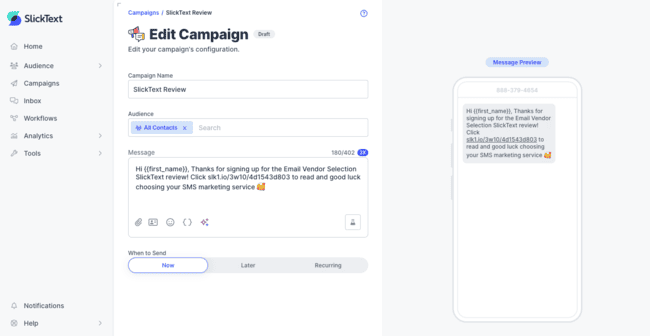
Creating campaigns in SlickText is very easy. You click Campaigns > Create Campaign. And you’re straight into the SMS editor. I like the simplicity of it. You don’t need a heap of design features, as you would with an email campaign builder. The interface is clean. Just three main sections. Campaign title. Choose an audience/segment. Then type your message.
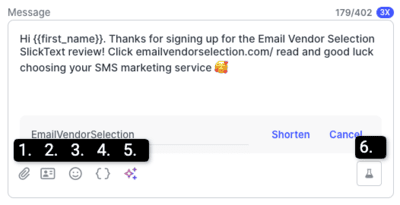
At the bottom of the text input box, there are 6 icons:
- Attach a file. This is how you add an image to your message. You can attach PDFs and other document types.
- Attach a Contact Card. You can create a vCard for your business. This makes it easy for recipients to save you as a contact.
- Emojis. Add emojis or symbols to your message.
- Merge Tags. This is how you personalize your messages. There are 12 ready-made data fields. Including first name, last name, and several location types. You can create your own custom fields, too.
- AI Compose. An AI tool that generates messages based on a prompt you provide.
- Send a Test. Test a message by sending it to your own mobile number. You can preview personalization and check that tracked links work.
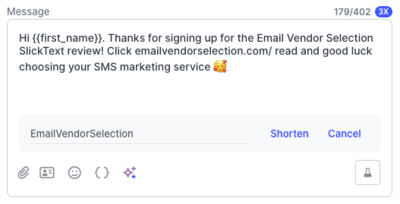
Adding a tracked link couldn’t be any easier. You simply paste the link you want to include. SlickText asks you if you want to track clicks. And prompts you to create a short link.
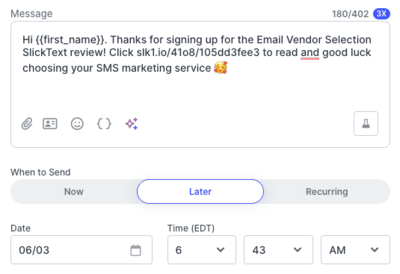
The last step is scheduling your campaign to send. I like that this is part of the same message-building window. There are 3 choices. You can set your campaign to:
- send straight away
- schedule a later time
- set up recurring sending at a fixed time.
Use recurring if you want to send the same SMS more than once. Like sending weekly updates or reminders.
ZeeMee, a community-building app for college students, was trying to get Gen Z students to download the app. Email barely moved the needle, driving a download rate of around 0.1%. They created SMS campaigns to reach students, lifting downloads to 20%. The campaign also turned into conversations, with around 600 replies for every 10,000 texts.
Two-way conversations (SlickText Inbox)
Another of SlickText’s USPs is that it has two-way text messaging. Most bulk SMS services are send-only. With SlickText, you can also receive messages. You can use SMS to build customer relationships and provide customer support.
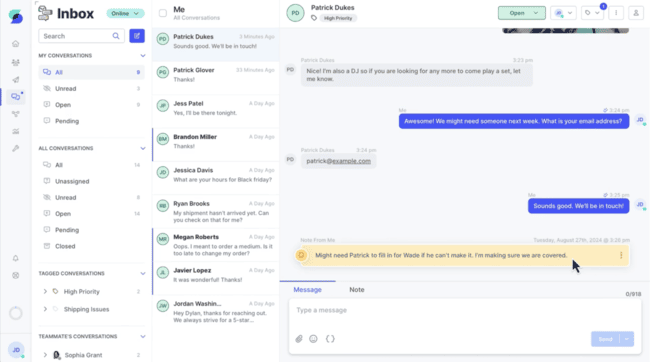
SlickText’s Inbox looks like an email client. Here’s where you manage all inbound SMS messages. Any response to campaigns lands here. There are no limits on how many inbound messages you can receive.
The Inbox doesn’t just look like an email inbox. It functions exactly like one. This makes it familiar and easy to use right away.
The best part of the Inbox is that you can start one-on-one conversations. You click on New Message, choose a contact, then type your message. The composer is the same as the one you use for campaigns.
One-to-one messaging is also repeatedly mentioned as positive in customer reviews. They describe using it for answering questions and following up with leads. It keeps customer conversations in the same place as their campaigns. For example, Game Show Network uses inbound SMS to run viewer quizzes where viewers can win a prize. A furniture brand gives another example where they follow up with sales leads from in-store customers. The salesperson asks for customers’ phone numbers as they talk. And then send follow-up texts and answer questions after they leave the showroom.
Another strength of SlickText’s inbox is team collaboration. By default, all users on a SlickText account share the same inbox. That provides shared visibility of all incoming messages. But then you have to think about how you organize messages efficiently. Who takes ownership. And how to find threads when colleagues need to work together.
SlickText has three main tools to manage this. One is using folders. There are default folders like Unread and Unassigned. You can also close a thread when it doesn’t need any more attention. This automatically sorts messages into Open and Closed folders. It can also move them to Pending if you set a time to close a conversation.
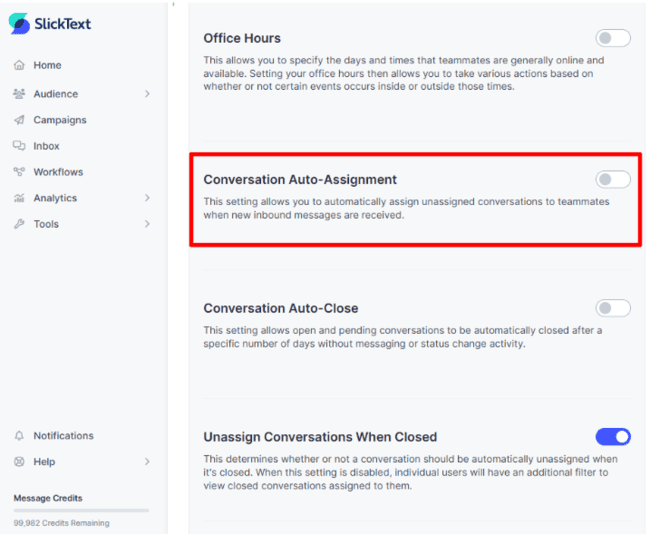
You can also assign conversations manually by clicking on a thread in the inbox. Or you can set up automatic assignment in Settings > Inbox > General Inbox Settings. Toggling Conversation Auto-Assignment means new messages will always go to someone. And not sit in the Unassigned folder, forgotten about.
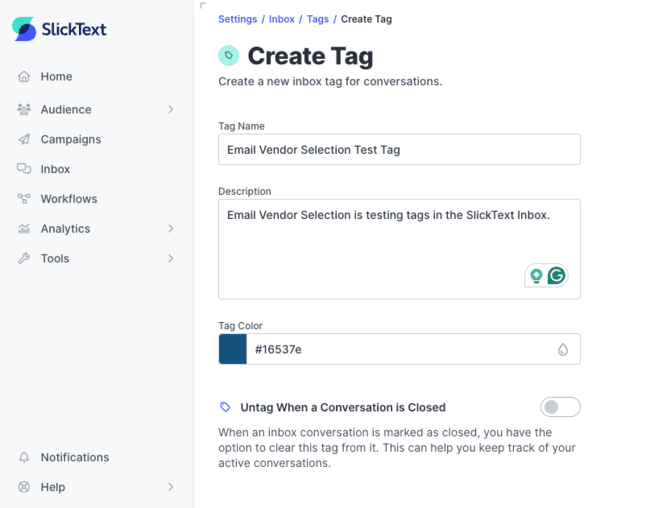
Finally, you can tag messages in the inbox. All messages sharing the same tag are listed together. Users can search for messages by tags.
SlickText’s Inbox is a strong fit for any customer-obsessed team that wants sales and service reps to manage conversations over SMS.
Get started with SlickText for free
SMS Automation in SlickText
SlickText’s automation tools stand out from most SMS marketing platforms. You can set behavioral triggers to send SMS and MMS based on actions. This means you can always send relevant messages. And you can link texts together into longer, multi-message workflows.
And SlickText does what all good marketing automation services do. SlickText has 47 workflow templates. I like that they’re not just triggered SMS message sequences. You can automate message tagging and assignment in your inbox. And add contacts to different lists and segments.
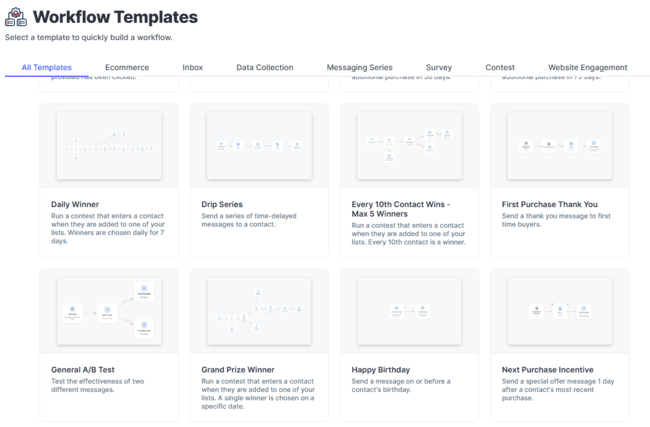
There are also some cool specialized workflows, like series for contests, surveys, and review requests. I particularly like the data collection templates. You set these up to send when a new contact joins, and they trigger a text asking for contact details. This is useful with one-click sign-ups with no data capture form.
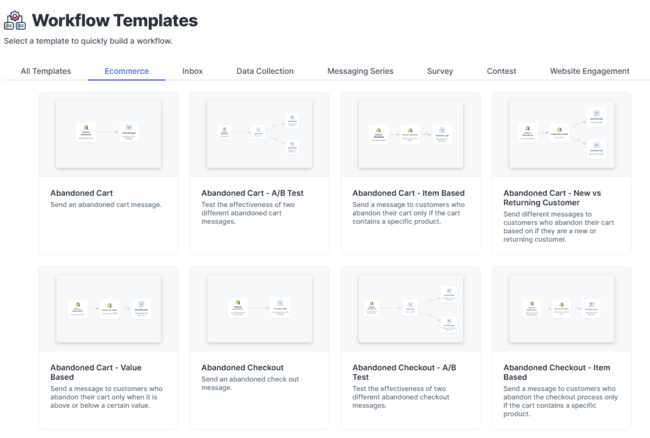
SlickText covers some of the classic automation workflows with its templates. Like a welcome series to get conversations started with new subscribers. Or automatically sending birthday greetings to every contact. Most impressive are the 8 different abandoned cart workflows. They all work with the Shopify integration.
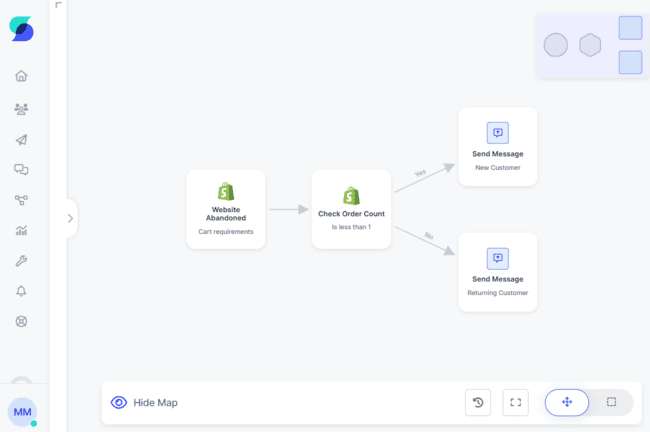
Abandoned cart messages are perhaps the most valuable ecommerce workflows. SlickText has templates for abandoned baskets and incomplete checkouts. You can split the flows between new and returning customers. And only send messages if certain items were in a cart. Or if the overall value is over a certain amount. That’s a lot of help if you’re new to SMS marketing or marketing automation.
All templates are fully customisable. SlickText’s workflow editor is well-designed. I like the single-screen layout and icons. There are little touches like being able to move and resize your flow so it fits on the screen. But it’s rule management in the workflow that really stands out.
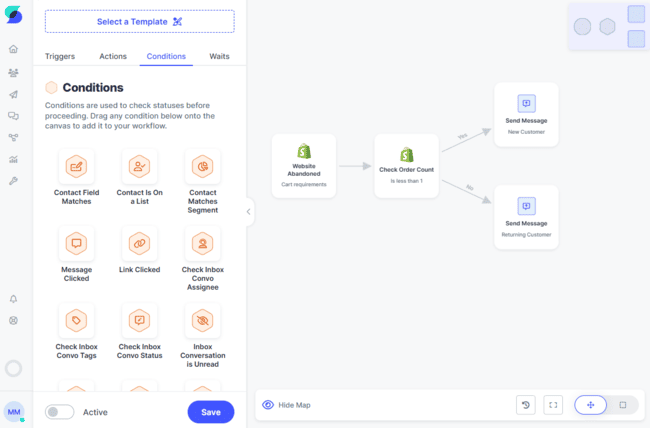
There are 17 different triggers and 24 actions, including integrations like sending a Slack message or adding and removing contacts from Meta or Pinterest lists, and 25 conditions for splitting paths.
You drag and drop rules to combine them into your flow. And you can add as many rules as you like. So you can build your workflows as big and elaborate as you like.
I’ve used a lot of marketing automation tools. Given how easy the interface is versus how sophisticated you can build the workflows, it’s up to par with the best of them. The only downside of the workflow builder I can think of is that it’s SMS-only.
Growing your list with SlickText
The brands that get the most from SMS are usually the ones that make list growth part of everyday marketing. Giving people simple ways to opt in wherever they already engage with your business: on your website, in store, at checkout, or through social media.
SlickText makes this a central part of the platform. You can capture leads with 6 different tools.
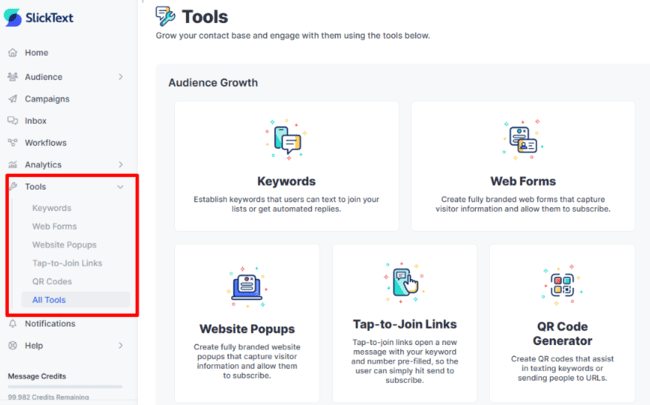
You find the audience growth features under Tools in the left-hand menu. What I really like is the mix of online and offline lead capture tools. Embedded and pop-up forms for websites. And text-to-join, tap-to-join, and QR codes for growing your list offline. These capture tools reflect how people use their phones. They let you create quick, one-touch sign-ups. And, with QR codes, you can capture leads in stores, restaurants, and hotels.
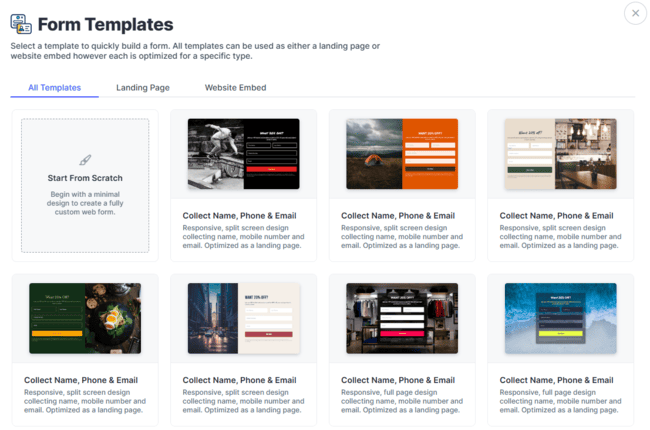
There are 29 form templates to get you started. They’re split between full landing pages and forms. The designs are simple but professional-looking. The full landing page templates have a large side image with the form in a separate box, or a background image with the form overlaid on top.
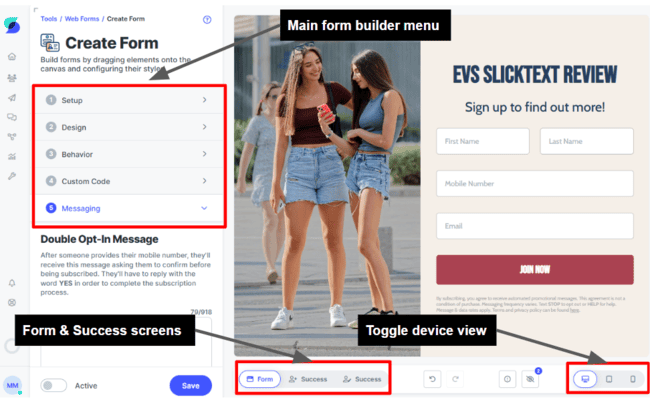
You can customize all the templates how you want. I’m impressed by the form editor. It’s easy to use, and you get so many tools. You can tell a lot of attention has gone into usability. I like the stacked menu tiles to the left. It’s a clever way to make lots of tools accessible but look uncluttered. Then there are the small details like sliders to resize text.
Some of the main tools are:
- Design: This gives you 13 content blocks you can drag-and-drop into your form, including text, images, fields, and buttons.
- Behavior: You can set forms to either capture new contact information, update existing contact details, or both. A clever touch is that you can hide mobile number capture fields for existing contacts.
- Custom Code: This lets you further customize your form using CSS or JavaScript.
- Messaging: This sets up opt-in and double-opt-in confirmations by SMS for new contacts.
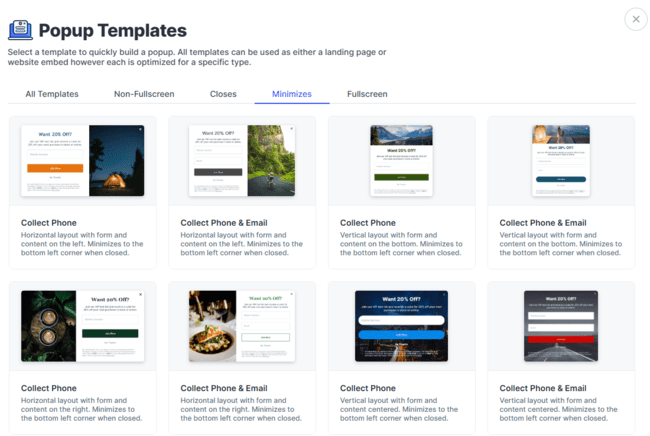
SlickText has 31 pop-up templates. They focus on capturing less data than the embedded forms. Many are set up for just a mobile number or mobile number plus email. You can change this as you like.
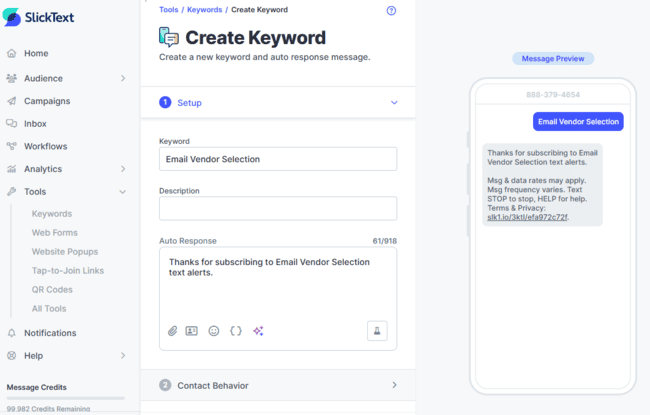
SlickText has two ways for SMS-based sign-up routes: keywords and tap-to-join. These are really helpful for growing an audience fast.
When someone texts a keyword, they get added to your contact list. Setting up a keyword is as simple as using one. You simply type the word you want to use. SlickText auto-generates a reply you can edit. Under Contact Behavior, you can specify which lists to add the contact to.
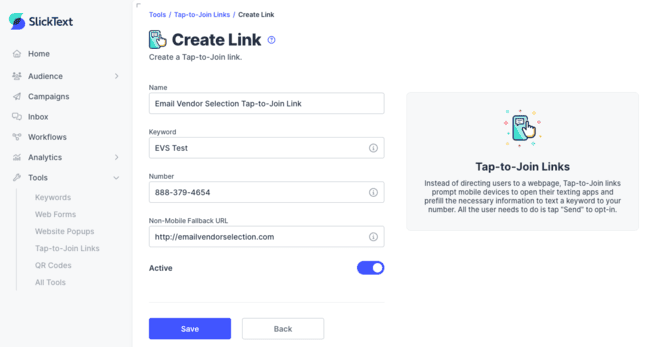
Tap-to-join links make the sign-up path even shorter. You pre-make an SMS message with a sign-up keyword in it. Then add the link to an SMS message. All the recipient has to do is tap the link.
Finally, you can make QR codes that link to a web-based form or trigger an SMS containing a sign-up keyword. This is a great way to capture new contacts offline. Dog Haus, the restaurant chain, uses QR codes to promote new restaurants. It runs contests for free hot dogs for a year, posting QR codes around the building projects for people to enter.
Get started with SlickText for free
Managing contacts in SlickText
SlickText has two main ways to manage and organize contacts: lists and segments. You can segment contacts by shared characteristics and behaviors. Lists are static and can include anyone. You either have to add and remove contacts manually or set specific rules in automation workflows. If someone unsubscribes, SlickText updates their status to unsubscribed. Segments are much more dynamic. They change when contact data changes or based on customer behavior.
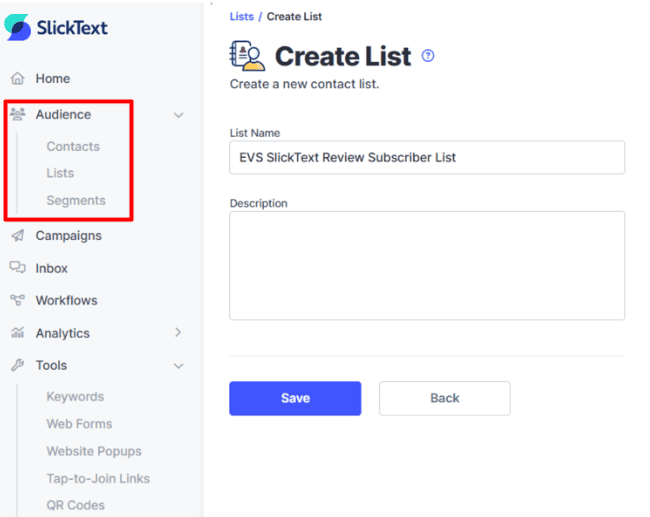
You create lists and segments in Audience. Making a list is just a matter of giving it a name and a description. You can link lists to signup forms, so all new contacts from a form sign up are added to one list. Or you can use an automation workflow action to add contacts to a specific list. This means you can build lists from things like inbox tags or link clicks.
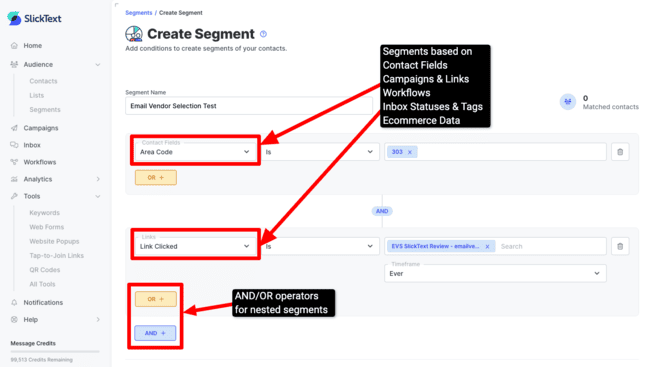
There’s a lot more to creating a segment. SlickText lets you get very detailed. There are 40+ properties you can use to create segments. That doesn’t include any custom contact fields you create.
But the real strength is nested logic. That lets you string properties together. So you could set a rule like “Link Clicked is X OR Link Clicked is Y”. And then refine it with an AND rule. Such as the clicks have to come from a specific campaign, or timezone. You can make these nested strings as long and as specific as you want.
Behavioral properties mean you can target by contacts’ actions. For example, you could add a condition about how many purchases people have made. Then build a segment based around your most loyal customers. You can refine actions further by setting timeframes. Who belongs in the segment will then change over time.
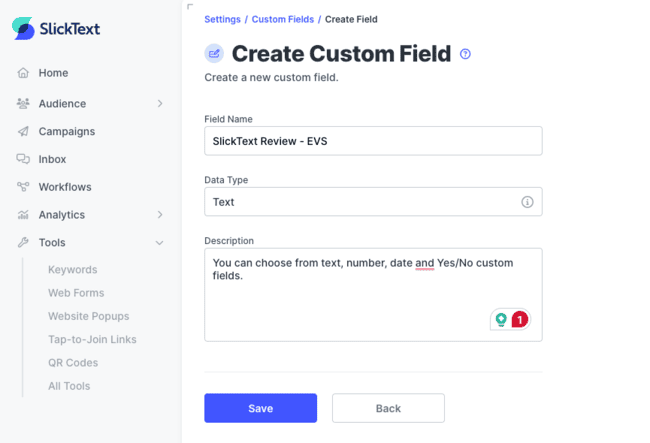
This all adds up to a very powerful targeting tool. It means you can be incredibly precise about who you send SMS campaigns to. One extra bonus is that you can create custom fields for contacts. This means you can collect any type of contact data you want.
To create a custom field, you go to Tools > All Tools. Custom fields can have text, a number, a date, or a yes/no value as data types. Automated flows can collect customer data for you. You can create any custom field you need. Set up automated SMS messages to collect it and then build a segment for that field.
Analytics in SlickText
SlickText’s data analytics cover all core functions: campaigns, automations, conversations, and audience growth. In tune with the whole platform, it’s big on usability. It presents data in bright, easy-to-read charts and graphs.
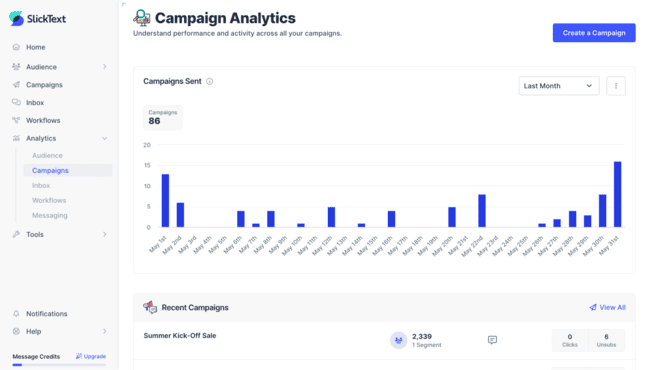
Campaign and messaging analytics track the number of messages, clicks, unsubscribes, click rates, and unsubscribe rates.
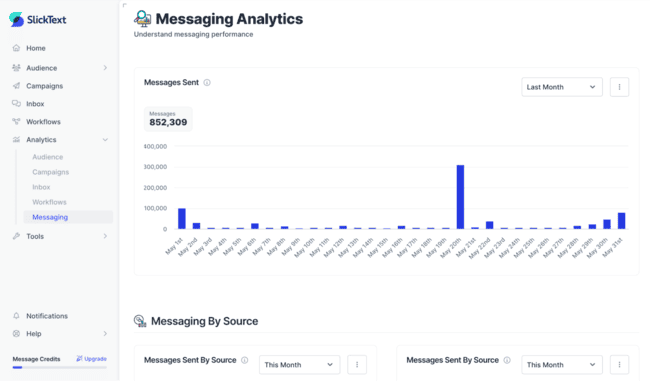
It digs deeper in two areas. One is a breakdown of messages by send status. This shows messages queued for sending. Confirmed delivered or undelivered. Or where a message has failed to send. This is useful for spotting where you might have delivery or list quality issues.
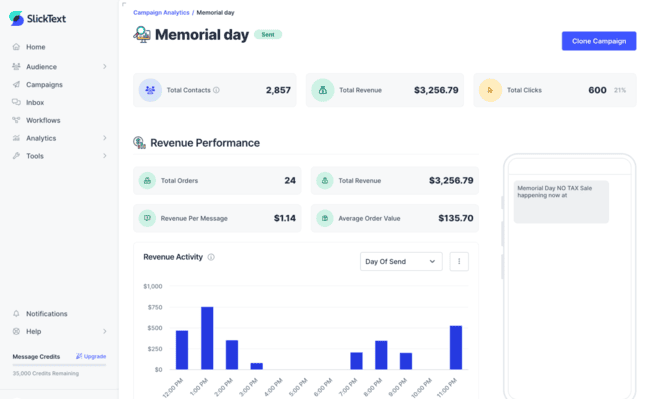
The other is revenue analysis from campaigns and workflows. This works with ecommerce platform integration, via the native Shopify plug-in or an API build. It calculates the orders and revenue attributed to SlickText and breaks that down into revenue per message and average order value (AOV).
What I like most is the ability to define your own attribution rules. Base it on receiving a message or click-based attribution. You can set a time limit to the attribution window. Revenue attribution can be controversial in marketing. So it makes sense to put the user in control.
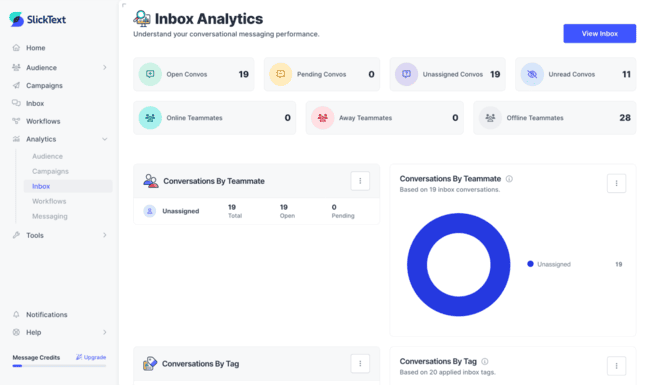
Another reporting feature I like is SlickText’s Inbox analytics. This is an internal analytics tool for your team. So you get a breakdown of conversations handled by team members. This includes performance metrics like average first response and resolution times.
SlickText’s Mobile App
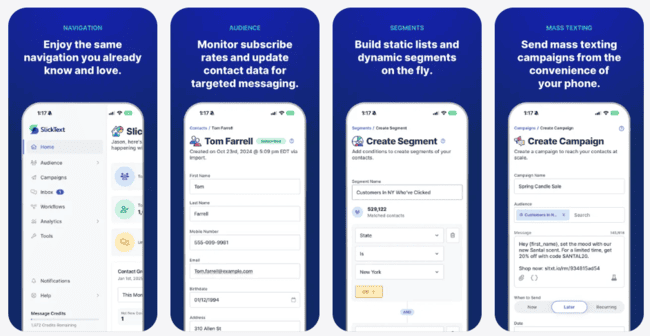
SlickText has a mobile app for both Android and iOS. The apps are similar to the web platform. You can use it to do everything you can do on a desktop. SlickText’s app is easier to use for some things than others. This is mostly down to the limited screen size.
The app is great for knocking together SMS and MMS, and for managing the shared inbox. More design-heavy functions like forms and automation workflows get a little trickier.
SlickText Integrations and API
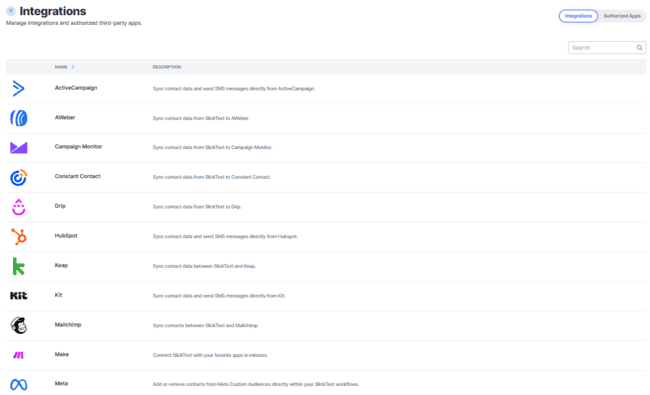
SlickText has 16 native integrations and one coming soon for Pipedrive. Most are for email marketing services and CRM platforms, like ActiveCampaign, Kit, AWeber, HubSpot, and Salesforce. This makes sense. It means you can easily sync SMS with other marketing and sales channels.
I’m a little surprised SlickText only has a native Shopify connector, as they have a lot of ecommerce functionality. I expected to see more native integrations with other ecommerce platforms. You can connect other ecommerce platforms with Zapier or Make.
Developers can build their own integrations with SlickText’s API. SlickText publishes extensive API help guides. These give you detailed instructions on how to send queries for all SlickText’s functions.
Get started with SlickText for free
How Much Does SlickText Cost? Pricing and Plans
SlickText pricing couldn’t be simpler. Every paid plan comes with all features, unlimited contacts, and unlimited inbound texts. The more credits you buy, the cheaper they get.
Pricing starts at $29 a month for 500 credits. You get two months free if you pay annually. Check out our SMS marketing pricing guide to see how SlickText compares with other platforms.
| $29 | – 500 credits/month – All features |
| $49 | – 1,000 credits/month – All features |
| $79 | – 2,000 credits/month – All features |
| $169 | – 5,000 credits/month – All features – 1-on-1 onboarding |
| $319 | – 10,000 credits/month – All features – 1-on-1 onboarding |
| $939 | – 50,000 credits/month – All features – 1-on-1 onboarding – Dedicated customer success manager |
You can try SlickText out with a 14-day free trial.
SlickText Customer Support
SlickText has phone, chat, and email support. Having phone and staffed live chat support is a huge plus. The help desk is open 8.30 am to 6 pm EST, Monday to Friday. So during office hours, you can always speak to a person to get help with anything you want.
I also tested SlickText’s live chat support, and it matched what a lot of customers say in reviews. The team is quick and easy to deal with. We had issues importing our list. We got our first quick response in 4 minutes, and the team fully solved it in about 50 minutes. I didn’t feel like I was being pushed toward a help article or left to figure things out myself.
Of course, you can find help yourself. The Help Center has 60+ guides covering all tools and features, plus API user guides for developers.
Final Conclusion: Is SlickText the right SMS Marketing for you?
The biggest impression SlickText leaves on me is how easy it is to use. Even if you’ve used the most basic SMS mass sender, you’ll find SlickText a breeze. Small businesses won’t find a better platform to start with SMS marketing.
The key is whether you want or need a complete marketing platform dedicated to SMS only. If you use a marketing platform that you like and doesn’t have SMS, SlickText is a great addition. And it’s certainly a great upgrade if you already use mass SMS broadcasts but want more features to grow your list or better segmentation and automation features.
Oh, and there is one last but very important consideration. SlickText is only an option if you need to send SMS in the USA and Canada.
Get started with SlickText for free
SlickText Frequently Asked Questions
Is SlickText free?
Is SlickText legit?
SlickText takes its privacy and data protection responsibilities seriously. It doesn’t allow ‘cold texting’. All recipients must opt in to receive SMS messages. It provides lots of support for consent capture and management, such as opt-in scripts, default confirmations, and automated opt-out handling.
Try SlickText for free
What kind of businesses use SlickText?
Try SlickText for free
Who owns SlickText?
SlickText Alternatives
SlickText vs. SimpleTexting
The main difference between SlickText and SimpleTexting is their automation features. SimpleTexting is a simple and accessible SMS marketing platform. Like SlickText, it lets you build campaigns. It supports two-way messaging. And it’s strong on audience growth. It has some cool extra lead capture features, like pre-programmed text-to-vote and text-to-enter buttons.
You can automate drip campaign sequences in SimpleTexting. But that’s it. SlickText supports conditional logic for much more complex workflows. Plus, you can automate contact management and task assignment.
SlickText works out better value, too. SimpleTexting’s pricing starts at $29/month for 500 credits. Exactly the same as SlickText. But there’s a $10/month surcharge for a local sending number on top of that.
Compare the best text marketing platforms.
SlickText vs. TextMagic
The main difference between SlickText and TextMagic is geographic reach. TextMagic is an SMS marketing platform that supports SMS sending in 150+ countries. It has pay-as-you-go pricing, starting at $0.049 per text in the US, plus separate charges for a sending number.
SlickText is much more of a complete SMS marketing service. It has tools to grow your audience, automate campaigns, and it supports one-to-one SMS conversations. But you can only send SMS in the USA and Canada.
Read our full TextMagic review to compare the platforms.
SlickText vs. EZ Texting
The main difference between SlickText and EZ Texting is pricing structure. EZ Texting is primarily a mass texting service. But in recent times it has added more and more marketing features. This includes two-way conversational texting, automation workflows with conditional paths, and also RCS messaging, which gives more content and interaction features than SMS.
But EZ Texting locks these features into a tiered pricing structure. It costs $60/month before you access the automation tools. And $100/month before you get a high-volume, high-speed local sending number. SlickText gives you everything, starting at $29/month.
SlickText vs. Textedly
Textedly is primarily a mass messaging service for SMS. It’s ideal if you want to send out quick, easy SMS broadcasts. It supports simple automated drip sequences and automated responses. But overall, its automation and targeting tools are basic. Like SlickText, you can use it for two-way SMS conversations and grow your audience with forms. It has some interesting extras, like text-to-pay for taking payments by SMS and an AI voice agent that can handle phone conversations.
SlickText is much better for managing campaigns. Conditional automated workflows give you more control over when and why messages send. You can trigger SMS based on contact actions. Advanced segmentation lets you target messaging very precisely, too.
SlickText vs. Attentive
Attentive is an enterprise ecommerce SMS marketing platform. It’s known for its AI campaign building, analytics tools, and advanced personalization. It’s also a multichannel platform. You can build automated workflows combining SMS, email, RCS, and push notifications.
SlickText is an SMS marketing service aimed at SMBs. Its feature set is smaller than Attentive’s. But it focuses on what small businesses need. It also has a much more user-friendly interface with less of a learning curve. Pricing is transparent and consistent. You get all features on every plan. And pay for the messages you need to send. Attentive offers custom pricing on application only. It bases quotes on message volumes, contact numbers, channels, and tools.