
7+ Best AI Email Design Tools (2026) – They’re this good already


Email marketing is creative work, but comes with a lot of repetitive business tasks. You rewrite copy blocks, adjust layouts, replace images, and check test sends again and again. That is necessary work, but not the most rewarding.
AI email marketing software is becoming more and more popular. AI handles parts of email design and email content, so you save a lot of time. And for those who are budget aware, it’s much cheaper than custom designs and content. The creative decisions should stay yours, large parts of the design work is done by AI.
Even marketers without design experience, can get to a quite high level of designs quickly. As a user, you can get more done in less time. And focus on being an email marketer and building your brand.
Now, before we get into the tools, let’s look at the gap between what AI email design tools promise and how they truly work in your email production workflow.
What is AI Email Design?
AI email design uses artificial intelligence to help email marketers structure and create email campaigns. Tools suggest a format, structure templates, generate content, generate visuals, and personalize messages for each recipient.
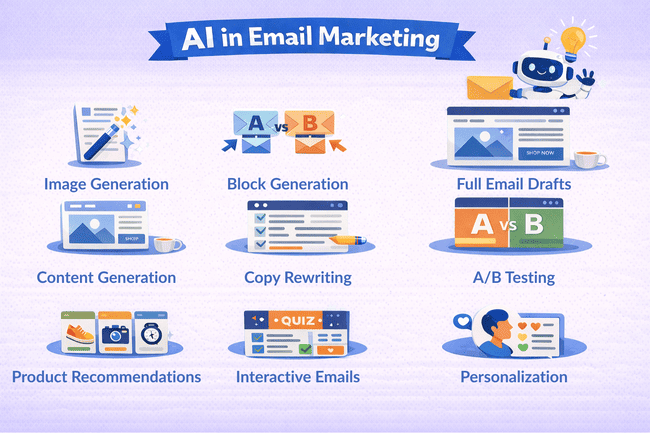
AI can handle many tasks that would normally eat up a lot of time. That includes subject lines, email layouts, content tweaks, and message variations for each audience. The user guides the message, AI just gets you there way faster.
Email Design Tasks AI can do in 2026
Here’s a list of email design tasks AI can handle today:
- Generate and refine images in email editors with prompts, often with style, aspect ratio, and size controls, and then insert them directly into the email design.
- Generate content blocks (headline/title, paragraph copy, CTA button text) and insert them into the email, including copy/drag/drop placement.
- Generate a full marketing email draft from a prompt with layout, copy, CTAs, and images.
- Generate subject lines directly inside the campaign builder, often with tone, language, and context controls.
- Rewrite existing copy in-place (shorten/extend/simplify/change tone) and replace the selected text.
- Create A/B testing versions with AI, varying email or subject lines for quick A/B testing.
- Add AI-powered product recommendations to emails, such as personalised product blocks based on customer behaviour.
- Create interactive emails with forms and quizzes without coding using built-in blocks in platforms that support interactive email.
- Personalise email content for each recipient using their data (such as behaviour, preferences, or purchase history). Experts refer to this as generative personalization.
Here’s a list of marketing platforms and email design tools with AI features:
Marketing Platforms with AI email design features
Marketing platforms built AI into their email editors to help you design and optimize emails that look good in different email clients.
- HubSpot – Generates full emails from prompts using an existing email/template layout (subject, preview text, body, CTAs). Plus AI for subject line and preview text suggestions, and AI image generation.
- GetResponse – AI Email Generator creates a complete newsletter from a short Q&A and lets the user choose design (layout + colour palette), plus an AI Subject Line Generator inside the newsletter flow.
- ActiveCampaign – Active Intelligence can generate a complete campaign from a single prompt (subject, preheader, layout options, images, content, CTA). And you get AI tools for generating text blocks and images in the email designer.
- MailerLite – AI writing assistant in the drag & drop editor to write titles, paragraphs, CTAs, and rewrite existing text. Plus AI subject line suggestions in campaign setup.
- Brevo – Aura (Brevo’s AI assistant) creates and refines titles, paragraphs, and buttons with rewrite/translate/tone settings. It also generates images and subject lines, and auto-translates templates.
- Beehiiv – Built-in AI tools in the post and email builder for writing and generating images.
- Mailmodo – AI generates email templates that match your brand. It also suggests subject lines and preheaders. Mailmodo also supports interactive emails with no-code forms and widgets that work with AMP and HTML fallback.
Standalone AI email design tools
Email design tools give you customization and full control over how your email is structured and styled. But these can’t send emails, so you’ll need a newsletter software, SMTP server, or email API for sending.
- Stripo – AI email and image generator, writing assistant, and subject line generator inside the editor.
- Genius Design – An AI UI design platform with email template generation, helping you create templates from simple text prompts.
- MigmaAI – AI email design tool that generates complete email layouts and templates from prompts, focusing on structure, visuals, and fast iteration.
AI email writing and image tools
You can’t build emails with these tools, but they help you create the copy and visuals to use with your templates.
- WriteSonic – generates marketing copy, including email campaigns and subject lines.
- CopyAI – writing tool for email drafts, promotional copy, and campaign ideas.
- Rytr – AI assistant for quick email writing and short marketing copy.
- Hoppy Copy – AI email copy and sequence generation with brand/tone guidance.
- Midjourney – AI image generator for creating custom visuals for email campaigns.
See our overview of the best AI writing tools for more detailed reviews.
What Isn’t AI Email Design?
Many email marketing tools say some features are AI, when in fact they aren’t.
Pulling your branding elements isn’t AI design. Taking brand elements like logo, colors, and fonts from your website and slotting them into email templates is automation. It’s a time saver, but it isn’t AI.
Most email design isn’t dynamic or data-driven. It usually starts with a template, a few brand assets, and content arranged in familiar blocks. That’s still how many companies build campaigns today.
AI can make a real difference in generating new layouts, visuals, and content ideas. A useful AI email design tool should be able to create email templates based on prompts, generate images that match the campaign, and help explore different visual directions quickly. It doesn’t need to reinvent the wheel every campaign. But it should expand what’s possible and make it very efficient.
7 Best AI Email Design Tools
Plenty of tools help email marketers write subject lines and fix body copy. It speeds up content creation and gets you started. But writing is only one piece of a great email.
Email design covers structure, layout, responsiveness, visuals, and workflow. Fewer platforms handle all that. Here is our overview of AI email design tools.
1. HubSpot
HubSpot’s CRM platform has AI-powered tools for creating marketing emails. Its AI email generator can produce a full email draft from a prompt, including the subject line, preview text, body copy, and CTAs. You can start from an existing template or layout and ask the AI to generate content that fits your campaign.
Inside the email editor, HubSpot also includes AI tools to generate subject lines and preview text, rewrite copy, and improve tone. The platform also supports AI image generation directly in the editor, allowing you to create images from prompts and insert them into your email design.

Pros:
- AI email draft generation from prompts
- AI image generation in the email editor
- Easy-to-use drag-and-drop email editor
- Full CRM and marketing automation platform
Cons:
- Advanced AI features require Marketing Hub Professional or Enterprise
- Daily generation limits apply to some AI tools
HubSpot has a free CRM with email tools. The Marketing Hub Starter plan costs $20/month for 1,000 contacts and 500 credits to use for AI tools.
Get started with HubSpot for free or read our full review
2. Stripo
Stripo is an email design platform with a drag-and-drop builder and a growing set of AI tools. The AI Email Assistant (AI Hub) helps generate and improve email layouts and content directly inside the editor. You can ask it to create email structures, generate sections, write copy, or refine existing text without leaving the design workflow.
I asked it to generate an ecommerce email for my fictional ecommerce store, Sir Barks-A-Lot Dog Accessories.

And this is how it turned out:

The assistant generated the layout, copy, and subject lines. After that, you can easily change the color theme or select a theme from your own templates. It’s very easy to play around and see different email versions. I wanted to see a header instead of the placeholders, so I went into the Stripo editor and generated images to complete the template.

The assistant also works alongside the visual builder. You can start with a template or layout and use AI to generate headlines, CTAs, and content blocks, or improve text with prompts like “shorten this,” “improve tone,” or “make it more persuasive.” When your template is ready you export the HTML code. Or you can use Stripo’s integrations to add it to an email marketing service.
Pros
- Easy drag-and-drop email design
- AI assistant for layouts, sections, and copy
- 1650+ templates
Cons
- AI image generation is limited on the free plan (8 images per month)
- Some features, like brand kits and translation, require a paid plan
Stripo pricing starts at the Basic plan, which includes 50 stored templates, 50 exports per month, brand kit features, translation tools, and higher AI usage limits for teams. The free plan includes the drag-and-drop builder, 10 stored templates, 4 exports per month, and limited AI image generation (8 images per month).
3. GeniusDesign
GeniusDesign is an AI UI design platform that also includes email template generation. It focuses on turning simple prompts into structured designs.
You describe the type of email you want, and the AI generates a layout with sections, hierarchy, and basic content. You can start from a blank prompt or use a starter template and let the AI refine it into your design.

Genius Design is more focused on layout generation than full email campaign workflows. You’ll still need an email marketing platform to send your campaigns.
Pros:
- Prompt-based email layout generation
- Quick way to explore design ideas
- Simple interface for generating templates
Cons:
- Can’t fine-tune designs with drag and drop editing
Genius Design offers a free plan with 3 credits. The Starter plan costs $11/month for 100 credits, priority support, enhanced image analysis, and deep thinking.
4. Mailmodo
Mailmodo is an email marketing platform with built-in AI tools for email design and interactivity. Its AI can generate full email templates based on your campaign goal, including layout, content, and CTAs. You describe your email, and the platform creates a structured design that you can open and edit in the builder.

Inside the editor, Mailmodo also suggests subject lines and preheaders during campaign setup. You can refine the content and layout using prompts, then customize everything with the drag-and-drop editor. Mailmodo’s key feature is interactive email, which lets you add forms, quizzes, and widgets directly to your emails without coding.
The platform supports AMP emails with HTML fallback, so your campaigns still work across different email clients. This makes it easier to experiment with more engaging email formats while keeping compatibility.
Pros:
- AI-generated email templates from prompts
- AI subject line and preheader suggestions
- Interactive AMP emails with no-code forms and widgets
- Drag-and-drop email builder
Cons:
- We’d love to see forms, landing pages, and automation templates.
Mailmodo’s free plan includes 4,000 emails, 1 automation, and AI content generation. Mailmodo plans start at $27/month with all AI features, 500 contacts, 2,000 emails, 1 automation, and all interactive email widgets.
5. ActiveCampaign
ActiveCampaign is a marketing automation platform with built-in AI features powered by Active Intelligence. Instead of configuring everything manually, you can describe the campaign or workflow you want using natural language prompts.

You can ask the AI to create a product launch email, a monthly newsletter, or even a multi-email automation sequence. Active Intelligence then generates the campaign draft, including the subject line, preheader, content, images, CTAs, and a suggested layout, which you can edit inside the drag-and-drop email designer.
You can also prompt the system to create entire automation workflows, like welcome series, lead-nurturing sequences, or re-engagement campaigns. The AI builds the automation and the emails. And you can review or adjust the workflow in the Automation Canvas.
Active Intelligence works like a conversational assistant inside the platform. You can ask it to generate campaigns, refine content, analyze results, or suggest improvements based on past performance.
Pros:
- AI campaign generation from prompts
- AI automation workflow creation
- Campaign optimization suggestions
- Powerful automation and segmentation tools
- Integrates email, CRM, and SMS
Cons:
- Advanced features take some time to get used to if you’re new to marketing automation
ActiveCampaign has a 14-day free trial. Paid plans start at $15/month for 1,000 contacts, with higher tiers adding advanced automation and CRM tools.
Try ActiveCampaign for free or read our full review
6. Klaviyo
Klaviyo is an email marketing platform for ecommerce brands. It includes AI tools that help generate email copy, suggest subject lines, and personalize content based on customer behavior.
Klaviyo’s AI can analyze customer data to recommend products, segments, and campaign improvements. For example, Klaviyo can suggest products based on browsing or purchase history and insert those recommendations into email campaigns.

Klaviyo also has a drag-and-drop editor with personalization, so marketers can create dynamic emails that adapt to customer segments or lifecycle stages.
Pros:
- Advanced personalization and segmentation
- AI copy and subject line generator
- AI product recommendations
- Deep ecommerce integrations
Cons:
- Expensive compared to similar email marketing services
The Klaviyo free plan has 250 contacts but doesn’t include AI tools. Paid plans start at $20/month for 500 contacts and AI content generation features.
Sign up to Klaviyo for free or read our full review
7. Midjourney
AI image generators, like Midjourney, can create custom visuals from text prompts and other images. These aren’t email marketing tools or email design platforms. But many marketers use it to generate images and illustrations for their content marketing and email campaigns.
With Midjourney, you simply describe the image you want as the prompt, input a few settings like style and variety, and the AI produces 4 image variations. You can iterate and edit. When finished, download the images and add them to email templates.
Because Midjourney focuses entirely on image generation, it’s commonly used alongside email marketing platforms to create custom visuals that stand out. Here is a real-life example.

Pros:
- Creates unique, high-quality images
- Any artistic style, the ability to save and reuse styles
- Easy to generate variations and iterate on designs
- Vast explore gallery with tons of examples of images for inspiration.
Cons:
- Text is still pretty hard for Midjourney to get right, though.
Midjourney pricing starts at $10/month for the Basic plan and 200 (fast) GPU minutes. Higher plans give more usage and faster generation.
Midjourney is a popular AI image tool, but there are many other image generators like Canva, ChatGPT Images, Nano Banana, and Ideogram.
How AI Emails Work
There are many different AI email tools. General-purpose AI models and tools are great for drafting email copy, getting ideas, email coding help, and generating images. Many marketing platforms include features for writing and refining text. Here we’re focusing on AI email design.
Data and Planning
You start email campaigns with data about your audience and goals. The AI reviews past performance (opens, clicks, devices, etc.) and segments your list. For example, it groups your most engaged readers. You also provide brand guidelines and objectives (topic, tone, product details).
Then it uses these inputs to guide content creation. Many platforms let you set prompts like “Make a newsletter about our new product.” The AI then generates content that matches your brand style and helps you save time in the early draft phase.
Content and Design Generation
The AI then creates the email’s content and layout. For text, many platforms use models like ChatGPT. You might highlight a sentence and use a “rewrite” feature to improve grammar or tone. The AI can suggest subject lines or email marketing phrases.

For visuals, some tools help too. For example, Midjourney can generate graphics from text prompts.
In short, artificial intelligence handles much of the writing and coding work so the user can fine-tune the final design. These features speed up creation and help ensure the design meets technical standards (like responsiveness).
Personalization and Testing
After the draft is ready, the artificial intelligence helps personalize and optimize for desktop and mobile devices. It can suggest products based on their behavior. The AI also helps create dynamic content variations and test subject lines or adjust timing based on time zones.
It often predicts the best time and date to send for each segment. Many platforms will automatically run A/B tests and choose the winning version. It can also check grammar, suggest improvements, and ensure compliance with rules (like an unsubscribe link).
All this testing and optimization improve your results before you even hit send.
AI Email Design Conclusion
Start the AI email game with the right mindset. For marketers, this isn’t about replacement. It’s about speed, clarity, and focus. Choose platforms that give the user control over both copy and structure, not just one.
Begin with small steps. Check out the tools above with a free plan or trial. Let AI draft content blocks, rewrite subject lines, or create layouts from existing templates. Test before sending. Own the final result. As trust builds, scale the workflow without dropping quality, especially for high-impact campaigns.
Most importantly, separate real artificial intelligence from shortcuts. If a tool repeats the same output every time, it isn’t learning. Real AI email design adapts, responds, and gives you raw material you can shape, not cookie-cutter email templates.