
Mailchimp Review: Honest Pros & Cons from our Experience (2026)


Mailchimp is one of the most recognizable names in email marketing. And you can’t argue it’s still widely used.
But just how good is Mailchimp these days? Because we are seeing lots of these customers starting on Mailchimp and then switching later on.
Well, Mailchimp was one of the first to offer a free plan and a no-code email builder. For a long time, that attracted a huge amount of small senders. The free plan included a banner at the bottom of emails for others to sign up. I was one of their customers, and loved their free model and the quirky chimp brand.
But things change. I’ve used 30+ email marketing tools over the years. Can I recommend Mailchimp?
In some ways, it still works. I think we consult for 5 to 10 brands from Mailchimp at any time. But with the likes of Brevo, Mailerlite, ActiveCampaign, and others alternatives, my answer is simple. Mailchimp just isn’t the best choice anymore.
What I like about Mailchimp
I was one of the Mailchimp users won over by its freemium plan about 7 years ago. That plan is what made Mailchimp famous. It still has a free plan. But in the last few years, Mailchimp has been limiting the free plan more and more, to the point where it is now hardly usable (more on that later).
Mailchimp was one of the first bulk email sending services to have a no-code HTML email builder. Now, it has a bit of everything: social, websites, and ads. Which is nice if you use them.
What has changed lately
In 2021, Mailchimp was bought by accounting software giant Intuit. The new mother company sure made some changes.
Multiple price increases
The least popular changes have been the price increases. Since the Intuit takeover, prices have kept rising steadily. Particularly for larger lists. 5000 contacts cost you $100/month now on the Standard plan.
Paying double for contacts
Mailchimp charges double or even more for contacts. If the same email address is added to more than one list, each time it is counted as an extra contact.
Charging for inactive contacts
Mailchimp will “clean” contacts from your lists if emails bounce, but Mailchimp still counts these cleaned contacts, and you still have to pay for contacts you can’t send to.

The free plan is limited
What I think is such a pity is that Intuit has apparently decided to undress the free version and step-by-step nudge everyone to paid. Mailchimp has been squeezing all the features from the free plan.
You used to have 2000 contacts, but now just 500 contacts. Features in the free plan are very basic. You no longer get automations, A/B testing, and you can’t upload your own templates. And what makes it unusable for many you can’t even schedule an email to send out later.

Uploading new lists is sometimes frustrating
Another change is how Mailchimp handles contact list imports. It’s become very strict on uploading existing contacts. Of course, it needs to protect sender reputation and avoid spam. But getting a rejected list when you are a legit sender is very frustrating. Mailchimp then insists on sending a ‘re-engagement’ campaign to that uploaded list. For long-term contacts, this means sending an email they won’t see as relevant. And it creates extra work for you.
Mailchimp Pricing and Plans: How Much Does It Cost?
| Contacts | Mailchimp Standard | Brevo Starter* | MailerLite Growing Business |
| 500 | $20 | $9 | $10 |
| 1,500 | $45 | $17 | $25 |
| 2,500 | $60 | $29 | $25 |
| 5,000 | $100 | $29 | $39 |
| 10,000 | $135 | $39 | $73 |
| 25,000 | $310 | $69 | $159 |
| 50,000 | $450 | – | $289 |
* Brevo has unlimited contacts. The price shown is based on 4 emails per contact month.
Mailchimp prices are based on the number of contacts you have. And has sending limits. On the Standard plan, you can send 12x your contact limit per month, or you’ll need to pay extra. On Essentials, that is 10x.
Compare that to a service like MailerLite, which doesn’t have any send limits. Mailchimp also gets way more expensive the more contacts you have. Another difference is the number of users you can have per account. On Mailchimp Standard, you get 5 seats. On MailerLite’s Advanced plan, you get unlimited users.
A few email marketing services, like Brevo, charge by emails sent instead. All Brevo plans come with unlimited contacts. For larger lists, the difference compared to Mailchimp is huge. This difference in value is increased by the way Mailchimp ‘double charges’ for contacts.
Feature-wise, Mailchimp’s Standard plan includes the basic email marketing features. It’s similar to Brevo Starter and MailerLite Growing Business.
Essentials is much more basic than Brevo Starter and MailerLite Growing Business. You get Mailchimp’s email, form, and landing page builder. It misses out all advanced features for automation, reporting, and segmentation. Plus Mailchimp’s AI Creative Assistant and Campaign Manager.
MailerLite’s Growing Business plan includes dynamic content for personalization. And you can also sell products. Brevo’s Starter plan includes transactional emails. These are paid-for extras in Mailchimp.
Mailchimp’s free plan now only includes 500 contacts and 1,000 emails a month. By comparison, Brevo’s free plan gives you unlimited contacts and 9,000 emails per month (300 emails a day). MailerLite’s free plan lets you have 1,000 contacts and send 12,000 emails a month.
Find out all the details and compare Mailchimp’s pricing to other tools in our complete Mailchimp pricing guide.
Mailchimp Core Features
- Drag and drop email editor: Mailchimp has recently added a new email builder. It keeps the same drag-and-drop interface. But updates a few tools.
- Email Templates: You get 260+ email templates with the new email builder. The designs are an upgrade on the old ones.
- Automation: Mailchimp’s Customer Journey Builder is easy to work with, but only has a few workflow templates.
- Contact Management: Mailchimp goes beyond basic audience tracking and tagging. I like the predictive and behavioral targeting tools. You can also measure engagement across your channels and calculate conversion likelihood.
- Other channels: Email marketing plans include social media posting and Google Ads retargeting. SMS campaigns are a paid-for add-on.
- AI Creative Assistant: Mailchimp’s AI assistant helps you custom-build your own templates. It recommends content by analysing what your audience will find most engaging.
Mailchimp Pros and Cons
Pros:
- AI tools: Mailchimp has been quick to get on board with generative AI. It has email writing and design tools.
- Contact Management: I like Mailchimp’s advanced targeting and segmentation tools. You can use behavioral data to target emails precisely.
- Integrations: Mailchimp has over 300 third-party integrations. This makes it really easy to connect Mailchimp to the apps you’re already using.
Cons:
- It is expensive: Mailchimp is expensive these days. Especially for bigger lists. That isn’t helped by how Mailchimp charges for double contacts.
- Navigation: Mailchimp isn’t an easy platform to find your way around. There are lots of tools. Some of them are hidden in strange places. None of it is very clear, especially for new users.
- Customer Support: If there’s one criticism of Mailchimp that crops up again and again, it’s poor customer support. People get very frustrated by the quality of the chatbots. And how hard it is to speak to a person.

Mailchimp Review Rating Details
Ease of Use | Mailchimp tools are generally user-friendly. But navigation between tools can be confusing. It’s not always easy to find what you are looking for. |
Creating & Sending Newsletters | Mailchimp’s drag-and-drop email builder is great to use and beginner-friendly. The AI Creative Assistant helps with designs and content writing. And you get recommendations for the best content to use. |
| Email Templates | All paid plans include 260+ pre-made email templates with the new builder. The crossover with the old editor and templates is confusing. |
Marketing Automation | The Customer Journey Builder provides a visual interface for building automated workflows. But workflow templates are very basic. And the navigation is inconsistent. |
| List Management | Mailchimp Audiences operate as completely separate lists. Counting the same email in different lists as a different contact is annoying. List cleaning is automatic and you can’t send to any email that bounces too many times. Again, it’s a pity you still pay for ‘cleaned’ contacts. Segmentation is a strength. It includes advanced behavioral targeting. |
| Personalization | Mailchimp has dynamic content and personalization. But personalization options are hard to find. |
Landing Pages & Forms | Mailchimp’s landing page and form options are tricky to find. There are several form-building tools. And they are not the easiest to use. It has only a few landing page templates, and all are very basic. |
| Reporting & Analytics | Analytics are accessible and detailed. There are lots of ways to refine and narrow down the data. But it’s all based on standard email metrics. |
Customer Service | Mailchimp says they have 24/7 email and chat support on all paid plans. But support is a frequent source of complaints from users. They complain that it’s hard to reach the support team and get solutions. This aligns with our testing. |
| Deliverability | Standard authentication tools for SPF, DKIM, and DMARC. We miss having deliverability reporting and list validation when importing contacts. Dedicated IPs for transactional emails cost $29.95/month. |
| Integrations & API✔️ | Mailchimp has an excellent choice of 300+ app integrations. They include many big-name platforms. |
| Interface Languages | Mailchimp is available in 6 languages: English, Spanish, French, Portuguese, German, and Italian. |
| Customer Satisfaction | Mailchimp gets mixed reviews from customers. It is still very popular. But plenty of users are left dissatisfied with it. Especially for cost, navigation around all the features, and customer service. |
Overall Score

Mailchimp built its name as the go-to email marketing platform for small and midsize businesses. And it’s still a decent email marketing service. But it could do better. It’s no longer good value, especially for larger lists. And the pricing model is frustrating. Double-charging for contacts and including ‘cleaned’ contacts in the cost is a deal-breaker for some. Its navigation is inconsistent. And getting support from a person is very hard unless you’re on the Premium plan.
Is Mailchimp for you?
Recommended if:
- You already know the platform. If you have much of a history of email marketing, there’s a good chance you’ve used Mailchimp. There’s always a case for sticking with what you know. Mailchimp has grown and added features. But a lot of the core functions are still the same. Knowing the platform helps offset some of its navigation niggles.
- You have a small list. Although its free tier has become more limited, Mailchimp is not bad for beginners. It’s better value the smaller your list is. Prices start to increase fast once you get to a few thousand contacts.
Not recommended if:
- You want good value and fair pricing as you grow. Mailchimp’s policy on how it counts contacts across lists is annoying for all users. But it really starts to bite as your audiences get bigger. And you might want to include email addresses in more than one list. If you have ambitions to grow your email marketing, you get much better value with MailerLite or Brevo.
- You want to automate your emails. Mailchimp has a decent visual workflow builder and supports complex automations. But you get virtually no help from templates at all. You get far more support in showing you how to make complex workflows on other platforms. On Mailchimp, you either have to know how or work it out yourself. If you’re looking for advanced automation, check out ActiveCampaign.
- You are an ecommerce business. Mailchimp has integrations with all major ecommerce platforms. But this is backed up by very few seller-specific features. Ecommerce email marketing is its own niche. If you want the right tools for the job, try Omnisend.
- You are a creator/blogger. Bloggers, creatives and influencers genuinely want their email marketing to be simple. They want quick, convenient ways to turn content into newsletters. And they want to automate as much of the work as possible. Mailchimp’s poor navigation slows you down. It doesn’t give you great support for automation. And, again crucial to creators, it gets expensive as you grow. If you’re a creator, beehiiv is worth a try. Find out more in our full beehiiv review.
So if not Mailchimp, which email marketing platforms should you look for?
Mailchimp Alternatives
Mailerlite
Mailchimp used to be known for simplicity and low cost. Lots of email marketing services have overtaken it on both those fronts. One of them is MailerLite. It’s one of the cheapest services around and very beginner-friendly. It’s ideal if you want to stick to the basics of email marketing. So things like sending out a regular newsletter. It has unlimited emails on all plans. And it has an excellent free forever plan. You can send 12,000 emails a month for free. I’d recommend MailerLite to getting started with email marketing, SMB, creatives, and solopreneurs. Check out our MailerLite vs Mailchimp comparison for a detailed review of features and pricing.
Try MailerLite for free or read our full review
Moosend
Moosend is another very cheap email marketing platform. It has a simple pricing structure. Its one main paid plan is cheaper than Mailchimp’s Essentials plan, and you can send unlimited emails. You also get excellent automation, segmentation, and A/B testing. Moosend is my pick for general small business email marketing.
Get started with Moosend for free or read our full review
Brevo
Brevo is another super cheap and user-friendly platform. It has an excellent free plan that lets you send 300 emails a day. Its pricing structure is different to most rival services. All plans have unlimited contacts. This makes Brevo a great choice for really big lists or ambitious growth. It’s also ideal if you want more than just email marketing from a platform. It has CRM, transactional email, SMS marketing, and live chat tools, too.
Try Brevo for free or read our full review
ActiveCampaign
ActiveCampaign is a little more expensive than the previous picks. And it doesn’t have a free plan. But it makes this list as a premium service that is still reasonably affordable. If you are serious about marketing automation, ActiveCampaign is the best option. Its automation tools are more flexible than most rival services. But unlike Mailchimp, it has hundreds of workflow templates. It also integrates sales and email marketing very well. It’s the best pick for growing businesses that want to automate everything they can.
Get started with ActiveCampaign for free or read our full review
Omnisend
Omnisend is my recommendation for ecommerce stores. It’s built top to bottom for ecommerce email marketing. It integrates with all major web store platforms. Segmentation, behaviour tracking, and customer lifecycle mapping help with precise campaign targeting. It’s also much more affordable than other specialist ecommerce marketing services like Klaviyo.
Try Omnisend for free or read our full review
Check out our full review of the best Mailchimp alternatives for detailed comparisons.
Mailchimp Review: Email Marketing Platform
I’ve used Mailchimp in the past. But for this review, I wanted to come at it with fresh eyes. So I started up again. And ran through all the key features as a new user.
Here’s what I found:
Email Templates in Mailchimp

I started with email templates. Straight away, I was reminded how Mailchimp navigation has changed. I’d always expect template options to be under the main Campaigns menu. Right where you build your emails, in other words. But not so in Mailchimp. Template options are hidden away under Content > Email Templates > Create Template.

To add to the confusion, Mailchimp has been running new and old email builders side by side. The legacy builder will be retired ‘soon’. But in the meantime, you get prompted to pick one before you can build a template. Each builder has different template choices.

The new builder has 260+ templates. This includes 220+ ‘fully designed’ templates. These are better quality than the classic templates. They look more professional and modern. They are also sorted into lots of categories by type of email, style and industry. So it’s easy to find what you are looking for. The others are basic layout templates with no styling. There are 40+ of these. So again, you get a good choice.
I also like the Code Your Own template option. This means you can use the HTML code from other templates in Mailchimp. You can either upload a zip file containing an HTML file with the code. Or just paste it in.

Other template options are in the Creative Assistant. This lets you set styling for all templates to suit your brand. You can do this automatically by importing your website URL. Confusingly, the same options are listed under the Brand Kit tab.

Get the best free Mailchimp templates here
Creating and sending newsletters with Mailchimp

Mailchimp’s campaign creation tools are, at least, where I would expect to find them. Right under the Campaigns tab in the main menu. Click on that, and you get confronted by lots of choices. Automations, landing pages, forms, social posts. And email.
The Design Email button opens up the campaign set-up page. The options are pretty standard. You choose who you want to send to (i.e. pick a segment). Who the email is being sent from. And when the email will be sent. Mailchimp has send time optimization. This uses open and click data to suggest the best time to send a campaign. You can also create a URL for your email. So you can share it in other ways, such as social media. And you can embed social posts into your email, too.

This is also where you set the subject line for your email. I’d always expect a personalization option here. A way to insert a recipient’s name or similar so it stands out in the inbox. I couldn’t see any, so I looked it up. Mailchimp does support personalization using merge tags. But you wouldn’t know this as a first-time user!
Once you’ve set your campaign up, you pick a template, and the editor opens. I was a fan of the old Mailchimp email editor. It was the definition of user-friendly. I have mixed feelings about the new one. Yes, I can see how Mailchimp has updated it. It has tried to make the editing options more ‘contextual’. So the tools you see depend on where you click in the editor. It has also added more features. Including suggestions to improve your email’s performance.
But the navigation is clunky. For example, the default option in most email editors is adding content blocks. You click and drag blocks for images, text, and headings into your design. Getting back to this core option in the new editor isn’t consistent. Sometimes you just click outside your design. Sometimes you have to click a ‘done’ button. Sometimes an ‘add’ button.

Something I like about the new editor is the Creative Assistant content block. This gives you AI-guided help on creating your own unique blocks. I also like the mobile and desktop preview options. You can set completely different layouts and styles to fit different devices. Overall, however, the number of layout options is disappointing.

As with subject line personalization, I had to look up how to use dynamic content. Dynamic content shows different content to different recipients. In the new Mailchimp editor, when you click on a content block, there is a tab called Visibility. This lets you build segments and set conditions for who sees each block.

Mailchimp Marketing Automation

You can get to Mailchimp’s automation tools via the Campaigns tab. But there is also a dedicated Automations tab. Why both? It adds to the feeling of confusing navigation.
Like most email marketing services, Mailchimp has pre-built automations. The idea is to save time and help new users. Mailchimp’s pre-built ‘journeys’ cover standard workflows like welcome emails and abandoned cart follow-ups.

The problem is, Mailchimp’s workflow templates are so basic. The welcome sequence above is a perfect example. It’s so simple it’s barely worth a template. Even a beginner could knock this up in a couple of minutes.
What you do get is an automatically generated email to fit whatever journey you choose. You can edit this via the button in the bottom-left corner. But where is the option to edit the workflow? I couldn’t find it anywhere. In the end, I clicked Turn On to make the sequence live. Then I worked out I could Pause & Edit to open the sequence in the workflow editor!
Even more confusingly, this was completely different when I tried an abandoned cart workflow. Here, I could click straight through to the workflow editor. Again, the inconsistency in navigation is baffling.

Mailchimp’s workflow editor is pretty good once you get to it. I found it easy to use. There’s a good choice of actions you can automate. Not just sending an email or SMS, but tagging and updating contacts, too. You simply drag these into position in the visual builder. I like the fact that you can also drag and drop rules into position. These include time delays and if/else conditions.
Overall, I would say Mailchimp’s automation builder has improved. It has made it easier to create more complex workflows. But its pre-built journeys are not useful. And the routes to the workflow editor are just plain confusing.
It’s hard to run email marketing at any kind of scale without automation. Mailchimp’s lack of support for creating workflows is a strong reason to look elsewhere. If you’re new to marketing automation, Moosend and Brevo offer great tools on a budget. If you want to go all in with advanced automation, ActiveCampaign is hard to beat.
Reporting and Analytics in Mailchimp

Mailchimp’s campaign performance analytics are more detailed than advanced. On the main Analytics dashboard, you get standard metrics. Number of sends, open rate, click rate, unsubscribe rate.
You can break down the data in lots of different ways. Comparisons of performance over time. Comparisons by campaign or message. Conversions. Delivery stats. Under the Reports tab, you can see individual metrics for each campaign. You can build your own custom reports to include the metrics that matter most to you.

So yes, it’s detailed. But all these options are different ways of viewing the same basic data. Conversions are calculated by clicks. You get lots of different ways to look at the same core analytics all email marketing services use.
The Audience tab gives a different set of data. This lets you track your list growth over time. It’s useful, but again, not exactly advanced. In Mailchimp, its best use is to track how many cleaned contacts you have. So how many you’re paying for that you can’t deliver to.

Mailchimp Integrations
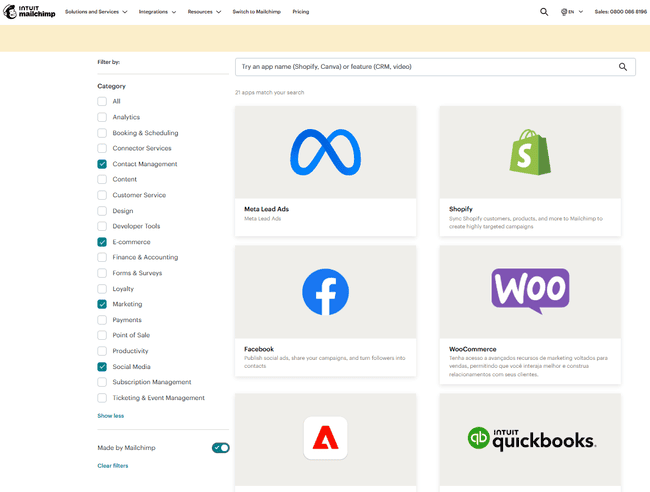
I rate integrations as a main strength of Mailchimp. It has 300+ to choose from. There’s a good chance you’ll find the apps you use. Mailchimp sorts them by lots of different categories for convenience. Some of the bigger names include Shopify, WooCommerce, Squarespace, and Wix for eCommerce. These let you run promotional email marketing campaigns for your online shop. And trigger automations from activity on your site.
Other famous names include Facebook, Instagram, X, and LinkedIn for social advertising. Stripe for payments integration. Intuit QuickBooks for accounting. And Canva for graphic design.
Mailchimp Customer Support

A lot of Mailchimp users are frustrated by its customer support. And I have to say, I don’t blame them. Every page advertises ‘Live expert help’. But this is misleading. When you click it, you get a search bar for the online knowledge base. There is a Contact Us button further down. But this just opens a chatbot tool. It’s a little better than the search bar. It simply directs you to articles based on what you ask. You don’t get phone support until the Premium plan, starting at $350 a month!
Pricing most users out of human support isn’t a great look. This is a big reason why I’d recommend other services over Mailchimp.
Final Conclusion: Is Mailchimp the right email tool for you?
Mailchimp has built its name as the go-to email marketing platform for small and midsize businesses. And to be fair, it still has some strengths. It uses AI well to improve email design and content. Its integration library is massive, which is great for linking email marketing into your tech stack. And it provides reliable deliverability to most major email clients.
But the overall message of my Mailchimp review? It could do better. You can do better in the email marketing software you choose. It is way more pricey than altenatives, especially for larger lists. And the pricing model is frustrating. Double-charging for contacts and including ‘cleaned’ contacts in the cost is a deal-breaker for some. Its navigation is very clunky and inconsistent. And support is basically non-existent below the high-cost Premium plan.
So my final word is that better options exist for most users. Especially if you care about value for money and helpful automation. Or customer service that actually serves customers.
Here are my recommendations for the best Mailchimp alternatives:
- Best for advanced marketing and sales automation: ActiveCampaign
- Best for ecommerce marketing: Omnisend
- Best for beginners and simple emailing: MailerLite
- Best for small businesses: Moosend
- Best free email marketing: Brevo and MailerLite
- Best for newsletters: MailerLite
- Best for email marketing, CRM, transactional email combo: Brevo
Mailchimp Frequently Asked Questions (FAQ)
What are the disadvantages of Mailchimp?
Find the best Mailchimp alternatives here
Is Mailchimp worth using?
But if you’re looking for a new email marketing service, there are better options. You can find cheaper Mailchimp alternatives that give you better features. And let you grow your lists bigger for much lower cost. Many free and cheap email marketing services are easier to use and provide better customer support.
Does anyone use Mailchimp anymore?
Is there a better option than Mailchimp?
If you want simplicity and low cost, MailerLite, Brevo and Moosend are all excellent. For straightforward features for sending newsletters, MailerLite is perfect. Along with Brevo, it also has a much more generous free tier than Mailchimp. So you can get started with email marketing for no cost. Brevo and Moosend are great small business services. Brevo gives you access to CRM and transactional email tools. Moosend includes small business-friendly automation and ecommerce features.
If you want to take marketing automation a step further, ActiveCampaign is hard to beat. It has some of the most powerful and flexible marketing automation tools around. But it’s still reasonably affordable and user-friendly. If you want a specialist ecommerce service, Omnisend is great. It’s a great value and designed for ecommerce campaigns. It includes specialist features for Shopify, like user reviews.