
My Honest Constant Contact Review 2026: All Pros & Cons


Constant Contact has been around as one of the first modern email marketing software. Since 1995, Constant Contact has grew a large customer base to 650,000 users worldwide.
Look at some of the older published online reviews and you’ll see a lot of positive reviews for the usability. We talked to some customers and ex-customers today, and it’s a mixed bag. Many think it’s ok, but not everyone is a fan.
This may come from a simple place. Over the years, they have introduced an event management feature that other email systems don’t have. The niche market focus of event management makes it very useful for real estate marketing, especially in the US.
I’ve used more than 30 services as an email marketer. After doing this full review, my take on Constant Contact is simple: it is a fair platform for basic email marketing, but not great. Yet charges a premium for features that other Constant Contact alternatives have by default. Even the standard plan is much more expensive.
Constant Contact Review Summary
Constant Contact is built for small to medium-sized businesses, but its pricing doesn’t really match other tools in the SMB market. The plans start at an affordable $12/month, but that only gets you 500 subscribers. Then the price climbs steeply, even when considering the platform’s feature set isn’t that advanced. In some cases even nearly twice as expensive as alternative email platforms.
They have found a niche market by adding event management tools, and it’s popular among real estate businesses that also like phone support. Yet some features that are now standard in other platforms, like segmentation and automations, come at a premium.
Constant Contact Pricing and Plans: How Much Does It Cost?
Constant Contact has changed its pricing plans in the US in 2023 and rolled them out worldwide in 2025.
The new pricing tiers come with a few new features. Like simple AI tools, and they add email templates and Stripe integration. But as you’ll see below, the new tiers come at a premium. And more features moved to the more expensive tiers. You’ll end up paying more for tools that have pretty much become industry standard.
| Contacts | Constant Contact Lite | Brevo Starter* | MailerLite Growing Business |
| Free plan | No | Yes | Yes |
| 500 | $12 | $9 | $10 |
| 1,000 | $30 | $17 | $15 |
| 2,500 | $50 | $29 | $25 |
| 5,000 | $80 | $29 | $39 |
| 10,000 | $120 | $39 | $73 |
| 25,000 | $280 | $69 | $159 |
| 50,000 | $430 | – | $289 |
*Brevo plans have unlimited contacts, this price is based on 4 emails per contact per month.
Constant Contact organizes pricing into three plans. Lite, Standard, and Premium. With each successive tier, you pay more to unlock more features. You also pay more within each plan depending on how many contacts you have.
With Constant Contact, emails are limited to 10x your contact number on the Lite plan. And 12x on the Standard plan. If you go over these limits, you’ll pay overage fees charged at $0.002 per email.
Constant Contact is expensive compared to others.
Like Constant Contact, MailerLite bases its pricing on subscribers. But you also get unlimited emails on every plan.
Brevo gives you unlimited contacts on all plans. And pricing by the number of emails sent. You can see the difference this makes as your lists get bigger. With 10,000 or more contacts, you can save hundreds of dollars using Brevo instead.
Constant Contact doesn’t shape up too well on features, either. Its Lite plan is very basic. You get the bare essentials of email building and sending. Plus a couple of extras like social media posts, polls, and event registration forms. But it also misses what by now are industry standard. Things like personalization and A/B testing for subject lines. You can build a single, very basic segment. And you can’t even schedule emails to send.
All of these are added to the Standard tier. But you still don’t get custom automations, only three pre-built workflows. For the cost of the Standard plan, this is a glaring omission.
Both MailerLite and Brevo have features on their cheapest plans that Constant Contact will ask to upgrade to Premium to access. MailerLite’s Growing Business plan has dynamic content to personalize emails. The Brevo Starter plan includes syncing campaigns to Google and Facebook Ads. Both also have free plans that let you send thousands of emails a month for free. Their free features are similar to Constant Contact’s Lite tier. Constant Contact has just a 30-day free trial.
Constant Contact Core Features
- Drag-and-drop email editor: Constant Contact’s email editor is simple. Creating emails is very quick. But it’s limited in layouts and customization.
- Templates: Recent changes increased email templates to 200+. Some of the new ones are modern-looking.
- Automation: Until you get to the Premium tier, automation options are very limited. There are a few workflow templates. Those that you do get are very basic, and there is little room to customize them.
- Contact management: Strong list-building options with 200+ forms and lead magnets. You can create engagement segments from tracking data for every contact. On the downside, it gets expensive as your list gets bigger.
- Social media posting and ads: Constant Contact has tools for managing social media posts and digital ads. You can connect to Google Ads Manager and Facebook Lead Ads.
- Event marketing: It includes tools for organizing and managing events. Build a list of attendees, run promotions, and handle ticket sales inside Constant Contact.
Constant Contact Pros and Cons
Pros
- It’s user-friendly: Constant Contact’s biggest plus it’s beginner-friendly. You can get started creating and sending email marketing campaigns in 30 minutes.
- Has event management and SMS marketing: Constant Contact goes beyond email with integrated event management, social media marketing and SMS marketing for the US. If you’d like send SMS outside the US, check out our review of SMS marketing platforms.
- Phone support customer service: Constant Contact stands out for offering phone support on all paid plans. This is unusual for email marketing services. The times differ per region, but it is 6 days a week. They also offer live chat with agents, and a sizable self-help knowledge base.
Cons
- Lack of automation: Constant Contact’s lack of automation features surprises me. It treats it as a premium extra at a time when competitors have it standard.
- Expensive compared to others: Constant Contact struggles to compete on price with other email marketing platforms. It charges more for plans that include fewer features than many rivals. And it gets particularly expensive the more you grow your email list. This limits growth for smaller businesses.
- Hard to cancel: Many users report difficulties cancelling their Constant Contact subscription. You have to call customer service and talk to them to cancel. It would be much better if you could do this in the account settings.
Constant Contact Review Rating details
Ease of Use | Constant Contact is very user-friendly. It has a simple, clean interface. Features are easy to find. And core email marketing tools are easy to learn. |
Creating & Sending Newsletters | I can’t fault Constant Contact for the basics of email marketing. It makes designing newsletters and other types of email quick and easy. The new AI tools for campaign and content creation are a good addition. |
Email Templates | Constant Contact recently updated its email template library. It now has 200+ to choose from. The designs are reasonable quality, but some still look dated. I and a lot of users would like more freedom to customize them. |
Marketing Automation | This is a weaker point for Constant Contact. You can’t even customize your own workflows until you get to the Premium plan. And even then, the options fall way short of the standard set by most others. |
List Management | Constant Contact gives you the usual functions for adding and editing contact details. But further list management options are limited. It’s disappointing that segmentation is capped until the Premium plan. |
Personalization | Personalization is locked behind paywalls on higher tiers. You can’t personalize a subject line until the Standard plan. And dynamic content is only available on the Premium plan. |
| Landing Pages & Forms | Lead generation is a strength of Constant Contact. It has 200+ form templates. And special ‘lead magnet’ forms with incentives to sign up. You can also link email subscriptions to social media accounts. It could do with more landing page templates. |
| Reporting & Analytics | Has some advanced reporting features. And I could create segments with this data. But some features, like click heat maps, are locked away on the Premium tier. |
| Customer Service | Lots of user reviews mention Constant Contact’s customer service as a positive. Having phone support on all plans is a real USP. The only negative is that some customers report long waiting times. |
| Deliverability | Constant Contact has pretty good deliverability on average. It has DKIM, SPF, and DMARC authentication. It also proactively monitors blocklists and any signs of suspicious activity from users to protect sender reputation. |
| Integrations & API ✔️ | There’s a big choice of 300+ native third-party integrations. You can connect 1000s more via Zapier. But some users report glitches with some connections. |
| Interface Languages | Constant Contact has an English interface. The knowledge base is in 4 languages: English, German, Spanish, and French. |
| Customer Satisfaction | Customer satisfaction with Constant Contact varies. It averages 4/5 in user reviews on G2. And 4.3/5 on Capterra. |
Overall Score
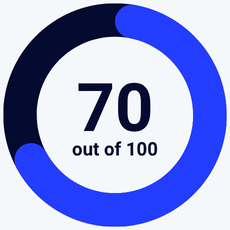
Constant Contact has some notable strengths. It’s user-friendly and makes creating and sending campaigns simple. It offers phone customer service. But weaknesses in automation and personalization drag its score down. For what it costs, you can do much better on these features.
Is Constant Contact for you?
Recommended if:
- You’ve used it before. If you don’t need advanced personalization and automation, and already know Constant Contact, it can work for your business.
- You need phone support. If you want a first taste of email marketing, Constant Contact is a reasonable choice. There are others that we rate are much stronger and cheaper. On the upside, you do get phone support on all paid plans.
- You run and promote events. Constant Contact’s event marketing tools are an interesting functionality if you run online and in-person events. You can build a guest list, run promotions, and handle ticket sales from inside Constant Contact.
Not recommended if:
- You want a good price. Constant Contact is more expensive than many rival email marketing services. The differences really start to show the bigger your list is. Find affordable alternatives in our full review of the best free and cheap email marketing tools.
- You want to customise your email designs. Making promotional emails and newsletters is easy in Constant Contact. It has plenty of templates to choose from, but gives you limited customization options. If you have unique designs in mind, try Moosend, MailerLite, or Brevo.
- You’re looking for email marketing automation. Constant Contact just doesn’t stand up to modern standards of email automation. Creating workflows to determine how and when an email is sent saves time and money. If that’s important to you, check out ActiveCampaign.
- You want to personalize your campaigns. Constant Contact’s personalization options are disappointing. The Standard plan only lets you personalize the subject line. And it limits how many segments you can make, restricting how well you can target emails. Personalization and targeting are key to email marketing success. You can do both much better on other platforms.
- You’re an affiliate marketer. Constant Contact doesn’t allow affiliate marketing. Check out our review of email marketing tools for affiliate marketers to find an alternative.
For all of the above, there are many better email marketing tools out there. Let’s take a look at my pick for 5 of the best.
5 Best Constant Contact Alternatives
If you are looking into different platforms, it’s good to know there is much to compare. You can find cheaper options with more advanced features. Here’s a summary of the top Constant Contact alternatives we recommend.
- Best for advanced automation: ActiveCampaign
- Best for affordable all-in-one marketing: Brevo
- Best for newsletters and small business email campaigns: MailerLite
- Best for funnel-building: GetResponse
MailerLite

Constant Contact is beginner-friendly, but if you’re new to email marketing and want to get started for free, look no further than MailerLite. Its free plan includes 12,000 emails a month and 1,000 contacts. By comparison, Constant Contact Lite costs $30 a month for 1,000 contacts and 10,000 emails. The features you get are very similar.
MailerLite is also much cheaper when you get to the paid plans. It’s even more user-friendly and ideal for simple email marketing tasks such as running a newsletter.
Get started with MailerLite for free or read our full review
Brevo
The main difference between Constant Contact and Brevo is affordability for larger lists. All Brevo plans come with unlimited contacts, with prices rising with the number of emails sent.
The effect of this is that Brevo is much better value if you have a really big contact list. Anything over 10,000 contacts, say. It also has a great free plan that has no contact limit. You can send 300 emails a day for free. Brevo also offers more than just marketing. Email marketing plans include transactional emails. There are also additional products for sales CRM, data management, and live chat.
Try Brevo for free or read our full review
GetResponse
GetResponse is the better pick if you want advanced features. But not the enterprise prices. Like Constant Contact, GetResponse has a tiered pricing system. More expensive plans unlock more features. But GetResponse is more affordable, especially as your list grows.
And it includes more advanced tools on cheaper plans that Constant Contact doesn’t have at all. For example, Constant Contact’s Standard plan still has very limited automation options. GetResponse’s middle tier is called Marketing Automation. It comes with all the powerful automation features missing from Constant Contact. It also has a whole tier dedicated to creating and selling courses unlike Constant Contact.
Get started with GetResponse for free or read our full review
Moosend
Constant Contact has always positioned itself as a service for SMBs. Moosend is just as user-friendly, cheaper, and has better features. Its single paid plan is cheaper than Constant Contact Lite, however many contacts you have. And it comes with all the features Constant Contact is lacking. Namely, advanced automation and contact segmentation. It also supports in-email selling for ecommerce businesses. And you can send as many emails as you like.
Try Moosend for free or read our full review
ActiveCampaign
The main difference between Constant Contact and ActiveCampaign is automation. The two platforms take a very different approach to marketing automation. Constant Contact largely ignores it. And only offers anything like advanced automation tools on its Premium plan.
ActiveCampaign has developed into a go-to marketing automation specialist. You can create virtually any workflow you want. It supports this with 900+ fully customizable templates. Its visual workflow builder is user-friendly. And it still manages to match Constant Contact on price.
Try ActiveCampaign for free or read our full review
Constant Contact Review: Email Marketing Service
It’s easy to make assumptions about email marketing software. But you don’t really know it until you’ve used it. How user-friendly is Constant Contact, really? Is it a good option for small businesses? I wanted to be able to tell you for definite. So I signed up and put it through its paces. Here’s what I made of it.
Email Templates in Constant Contact
The first thing I do with a new email marketing platform is check out the templates. This is where my journey starts.
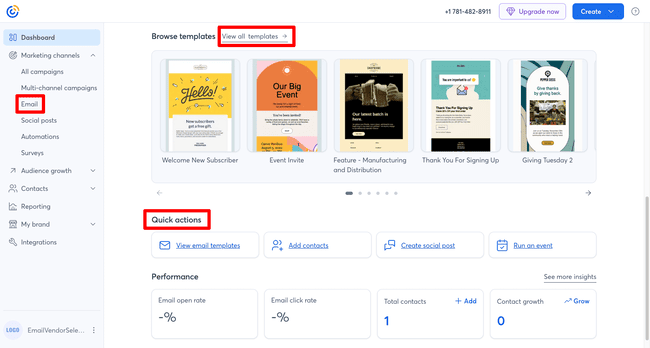
Constant Contact makes it easy to get straight to its templates. There’s a View all templates link on the home page dashboard. You can also find them under Marketing channels > Email in the main left-hand menu. And there’s a handy Quick actions navigation section with links to four main tools.
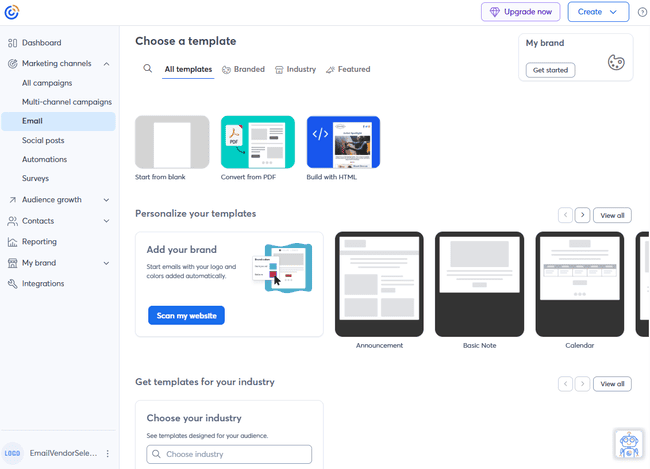
Constant Contact offers you no shortage of templates. You can start an email from scratch. You can code your own with HTML if you like. The option to convert a PDF into an editable template is a very niche tool. You can use BrandKit to copy your website’s style to a template. And you can choose pre-designed templates.

Constant Contact has more than 200 pre-made templates available. I like the quality and the variety of the newer ones, although there are also some dated templates still in there. The ways to filter template options are quite hidden. For example, I wanted to test Constant Contact’s email builder out by creating a newsletter. How do I find the newsletter templates?
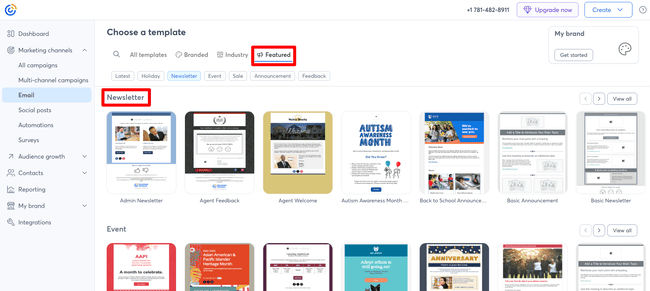
By trial and error, I tried the Featured tab on the Templates page. There were the newsletters! It doesn’t feel very obvious or intuitive.
Creating and sending newsletters with Constant Contact
I always think newsletter building is a good test of an email marketing service. What are the newsletter templates like? How easy and quick is it to create and send a newsletter?
Constant Contact lists 90+ newsletter templates. That much choice is a good start. But a template is only the start. What also matters is the editing process. How much can you customize the template? How easy is it? Can you personalize and test your emails?
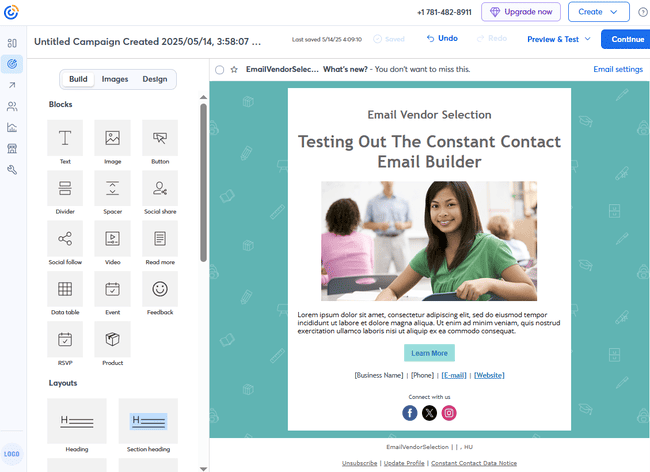
Constant Contact lives up to its reputation for making email creation easy for beginners. The above took me about two minutes from the moment I chose my template.
The drag-and-drop editor is very simple and straightforward. You can see all the content blocks to the left. The drag-and-drop action is simple and accurate. Then, when you click on a block in the main window, you see the editing options.
There’s often a price for simplicity, though. In Constant Contact, it’s the amount of control you get over the design. There aren’t too many customization options. You can keep adding content blocks. But they just stack on top of one another in rows.
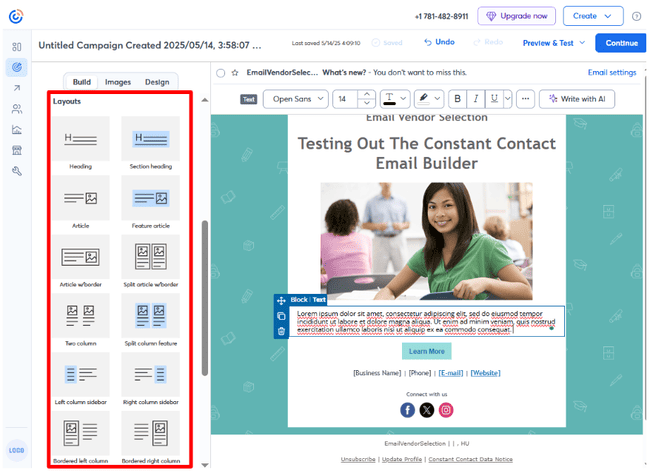
Further down the Build menu is a section called Layouts. You drag and drop these into your designs, too. They change how the content blocks are laid out. But the choice is pretty limited. The best email template builders let you arrange blocks more or less how you want. Constant Contact’s layouts all end up looking the same.
Talking about looking the same, Constant Contact has limited ways to personalize the emails. You unlock dynamic content on the Premium plan. But until then, every recipient receives the same email. On the Lite plan, you can’t even personalize subject lines by adding a name.
When Lite plan customers want to personalize a subject line, they see this upgrade message:
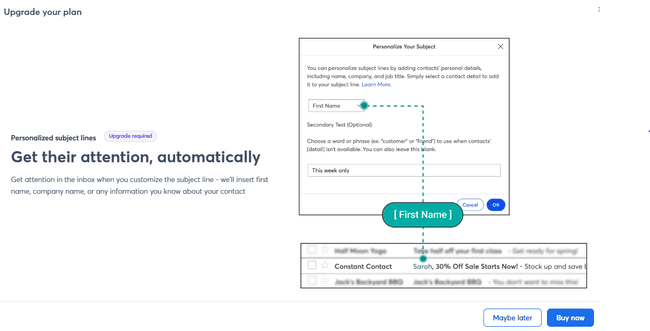
You get the same for subject line recommendations. This is weird because AI content suggestions within emails are included in the Lite plan. I’m not a fan of upgrade messages for something as simple as making a successful subject line. I think it just serves to remind users they’re missing a basic tool.
Constant Contact Marketing Automation

Constant Contact has improved its automation features in recent years. It has introduced more workflow templates and updated the visual workflow builder.
But even with these changes, Constant Contact’s automation options aren’t to write home about. Especially as you don’t unlock all the features until the Premium plan. Quite frankly, Constant Contact’s automation tools aren’t a premium feature.
What you get is a choice of 12 workflow templates. 7 only work with an integration to an ecommerce platform like Shopify or Wix. The others range from the basic to the very basic. For example, there’s a ‘Welcome Nurture Series’ which tees up a sequence of emails after someone joins your list. And there’s a ‘Welcome: Basic’ workflow that sends one email triggered when someone joins your list.
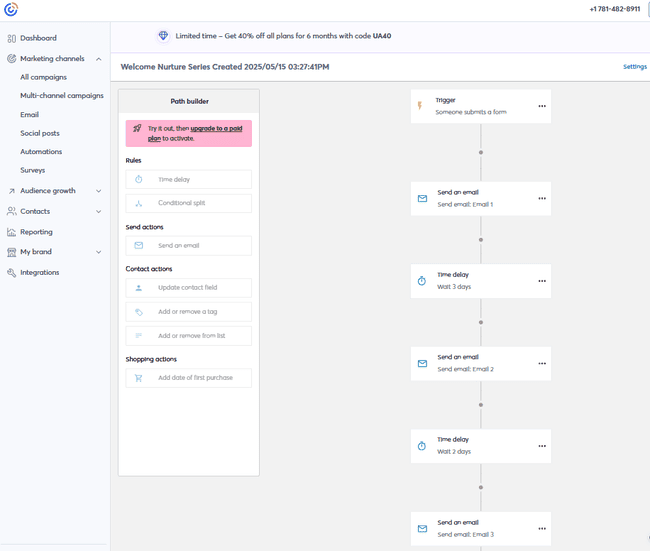
I’d question whether Constant Contact needs these templates on its cheapest tiers. I suppose they are useful for absolute beginners. But the point of a template is to save you time. The Welcome: Basic workflow is so basic you could make it in 30 seconds. And there aren’t any options to make them any more advanced. The choice of two rules and five actions is very limiting. And there’s no option for adding split paths with conditional logic.

The ecommerce workflows are more useful. Some, including the Abandoned Cart workflows, include conditional logic. So in the example above, you can target different emails to local and international customers. In another, you can send different emails for high and low value abandoned carts. These automation templates work with the best ecommerce platforms, like Shopify, Wix, and WooCommerce. But you can’t use these templates until the Premium tier.
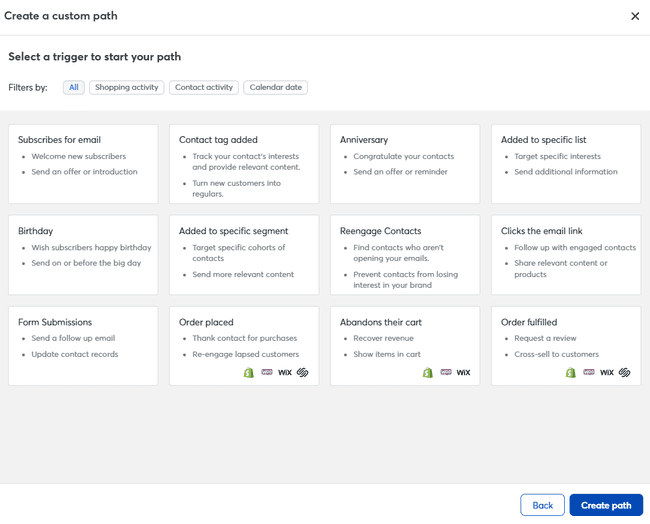
With the build your own workflow option, you get a much bigger choice of actions and rules. Plus 12 trigger options, as shown above. This is much more like what I expect from modern email marketing automation. But it’s hidden away on the Premium tier.
Reporting and Analytics in Constant Contact
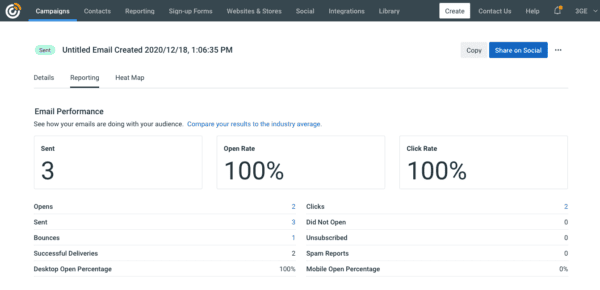
Constant Contact has the standard email reporting and analytics features. But once again, you run into the issue of the best parts hidden behind paywalls on the higher tiers.
On the Lite plan, you get the basics of email marketing reporting. Open rates, click rates, bounces, and unsubscribes. You can analyze these by trends over time or by individual campaigns. But that’s about it. It’s hard to draw detailed insights from this that will make a difference to performance.
On the Standard plan, you get what Constant Contact calls ‘drill down reporting’. This digs down into which of your contacts are opening your emails and clicking links. And which links subscribers click. This is much more useful. You can use this information to group contacts by how often they open and click links. And tailoring your campaigns to each group. They show industry benchmarks to compare your performance to.
On the Premium plan, you can also track activity in your ecommerce store. And build segments from that data. This is where ‘heat maps’ for which clicks in your emails get the most clicks are unlocked. This is useful for quickly seeing how the links are doing in the emails.
Constant Contact Integrations

Constant Contact tries a trick with its integration numbers that I’m not a big fan of. When you go to the Integrations & Apps page, you see close to 8,000 listed. Woah, that means it must connect to every business app going! That’s awesome!
But it’s a sleight of hand too many software providers use nowadays. The vast majority of these connections come via Zapier. Yes, you can link your Constant Contact account to them all. But you need a Zapier account, too. And that will increase your costs.
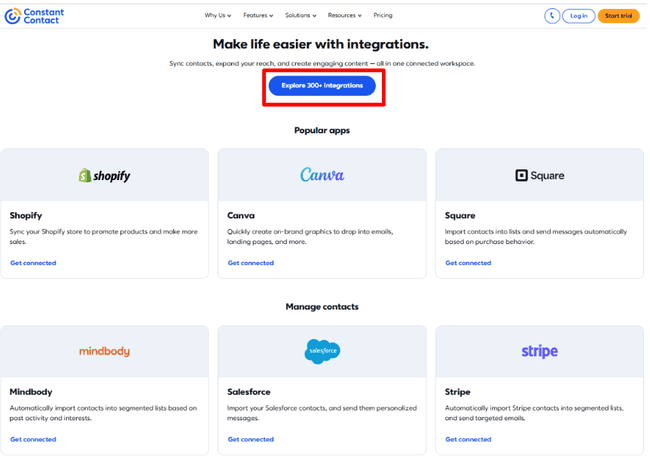
Constant Contact does later share that they have 300+ native integrations, that means the direct connections between Constant Contact and another app. It has a good selection that includes plenty of major names. You can link directly to ecommerce platforms such as Spotify, Wix, and WooCommerce. Canva for user friendly image editing and graphic design. Salesforce for sales CRM and more.
Constant Contact Customer Support
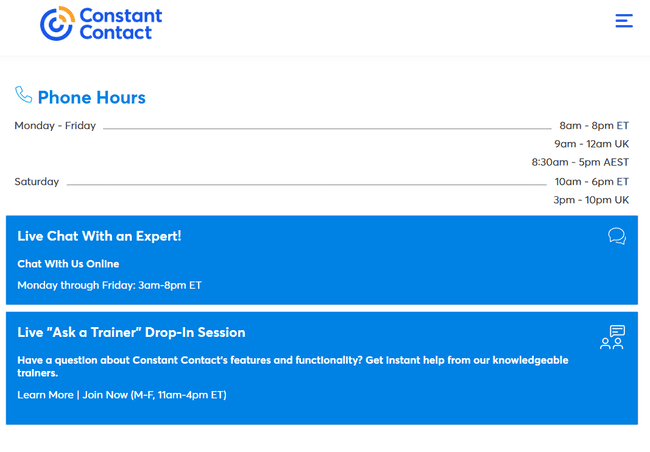
Customer support is one thing I’d definitely recommend Constant Contact for. The fact that you get phone and live agent chat support on all plans is pretty unique. It’s a sign of how big Constant Contact is that it can offer those resources.
It’s not as if these services are limited, either. Live chat is available 18 hours a day, five days a week. US customers get 12 hours of phone support on weekdays, and 8 hours on Saturdays. In Australia, hotlines are open 8.5 hours Monday to Friday. UK customers have to make do with shorter time slots. But the lines are still open six days a week, including Saturdays.
Final Conclusion: Is Constant Contact the right email tool for you?
Throughout this Constant Contact review, I’ve been pretty clear in my opinion. For all-around value and email marketing performance, you can do much better these days. But saying that, Constant Contact is a funny one. The good things it does, it does really well. Things like deliverability, customer service, and ease of use. But when it’s bad, it’s really bad. See automation, personalization, and value for money.
I still think Constant Contact has appeal. Someone looking for a service that is easy to use. And who isn’t so interested in features like automation and segmentation. The caveat there is that you would grow out of it quickly. If you run events, Constant Contact is also an option. For all the gaps in its email marketing, it does cover event management well.
But for everyone else, you can find cheaper options with more/better features. Whatever your needs are. Here’s a summary of my top recommendations:
- Best for advanced automation: ActiveCampaign
- Best for affordable all-in-one marketing: Brevo
- Best for newsletters and small business email campaigns: MailerLite and Moosend
- Best for funnel-building: GetResponse
Constant Contact Frequently Asked Questions (FAQ)
What are the downsides of Constant Contact?
Is it safe to use Constant Contact?
What is better than Constant Contact?
If you are looking for specific tools, Brevo includes transactional emails. Moosend is a solid option for small ecommerce businesses. Its ecommerce integrations are many times cheaper than Constant Contact’s Premium plan. Brevo, Moosend, and MailerLite all beat Constant Contact for running automated email campaigns. But if you want premium automation at affordable prices, ActiveCampaign is the best choice.